
BLUF
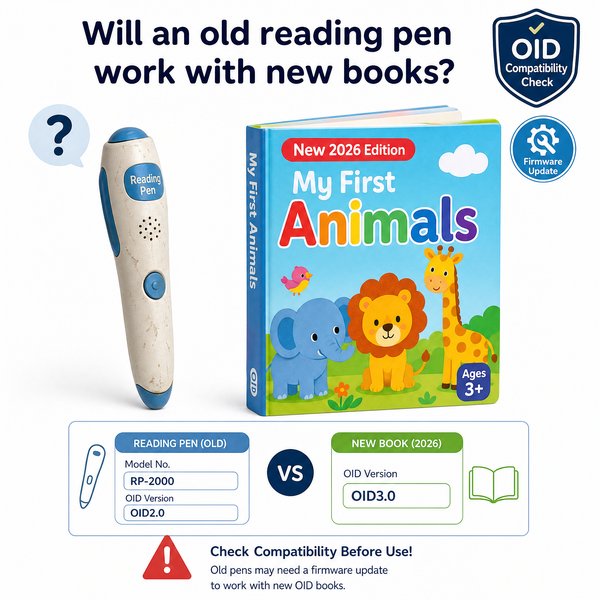
If the pen and the book use the same OID (optical ID) encoding and the pen’s firmware supports that OID version, an old reading pen will work with new books with <0.1s response time in typical use. If the book uses a different OID scheme or updated content IDs and there’s no firmware/content update path, the pen will not recognize the book. For B2B buyers who need predictable compatibility at scale, verify OID versioning and firmware/update policy before purchase — or source factory-direct, OEM/ODM pens (MOQ 100–500) from a supplier like Toyvao to manage firmware and re-encoding options.
How reading-pen compatibility actually works
Most modern reading pens (including Toyvao’s line) use OID-coded books: every page/word has a printed micro-pattern the pen decodes. There is no OCR, no Bluetooth dependency, and recognition is driven by two things: 1) the OID pattern set printed in the book, and 2) the pen’s firmware/content index mapping those patterns to audio files stored on the pen (16GB / 32GB / 64GB choices). If either side changes (new OID scheme or new content IDs), the pen must have a matching firmware/content map to work.
When it’s worth caring about / When you don’t need to overthink it: OID version & firmware
When it’s worth caring about
- New book editions use a different OID generation or numbering system than older editions.
- Your fleet of pens will be used with mixed publishers or with frequent new releases.
- You require zero-fail classroom deployments and can’t afford unsupported mismatches.
When you don’t need to overthink it
- You reuse books and pens from the same series/publisher that has not updated their OID encoding.
- Your supplier guarantees backward compatibility or provides a firmware/content update process.
When it’s worth caring about / When you don’t need to overthink it: Content licensing & indexing
When it’s worth caring about
- You need to add proprietary audio for your brand or local language; content mapping files must be regenerated for each book set.
- You plan to repackage the pen with school-specific curricula — content re-indexing is required.
When you don’t need to overthink it
- You buy pens and books as a matched bundle from the same vendor/publisher who provided the OID and audio map.
- You use off-the-shelf book sets that explicitly list compatibility with the pen model.
When it’s worth caring about / When you don’t need to overthink it: Hardware limits
When it’s worth caring about
- You require wireless updates (Bluetooth) or cloud sync — Toyvao pens do NOT support Bluetooth; updates must be done via USB/file transfer.
- You need headphone-free classroom playback to multiple students (pens have a 3.5mm jack for individual headphones only).
When you don’t need to overthink it
- Your use-case is local, one-to-one reading practice with headphones or speaker output from the pen.
- You need long battery life: Toyvao pens deliver 8–12h runtime per charge, enough for a full school day.
Compatibility scenarios (quick reference)
| Scenario | Will it work? | Why | Action for B2B buyer |
|---|---|---|---|
| Old pen + old book (same OID) | Yes (expected) | OID and content mapping match; audio files on pen available | Buy in matched bundles or standardize on publisher |
| Old pen + new book (same OID) | Yes | New book reuses OID scheme and numbering; mapping still valid | Confirm publisher’s compatibility notice |
| Old pen + new book (new OID) | No (unless updated) | Pen lacks mapping for the new OID; no OCR fallback | Request firmware/content update from manufacturer or re-encode book |
| New pen (updated firmware) + new book | Yes | Pen supports current OID, has updated maps | Preferred option for long-term compatibility |
Procurement & deployment checklist for B2B buyers
- Ask publishers to specify the OID version and whether new editions change OID or numbering.
- Require firmware/update policy from pen suppliers: how are new OID mappings delivered and at what lead time?
- Specify storage needs: 16GB, 32GB, or 64GB options depending on the audio volume per title set (16–64GB available).
- Confirm battery and I/O: expect 8–12h battery life and a 3.5mm headphone jack; no Bluetooth, no OCR.
- For customized branding/voice content request OEM/ODM terms (Toyvao MOQ 100–500 pcs for custom units) and certifications: CE, FCC, RoHS, EN71, ASTM, UN38.3.
Customer Feedback Synthesis
Three representative positive remarks
- “Great reliability — pens respond instantly (<0.1s) and kids don’t get frustrated waiting.” — Primary school procurement officer
- “Factory-direct pricing and MOQ worked for our district; Toyvao handled firmware mapping for our custom curriculum.” — Regional distributor
- “Battery lasts a full school day (8–12h) and the 3.5mm jack keeps classroom hygiene simple with student headphones.” — After-school program manager
Three representative negative remarks
- “We had a batch of new books that used a different OID scheme and older pens couldn’t read them — required re-encoding.” — School tech lead
- “No Bluetooth or cloud sync meant manual updates for content, which took extra staff time.” — Retail buyer
- “Some older pens lacked enough storage for larger bilingual audio packs; needed 64GB units.” — Curriculum coordinator
Quick recommendations for retailers, distributors and school buyers
- Standardize on matched pen+book bundles where possible to avoid OID mismatch risk.
- Negotiate firmware/update SLA with your pen supplier (same-day vs. multi-week turnaround matters at scale).
- Order a pilot (10–50 units) and test with your new book sample set before placing a full roll-out order.
- For private-label or localized content, consider Toyvao’s OEM/ODM factory-direct route (MOQ 100–500) to control OID mapping and pre-load audio.
FAQ
Q: Can firmware updates make an old pen read a new book?
A: Yes — if the difference is only the content map or compatible OID version. Firmware or content index updates (delivered via USB/file transfer) can add new OID mappings. However, if the book uses a fundamentally different OID generation that the pen’s decoder hardware cannot interpret, a firmware update will not help.
Q: Will a pen read any printed book if I print the OID pattern?
A: Only if the printed OID patterns exactly match the pattern generation and numbering expected by the pen’s content map. Publishers and manufacturers coordinate OID assignment; ad-hoc printing without correct mapping will not work.
Q: What are minimum order quantities and certifications for OEM pens?
A: Typical MOQ for custom OEM/ODM units is 100–500 pcs depending on customization level. Certifications to request include CE, FCC, RoHS, EN71, ASTM and UN38.3 for battery transport compliance.
Q: How do I test compatibility before buying at scale?
A: Request sample pens and sample copies of the new books or book proofs. Run a scripted test of pages/words across editions. Require your supplier to provide a compatibility report and, if needed, a plan for firmware/content updates.
Final takeaway & call to action
Old reading pens will work with new books only when OID encoding and pen firmware/content maps match. For reliable, scalable classroom or retail deployments, validate OID/versioning, storage needs (16–64GB), and update pathways in writing — or choose a factory-direct partner who can manage encoding and firmware (Toyvao offers OEM/ODM support with MOQs of 100–500 and holds CE/FCC/RoHS/EN71/ASTM/UN38.3 certifications).
To evaluate compatibility for your catalog or to request samples and OEM pricing, contact Toyvao: WhatsApp +86 186 8106 4480 or email sales@toyvao.com. Get a compatibility test plan and quote — fast delivery and firmware support options available.
