
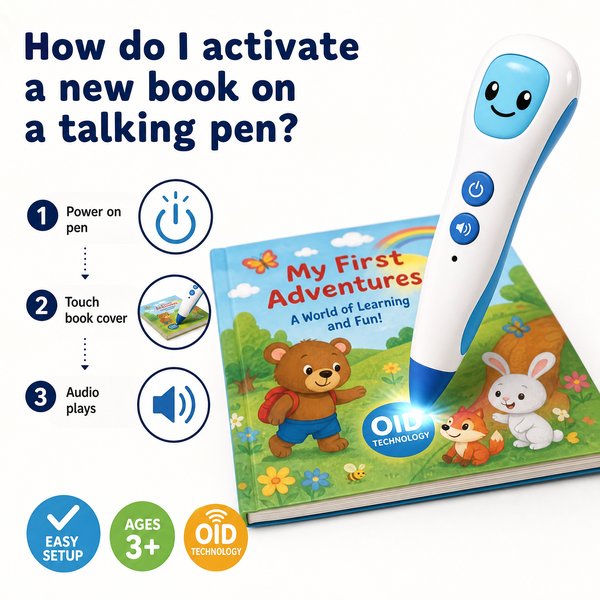
BLUF: To activate a new book on an OID (optical-identifier) talking pen you must confirm the book is OID-coded and then load the publisher’s OID package (audio + index) onto the pen’s internal storage via USB (or have the factory pre-load it). Once the correct package is in the pen’s /Books (or /Content) folder, the pen will recognize the book immediately (<0.1s touch response) when the tip is placed on the coded page. Toyvao can supply factory pre-loading or the OID packages for direct USB loading.
When it’s worth caring about / When you don’t need to overthink it — Key topics
- Compatibility (When it matters): Care when the book isn’t explicitly labeled “OID-coded” — these pens do NOT use OCR or Bluetooth and will not work with ordinary print books. If the book lacks the printed OID dot/pattern or a publisher’s OID sticker, it won’t activate. When you don’t need to overthink it: if the publisher supplies an OID sticker or the product description says “OID-compatible,” you can proceed.
- How the book is delivered (When it matters): Care when content is provided as raw audio files without an OID index file — you need the index/map (.idx, .oid, .map, or vendor-specific .pkg) that maps audio to OID coordinates. When you don’t need to overthink it: if you receive a ready-made package from your supplier (Toyvao or the publisher), simply copy it to the pen.
- Mass deployment (When it matters): Care for scale — copying files one-by-one on hundreds of units is slow and error-prone. For MOQ 100–500, factory pre-loading or distributor bulk services are worth the extra coordination. When you don’t need to overthink it: for single retail sample units or small classroom sets (<20 units), USB copying is fine.
- Firmware/Version matching (When it matters): Care if the pen firmware and book package versions mismatch — some packages require a specific firmware build. When you don’t need to overthink it: Toyvao-certified packages include version notes; if you use their supplied package the risk is low.
Concrete activation workflow (step-by-step)
- Confirm the book is OID-coded — look for the dot/pattern artwork or the publisher’s OID label. Non-OID books are not supported.
- Obtain the OID package from the publisher/distributor or Toyvao. Typical package contents: an index file (maps OID coordinates) + audio files (.mp3/.wav) + a small manifest. Package size: commonly 5–50 MB per book (depends on audio bitrate).
- Connect the pen to a PC/Mac using supplied USB cable or remove microSD (if allowed). The pen exposes as mass storage (16/32/64GB options).
- Copy the package into the pen’s /Books or /Content folder. Ensure you preserve the folder structure included in the package.
- Safely eject the pen. Power it on. Point the pen tip at the book cover or activation area — the pen should respond in <0.1s and begin the audio playback tied to the page.
- If the pen does not recognize the book: check storage space, confirm the package includes an index file, verify firmware compatibility, and retry. See Troubleshooting below.
Troubleshooting quick checks
- No sound or “book not found”: confirm the package is in the correct top-level folder and the index filename matches the pen’s expected manifest (ask supplier for naming convention).
- Poor mapping or wrong audio: confirm firmware version and request a package matched to that firmware build.
- Insufficient storage: 16GB holds roughly 300–1,600 books depending on average package size (10–50MB/book). Use 32/64GB for large catalogs.
Options at a glance
| Option | Best for | Steps | Time per unit | Notes |
|---|---|---|---|---|
| Factory pre-load (Toyvao OEM/ODM) | Retail bundles, school deployments, distributors | Supplier flashes packages to pen before shipping | Bulk — no per-unit copy time; lead time 7–21 days | MOQ 100–500 for custom preload; ensures firmware/package match; certified factory direct solution |
| Self USB upload | Samples, small classrooms, quick testing | Connect pen → copy package → eject | ~2–5 minutes per unit (depends on file size & USB speed) | No network needed; good for <20 units |
| Distributor bulk service | Regional resellers, value-added resellers | Send inventory to service → they preload & return | Hours per batch + shipping time | Useful if you lack on-site logistics; may carry per-unit fee |
Customer Feedback Synthesis
3 positive quotes
- “Preloaded sets saved us weeks of work — kids started using them on day one.” — Elementary school purchaser
- “Recognition is instant (<0.1s). No lag when children tap the page." — Distributor
- “Toyvao’s factory loading matched firmware so we had zero mismatch issues during rollout.” — Brand-owner
3 negative quotes
- “We initially tried to load ordinary PDF audio files; the pen didn’t recognize them — requires OID package.” — Retail buyer
- “Copying packages manually on 200 units is very time-consuming without a bulk service.” — Procurement manager
- “One batch had mismatched index filenames and several pens wouldn’t map pages until files were renamed.” — Reseller
Certifications & hardware facts (concrete data)
- Storage: 16GB / 32GB / 64GB (choose based on catalog size)
- Battery life: 8–12 hours typical playback
- Headphone: 3.5mm jack (analog)
- Connectivity: USB mass storage for file transfer. NO Bluetooth. NO OCR support.
- Response time: OID recognition <0.1s under normal lighting
- Certifications: CE, FCC, RoHS, EN71, ASTM, UN38.3
- MOQ for OEM/ODM custom pre-loading: 100–500 pcs
FAQ
- Q: How can I tell if a book is OID-coded?
- A: Look for a printed dot/pattern grid on the book pages or an “OID-compatible” label from the publisher. If in doubt, ask the publisher or supplier for the OID package (index + audio).
- Q: Can I activate a book over Bluetooth or Wi‑Fi?
- A: No. This pen uses local OID recognition and USB mass storage for content installation. There is no Bluetooth or Wi‑Fi transfer path.
- Q: How many books fit on a 16GB pen?
- A: Depends on package size. Typical OID packages are 5–50MB. With an average 20MB/package, 16GB (≈16,000MB) holds ~800 books. Pick 32/64GB for larger catalogs.
- Q: I have 500 pens for a school district — should I preload at the factory?
- A: Yes. For volumes in the 100–500 MOQ range, factory pre-load (OEM/ODM) reduces per-unit labor, avoids firmware mismatches, and is generally the lowest operational risk.
Final checklist before deployment
- Confirm each book is OID-coded and request the supplier’s OID package.
- Verify package filename and folder structure match pen expectations.
- Decide: USB self-load for <20 units; factory pre-load (MOQ 100–500) or distributor service for larger runs.
- Confirm firmware version compatibility or request Toyvao-matched packages.
Ready to activate at scale? Toyvao offers factory-direct solutions (preloading, firmware matching, and certified hardware) to simplify deployment. For samples, OEM/ODM quotes, or pre-loading services contact Toyvao via WhatsApp +86 186 8106 4480 or email sales@toyvao.com — tell them your unit count, preferred storage (16/32/64GB), and which books you need preloaded. Get a deployment plan and lead time estimate today.
