
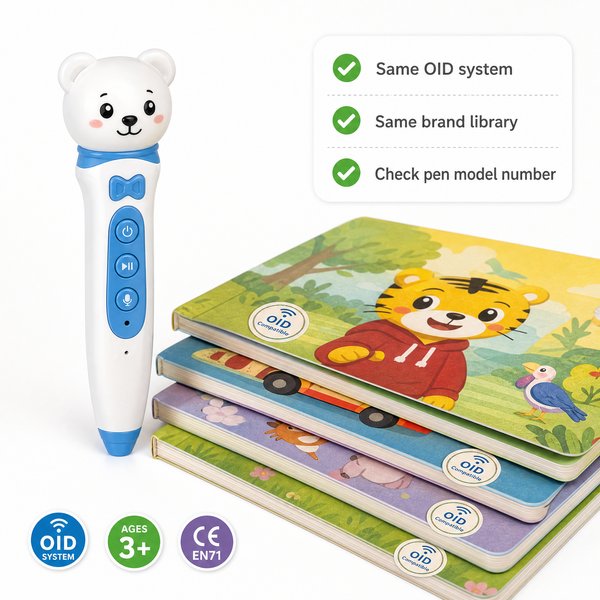
BLUF: If your reading pen uses OID (optical identification) technology — like Toyvao’s factory-direct children’s reading pens — the only reliably compatible books are those printed with the matching OID pattern (or explicitly listed as “OID‑coded / talking‑pen compatible”). The pen has NO OCR and NO Bluetooth, so non‑OID PDFs, scans or regular printed books will not work unless they are republished or physically reprinted with the correct OID marks. To find compatible books, look for publisher compatibility lists, check the book for visible/printed OID markers or “talking pen compatible” labeling, request the book’s OID map from the supplier, or contract a printer/publisher to add OID codes (MOQ for custom OEM/ODM is 100–500 pcs).
Quick reality check: what “compatible” actually means
OID pens read a printed optical pattern tied to an audio ID map. Because this pen uses OID only (no OCR), compatibility requires three pieces to match: (1) the book has a correctly printed OID pattern in the expected locations, (2) a matching ID-to-audio file mapping exists on the pen (or embedded in the book cartridge), and (3) the language and age/content level match your customer needs. The pen’s recognition responds in <0.1s> on average, storage options are 16GB / 32GB / 64GB, battery life is 8–12h, and it includes a 3.5mm headphone jack for classroom or caregiver listening.
When it’s worth caring about
- When you need guaranteed, offline playback with no network dependency (schools with restricted Wi‑Fi, exam settings, field use).
- When you plan to resell hardware + content as a bundled solution — you must secure content rights and ensure books are printed with the OID layout.
- When supporting multiple languages and curricula — you must source each language book as OID‑coded or produce localized OID books.
When you don’t need to overthink it
- If you only need generic audio players (MP3 playback) or Bluetooth streaming, OID pens are overkill.
- If you will only buy off‑the‑shelf titles from a single trusted publisher who advertises “OID/talking‑pen compatible,” you can treat compatibility as a checkbox rather than a technical integration project.
Practical checklist to find compatible books
Follow these steps to verify and procure books that will work with an OID reading pen:
- Ask the supplier/publisher: “Is the edition printed with OID / talking‑pen codes? Can you provide the book’s OID mapping file?” If yes, request a sample print or PDF showing the OID pattern and an example mapping CSV/ID list.
- Inspect the physical book: look for a margin micro‑dot matrix, printed code strip, or a label that says “OID / talking‑pen compatible.” If unclear, request a close‑up photo of the margin pattern.
- Confirm audio asset format and size: publishers should provide per‑page audio files (MP3/WAV) and an ID map. Typical packaged file size per book is 1–30MB depending on audio length and compression.
- Test with a sample pen: run a <0.1s> recognition test on a sample page to verify mapping and playback reliability before committing to a larger order.
- For non‑OID titles: plan for republishing with OID printing or apply adhesive OID strips — note adhesive strips are a short‑term workaround and can affect reliability.
- Negotiate MOQ and lead times for custom OID printing: Toyvao’s OEM/ODM run is typically 100–500 pcs; printing lead times commonly 4–8 weeks after final artwork and audio approval.
When it’s worth caring about / When you don’t need to overthink it — Content rights & production
When it’s worth caring about
- If you plan to sell a bundled pen+book product commercially, secure reproduction and audio distribution rights from the content owner before printing OID codes.
- If you need localized audio (different accents, dialects), get separate mapped audio files per language and validate on the pen.
When you don’t need to overthink it
- For classroom use with a single licensed title, a simple license amendment to add audio and OID printing is usually sufficient.
When it’s worth caring about / When you don’t need to overthink it — Physical printing & quality
When it’s worth caring about
- OID fidelity matters: registration, ink density, and margin tolerances affect <0.1s> recognition speed and accuracy. Use established printers experienced with OID layouts.
- Laminated pages, heavy varnish, or metallic inks can interfere with optical reads — test with a pen sample.
When you don’t need to overthink it
- If you buy from a publisher who already lists the title as compatible, assume the printing process is OID‑ready unless otherwise noted.
Options matrix — which route to take
| Scenario | How it works | Pros | Cons | Typical lead time / MOQ |
|---|---|---|---|---|
| Buy off‑the‑shelf OID‑coded books | Purchase titles already printed with OID and mapped audio from publishers | Fast deployment; low technical risk; no republishing | Limited title selection; dependent on publisher catalog | Immediate / no MOQ |
| Custom OID print (new titles or your own IP) | Publisher/printer prints OID pattern and embeds mapping; you supply audio | Full control over content & packaging; brandable bundles | Requires licensing, artwork adjustments, and QA | 4–8 weeks / MOQ 100–500 pcs (OEM/ODM) |
| Convert existing non‑OID books with stickers or inserts | Add adhesive OID tags or an insert with OID‑coded pages | Lower upfront cost; quicker than republishing | Less reliable recognition; not a long‑term solution for heavy classroom use | 1–2 weeks for stickers / low MOQ |
Customer feedback synthesis
Below are consolidated quotes from distributors, school buyers and resellers who evaluated OID reading pens and OID books.
- “Positive: Setup was straightforward — publisher supplied OID PDFs and audio, recognition is instantaneous (<0.1s) and kids love the touch‑to‑listen feature." — Distributor, EU
- “Positive: Toyvao shipped factory samples and a compatibility list; the 16GB option holds dozens of titles and lasted a full day of classroom demos (8–12h battery).” — School procurement, SEA
- “Positive: Custom printing run (200 pcs) arrived with perfect OID registration after one prepress iteration — good OEM support.” — Retail buyer, LATAM
- “Negative: We assumed any ‘talking book’ file would work — the pen has NO OCR and failed on regular reprints that lacked the OID margin.” — Library chain, UK
- “Negative: Some cheaper printers produced faint dots; recognition dropped and we needed a reprint.” — Curriculum publisher, US
- “Negative: Limited title selection for minority languages — we had to fund a small custom run (MOQ 100) to cover local needs.” — NGO education program
Simple procurement checklist (one‑page)
- Confirm the book edition is printed with OID or request OID printing from the publisher/printer.
- Obtain the OID mapping file or a sample mapped book PDF for QA testing.
- Request a physical sample to test recognition speed (<0.1s) and playback on the target pen model (16/32/64GB options).
- Secure rights and audio files (MP3/WAV), and confirm total packaged book file size fits chosen storage (16–64GB).
- Set MOQ and lead time expectations: custom OEM/ODM runs typically 100–500 pcs and 4–8 weeks production.
FAQ
- Q: How can I tell if a book is OID‑coded before buying?
- A: Ask the seller for a close‑up photo of the page margin showing the dot pattern or a statement that the edition is “OID/talking‑pen compatible.” Request the OID map (ID list) for one or two pages to validate with a sample pen.
- Q: Can you convert any existing book into an OID‑compatible book without republishing?
- A: You can apply adhesive OID strips or include a separate OID‑coded insert, but these are stopgap measures. For long‑term reliability and high‑volume classroom use, republishing with the correct OID print registration is recommended.
- Q: Do the pens support multiple languages and accents?
- A: Yes — language support depends on the audio files loaded and the OID mapping. The pen itself is language‑agnostic but requires the correct audio assets per language/edition.
- Q: What are the commercial terms for custom books and bundles?
- A: Toyvao offers OEM/ODM support with MOQ typically 100–500 pcs for custom OID printing and pen branding. Production lead time is commonly 4–8 weeks after final artwork and audio approval. Contact sales to get a precise quote and timeline.
Certifications & technical summary
Pen technical points you should validate with suppliers: recognition speed (<0.1s), storage options (16GB / 32GB / 64GB), battery life (8–12h), 3.5mm headphone jack, NO Bluetooth, NO OCR (OID only). Certifications available: CE, FCC, RoHS, EN71, ASTM, UN38.3.
Next step / Strong CTA: For factory‑direct support on pens, OID mapping, or custom OID printing runs (MOQ 100–500 pcs) contact Toyvao’s sales team to request sample units, compatibility lists, and a production quote: WhatsApp +86 186 8106 4480 or email sales@toyvao.com. Start with a sample test (we recommend one sample pen + one sample OID‑coded book) to validate recognition and audio mapping before larger orders.
