
Executive Summary
This guide is a practical, operational reference for sourcing teams, product managers, quality engineers, and after-sales managers who handle Picture Book Reading Pens (aka Talking Book Pens, Story Pens, OID Reading Pens). It focuses on the most common hardware and software failure modes, step-by-step troubleshooting procedures, diagnostic thresholds, and how OEMs typically structure support and service. It also covers supplier selection criteria, expected lead times, warranty and RMA best practices, and compliance tests required for toys and batteries.
Key takeaways
– Typical return rates for consumer educational electronics range from 1% to 5%; for toddlers’ toys expect 1–3% after robust QA. Battery and charging problems account for roughly 25–40% of service incidents. Mechanical failures (tip, buttons) and audio issues account for another 30–40%.
– Common fault categories: power subsystem (Li-ion/Li-Poly battery, charging ICs), OID/optical sensor misreads, speaker/amplifier faults, connector/PCB failures, firmware crashes and corrupted audio mapping tables.
– Effective OEM support requires documented SLAs: initial response within 48 hours, diagnostic turnaround 5–10 business days, repair/RMA completion 7–21 days depending on spare parts stock and geography.
– Acceptance and incoming QA should use AQL 2.5 (major defects) with defined test procedures: 48–72 hour aging, 1.0 m drop test, battery capacity sampling, OID read-rate test >99% on production books.
This guide provides concrete diagnostic steps, expected electrical thresholds, firmware update options, and contract terms to include in OEM agreements to reduce failure rates and shorten the repair cycle.
What Is Picture Book Reading Pen and Who Uses It
Product definition
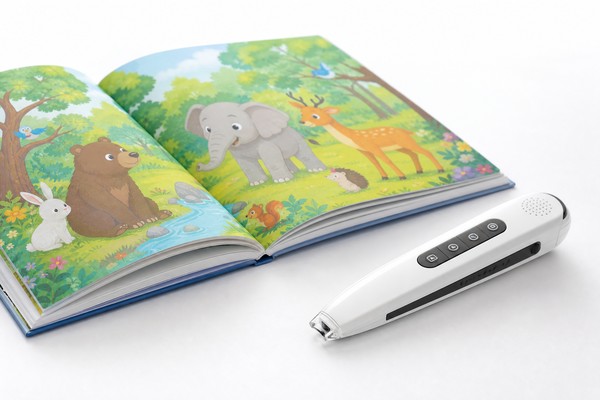
– A Picture Book Reading Pen is a handheld electronic device that converts printed book content into audio when a user taps the pen’s tip on specially printed areas of a book. The printed areas contain an optical identification pattern (OID micro-dots, printed markers, or QR-like markers) that the pen’s sensor reads to map inked positions to audio files.
– Core subsystems: optical/OID sensor and LED/IR illumination; microcontroller (MCU) with flash/NAND or microSD storage; audio decoder (MP3/WAV/ADPCM); power management and battery; speaker and amplifier; user I/O (buttons, LEDs, microphone for recording); connectivity (USB mass storage, BLE 4.0/5.0 optional).
Primary users and channels
– End users: children (ages 2–8) and caretakers using the pen for learning language, phonics, and storytelling.
– Buyers: educational publishers, private-label toy brands, retail buyers, e-commerce channels, and private-label OEM customers.
– Use environments: home, preschools, libraries. Typical duty cycles: daily sessions of 10–30 minutes; lifetime expectation 6–24 months depending on price tier and build quality.
Variants
– Entry-level: basic OID sensor, mono MP3 playback, 3.7V 300–600 mAh battery, microSD or 4–8 GB internal storage, micro-USB charging.
– Mid-range: BLE connectivity, microphone recording, 8–16 GB storage, Type-C charging, louder 2–3 W speaker.
– Premium: Wi‑Fi updates, multi-language switching, 16–32 GB, higher quality DAC, shock-resistant housing, IPX splash resistance.
Why Demand Is Growing
Drivers
– Increasing adoption of interactive STEM and literacy tools in early education. Publishers add audio-enabled editions to maintain product differentiation.
– Fast growth in emerging markets where audio-enhanced print provides low-bandwidth digital learning.
– Licensing opportunities: branded story pens for characters/educational IP increase per-unit prices and margins.
Operational implications for buyers
– Higher demand means larger BOM visibility, but it also amplifies warranty and after-sales logistics. Buyers must plan RMA flows, spare parts inventories, and firmware maintenance cycles.
– Pen designs must balance cost, durability, and updateability: pens that can be updated in the field via USB/BLE reduce long-term support costs.
Key Technology Differences
OID vs. Alternative identification methods
– OID (Optical ID) micro-dot pattern: on-book micro-dots are read by an optical sensor/camera. Advantages: precise mapping to positions, low cost per book, offline operation. Typical sensor requires 100–200 lux of illumination from internal LEDs; camera frame rates 30–120 fps with image crop processing.
– NFC/RFID tagging: limited to region-based triggers (no precise location); low cost per tag but higher per-book cost and limited interaction granularity.
– Capacitive/contact stylus: needs conductive ink or contact points. Lower complexity, but wears faster and requires robust mechanical design.
MCU and audio decoding
– MCU types: Cortex-M0/M3/M4 or equivalent 32-bit MCUs are common. Higher-end units include Cortex-M7 or small application processors when Bluetooth/Wi‑Fi and audio DSPs are integrated.
– Audio codecs: MP3 (bitrates 32–320 kbps), WAV (PCM 8/16-bit sample rates 8/16/22.05/44.1 kHz), ADPCM for lower footprint. Choose codecs to balance storage vs. CPU load. Example: 2 minutes of stereo MP3 at 64 kbps ≈ 1 MB; more realistically, 32–128 kbps mono for voice.
Storage and expansion
– Internal flash: 4–32 GB SLC/MLC flash or embedded eMMC for larger capacity. MicroSD support common for field updates and content swaps.
– File system: FAT32 for compatibility with Windows. Ensure the OEM implements robust file indexing to prevent data corruption when ejected during write.
Power and battery
– Typical battery: 3.7 V Li‑Ion or Li‑Po, capacities 300–1200 mAh. Charging via integrated charging IC with USB-C or micro-USB. Design must include protection IC, temperature monitoring (NTC), and over-discharge cutoff.
– Expected runtime: 4–20 hours depending on speaker output, duty cycle. Standby current should be <100 µA to prevent long-term discharge.
Connectivity
– USB: Device mode as USB mass storage and serial console for diagnostics. Baud rates commonly 115200 bps for boot logs.
– BLE: BLE 4.2/5.0 primarily for content sync and remote diagnostics. OTA firmware updates via BLE are slower and should be complemented by USB-based DFU.
Manufacturing test and calibration
– OID read-rate tests must be performed on production books; aim for >99% recognition with a 95% confidence interval across 100 random taps.
– Speaker output verification: measure SPL at 0.5 m — typical targets: 70–85 dB SPL depending on power and use-case.
Key Features and Specifications to Evaluate
Hardware specifications to require in RFQ (minimum acceptable values and recommended)
– Optical sensor: resolution ≥640×480 pixels or equivalent, capture at ≥30 fps, IR-LED illumination, read latency ≤100 ms.
– MCU: 32-bit core, ≥64 MHz for basic; ≥120 MHz recommended if including decoding, BLE stacks, and recording.
– Storage: internal flash or eMMC ≥4 GB; recommend 8 GB for catalog of 50–100 short stories. Provide microSD slot with support up to 32 GB for expandability.
– Audio: MP3 and WAV support. Mono playback OK for basic; stereo for higher-end. DAC SNR ≥80 dB for clear voice; amplifier output 1–3 W into 8 Ω for audible output in playrooms.
– Battery: nominal 3.7 V, capacity ≥500 mAh recommended. BQ-series or similar charging IC with 4.2 V charge termination ±0.05 V. Include battery protection (overcharge, overdischarge, short-circuit).
– Mechanical: drop test from 1.0 m onto concrete or IEC-equivalent surface; stylus tip replaceable; ingress protection IPX1 minimum (splash proof).
– Connectivity: USB 2.0 Full Speed for mass storage and diagnostics; BLE 4.2/5.0 optional.
– Buttons and LEDs: Provide at least power, play/pause, volume or next/prev. LED to show charging, firmware update, and error codes.
– Operating temperature: 0°C to 40°C for charging; -10°C to 50°C for storage. Thermal cutoff recommended at 60–70°C for battery/charger.
Software and firmware requirements
– Bootloader with DFU via USB or SD card for field recovery. Bootloader must have robust CRC/CRC32 integrity checks and fallback mechanism.
– Error logging: optional persistent micro-log (circular) of last 5–10 crashes or exceptions with timestamp, firmware version, and battery voltage at fault.
– Content mapping: deterministic SQLite or indexed file mapping; use metadata and checksum verification on load.
– Localization: support for multiple UI languages and audio sets. Provide content package format with manifest (JSON/XML) to keep mapping robust.
QA and test scripts to request
– Incoming inspection report (IQC) with AQL levels: AQL 2.5 for major, AQL 4.0 for minor.
– Production functional test: power-on self-test, OID read test with 100 random points, speaker SPL measurement, battery charge/discharge sample, USB connectivity and file write/read test.
– Burn-in: 48–72 hour burn-in at ambient or elevated temperature (45°C) with periodic playbacks.
Pros and Cons
Pros of using Talking Book Pens
– Low friction: offline operation without Internet required.
– High engagement: tactile interaction improves retention for early readers.
– Cost-effective scale: per-unit manufacturing cost is comparatively low versus tablets for similar learning outcomes.
– Expandable: content is updated via microSD/USB or BLE for long product life.
Cons and risks
– Mechanical wear: stylus tips and buttons wear and must be warranty-managed with spare parts.
– Battery hazards: Li-ion/Li-Po batteries require compliance (UN38.3, IEC62133) and add complexity to shipping and warranty.
– Firmware maintenance: large deployments require ongoing firmware updates and content management; inadequate processes create fragmentation and support load.
– Book printing tolerances: OEM must tightly control print registration to ensure OID read rates remain high; poor book print is a frequent source of “pen failures” that are not hardware defects.
Step-by-Step Decision Guide
Choosing an OEM and setting up support processes
– Step 1 — Define performance and service KPIs: Specify OID read rate target (≥99%), battery runtime, drop resistance, initial defect rate target (<1.5% after QA), and SLA response times.
– Step 2 — RFQ with clear test requirements: Provide sample books, target audio library size, mechanical shock and ingress specs, and exact file format requirements. Request functional test scripts and sample AT reports.
– Step 3 — Request proto and verification builds: Approve two engineering samples: alpha (PCB + housing) and beta (mass-production-equivalent). Require firmware DFU path and engineering logs.
– Step 4 — Insist on burn-in and AQL sampling: Specify 48–72 hour burn-in and AQL 2.5 for major defects with documented IQC trays.
– Step 5 — Define RMA flow and spare parts terms: Include RMA turn-around times, repair vs. replace rules, spare parts MOQ and lead times (typical spare parts lead: 6–12 weeks for PCBs and molds).
– Step 6 — Negotiate warranty and support: Standard consumer warranty: 12 months. Request optional extended warranties and a clearly defined reverse-logistics process with regional repair centers if volumes justify.
– Step 7 — Establish firmware support agreement: Define patch cadence (security/critical patches within 30 days, minor feature patches quarterly), OTA/USB DFU method, and how OEM will distribute release notes and rollback metadata.
– Step 8 — Set acceptance criteria for final shipment: Use production sample runs to validate OID read performance on production print, battery capacity checks, and mechanical tests.
Troubleshooting decision flow (high level)
– If the pen fails to power on: check battery voltage (nominal 3.7 V), charging LED behavior, and USB cable. If voltage <2.8 V and charger LED not lit, check charger IC and battery connector.
– If OID misreads or is intermittent: test with OEM-supplied sample book and measure internal IR LED drive and camera exposure. Check book print registration and contrast.
– If audio is distorted or absent: confirm file integrity and codec compatibility. Measure speaker impedance (typical 4–8 Ω) and amplifier supply rails (e.g., +5 V or system Vbat).
– If pen freezes or reboots: retrieve serial logs via USB, check firmware version, verify power supply stability and watchdog configuration.
Pricing and Cost Analysis
Typical cost breakdown (per unit approximate ranges; final costs vary by volume)
– BOM: $5.00–$25.00 depending on components and quality. Examples:
– Entry-level BOM: $5–$9 (basic MCU, 4GB flash, 1 W speaker, 500 mAh battery).
– Mid-range BOM: $9–$18 (32-bit MCU, 8–16 GB, 2–3 W speaker, BLE).
– Premium BOM: $18–$40+ (higher-quality DAC, larger battery, Type-C, better materials).
– Assembly & test: $0.80–$3.50 per unit depending on test complexity and automated vs manual lines.
– Molding/tooling: $2,000–$12,000 per cavity depending on complexity and steel grade. Allocate amortized tooling per unit: tooling cost / expected run (e.g., $6k tooling / 50k units = $0.12 per unit).
– Packaging and manuals: $0.20–$1.50 per unit.
– Logistics and duties: variable by country; budget 3–8% of FOB for freight + tariffs.
– Warranty/after-sales cost: estimate 1–3% of unit price annually for RMA and spare parts if product is designed with reasonable reliability.
Pricing examples (FOB China, tooling amortized, estimated for orders of 10k–50k)
– Basic pen: FOB $8–$15.
– Mid-range pen with BLE and 8 GB: FOB $16–$30.
– Premium pen with advanced features: FOB $30–$60.
Total Cost of Ownership (sample calculations)
– For 20,000 units of a mid-range pen at FOB $22:
– Unit cost: $22 × 20,000 = $440,000
– Tooling amortized: $6,000 / 20,000 = $0.30 per unit → $6,000
– Testing & QA overhead: sample 2% full inspection labor = ~$4,000
– RMA reserve (2% rate, replacement COGS $22): 400 units × $22 = $8,800
– Total program budget ≈ $458,800 (not including freight, duties, or marketing)
Negotiation levers with OEMs
– Volume discounts: scale-based pricing tiers (e.g., 1–5k, 5–20k, 20k+).
– Component selection flexibility: allow supplier to propose equivalent ICs to reduce cost but require performance validation.
– Spare parts MOQ reductions: negotiate minimums for key wear parts like stylus tips, batteries, and speaker assemblies.
Competitive Landscape
Supplier segmentation
– High-volume contract manufacturers (Shenzhen/Dongguan): strongest in large runs, integrated testing, local supply chain, typically best for rapid turnarounds and lower per-unit price at scale.
– Specialty educational OEMs (Zhejiang/Guangdong/Ningbo): focus on features like content platform integration, cloud content management, and localization.
– Tier-2 factories: competitive for small runs and rapid prototyping but higher defect rates and limited testing capabilities.
Market trends to monitor
– Move toward BLE-based content synchronization and simple companion apps for analytics and usage reporting.
– Shift to Type-C for charging and increased battery safety features.
– Growing demand for content management services: publishers want an easy way to push new audio packs; OEMs that offer a secure content package format and hosting gain an advantage.
What differentiates suppliers
– Embedded QA capabilities (in-house EMC chamber, battery testing, burn-in racks).
– RMA handling and localized repair centers in target markets.
– Engineering support: willingness to provide bootloader source or debug logs, and more transparent failure analysis.
What Buyers Say
Common buyer-reported failures and lessons
– “Pen won’t read certain pages” — often book-print registration or low-contrast printing, not pen hardware.
Lesson: enforce print specifications and require supplier to test sample book runs.
– “Battery drains quickly after a few months” — typical root cause: poor battery cell sourcing or no low-power firmware optimization.
Lesson: specify battery grade, vendor list, and require sample cell cycling reports.
– “Firmware updates bricked units” — caused by incomplete DFU safeguards and missing power checks during updates.
Lesson: require robust dual-bank bootloader and device-side integrity checks; insist on staged OTA testing.
– “High failure rate of stylus tips and buttons” — mechanical design oversight and weak suppliers.
Lesson: require replaceable tips, specify materials, and include lifecycle tests (button press cycles 50k+).
– “Slow RMA turnaround” — local logistics and spare parts shortages increase downtime for buyers.
Lesson: include RMA SLAs in the contract and negotiate regional repair options with stock levels.
Positive feedback patterns
– Buyers value vendors that provide engineering logs and root-cause analysis (root cause reports with corrective actions) within the SLA window.
– Vendors that support DFU and mass content update tools reduce after-sales cost for buyers.
– Structured incoming QA and burn-in significantly reduce early-life failures and downstream support costs.
Safety, Maintenance and Compliance
Required safety and compliance testing
– Toy safety: EN 71 series (Europe), ASTM F963 (U.S.) where applicable. For sound-producing toys, check sound pressure limits as specified in EN 71-1 and IEC 62368-1 for audio.
– Chemical: RoHS and REACH compliance for materials and solder.
– EMC and radio: FCC Part 15 for Wi‑Fi/BLE devices in the U.S., CE (EMC & RED) for EU.
– Battery: UN38.3 for air transport; IEC 62133 for cell safety; CN regulations for pre-shipment battery testing. Ensure battery manufacturer certificated compliance and UN38.3 report available for each shipment.
– Electrical safety: internal protection circuits, thermal protection, and flame-retardant housings per local toy safety norms.
Maintenance best practices for buyers and end-users
– Charging: use OEM-approved chargers. Improper chargers and repeated overcharging reduce battery life. Specify charge termination at 4.20 ±0.05 V and charging current no more than 0.5 C for small cells.
– Cleaning: wipe with a damp cloth; avoid immersing pen in water. Provide cleaning intervals and recommend isopropyl wipes for tip hygiene (avoid solvents that attack plastic).
– Storage and transport: store at 30–50% state of charge when not used for long periods to maximize battery life. Avoid storing above 45°C.
– Stylus tip replacement: provide spare tips; instruct end-users to replace tips every 6–12 months in heavy-use environments.
Documentation and labeling
– Include clear instructions in packaging on battery safety, charger use, and firmware update procedures.
– Provide a QR code linking to firmware downloads, troubleshooting guides, and RMA initiation forms.
Frequently Asked Questions
Q: How do I recover a “bricked” pen after a failed firmware update?
A: Request the OEM bootloader procedure. Typical recovery: place firmware.bin on a FAT32-formatted microSD card (or connect via USB mass storage), insert while pressing a hardware recovery button, power on to force bootloader write. If bootloader is corrupted, OEM must provide JTAG/SWD or chip-specific programming. Preventive measure: require dual-bank bootloader and CRC checks in contract.
Q: What diagnostic data should I ask for from the OEM when an RMA arrives?
A: Serial console logs (115200 bps common), firmware version, battery voltage history, last known content package, OID read count and error codes, and photos/videos of failure. These enable quicker root-cause analysis.
Q: How should I handle books that cause misreads?
A: Test book print against OEM-provided calibration sample. Verify print contrast (optical density), registration tolerance (±0.3 mm typically), and micro-dot printing quality (no smearing). If books are printed by an external vendor, require pre-shipment book inspection and include an OID read acceptance test.
Q: Are firmware OTA updates safe over BLE?
A: BLE OTA is practical but slow; ensure secure DFU (signed image) and a failure-safe bootloader. For large content packs use microSD or USB mass updates. Include version signing and rollback capability.
Q: What are reasonable RMA rates to plan for?
A: Aim for <2% after proper QA. Initial pilot runs may see 2–5% until processes stabilize. Budget for 2% RMA reserve in cost models and require OEM to share corrective action plans if rates exceed agreed thresholds.
Q: Should I require the OEM to stock spare parts?
A: Yes. Minimum recommended spares: 1–2% of production run for wear parts (tips, speakers, batteries) and 0.5–1% for critical PCBs. Negotiate replenishment lead times and price breaks.
Contact Toyvao
For RFQs, technical assistance, supplier vetting, and managed sourcing for Talking Book Pens, submit your project brief and required specifications at:
– Website: https://Toyvao.com/contact
Services available
– Supplier identification and qualification (factory audits, capability mapping).
– Technical due diligence (hardware and firmware review, BOM cost breakdown).
– QA program setup (IQC, PQC, FQC, burn-in, AQL sampling plans).
– Contract negotiation templates (SLA, RMA terms, firmware maintenance obligations).
– Project management for prototyping, PPAP runs, and product launch.
Provide your target volumes, desired features (OID/NFC/BLE), sample books, and preferred certifications when you contact us. This enables an accurate cost estimate and supplier shortlist tailored to your program.
