
Executive Summary
This guide provides a practical, technical framework for publishers, OEMs, and procurement teams designing picture books for Picture Book Reading Pens (also called Story Pens, Talking Book Pens, or OID Reading Pens). It focuses on compatibility between printed pages and pen recognition systems: OID dot layout principles, page templates, hotspot mapping, printing and binding constraints, testing procedures, and cost drivers. The content is written for buying and product-development decisions: what to ask suppliers, what tolerances to require, how to structure files and tests, and how to budget for production and QA. Use this as a checklist to reduce rework, minimize mis-detections in final product, and to ensure reliable end-user performance.
Key takeaways:
– Pen systems rely on a micro-dot optical identification pattern printed on every page. Dot fidelity and print registration (600–1200 dpi) determine recognition accuracy.
– Design page templates with minimum safe areas, binding gutters, and mapped tap zones sized to the pen tip (recommended tap target diameter 8–12 mm).
– Audio mapping files and asset naming standards (CSV/JSON) are essential for automation and rapid integration.
– Test samples, registration proofs, and pen validation across at least three pen firmware builds will avoid batch failures.
– Expect additional costs: micro-dot printing premium, mapping labor, audio production, and a small setup / testing fee from experienced vendors.
What Is Picture Book Reading Pen and Who Uses It
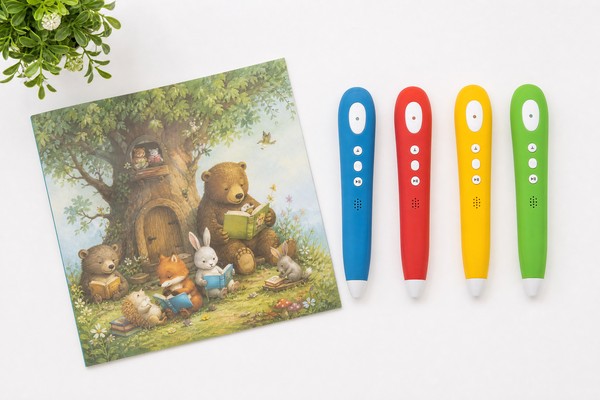
Picture Book Reading Pens are handheld optical-scanning devices that detect a printed micro-dot pattern embedded on each page to identify position and trigger recorded audio. The pen houses a camera/IR sensor, microcontroller, DSP, speaker, microphone, battery, and flash memory. Users tap the pen tip on illustrations, words, or icons (“hotspots”) to hear narration, sound effects, or educational content.
Primary buyers:
– Educational publishers adding audio to storybooks, early-learning picture books, language-learning titles.
– Private-label and toy brands sourcing talking-books at scale.
– Learning technology integrators packaging multimedia products for schools and libraries.
– OEM vendors and contract manufacturers integrating pen hardware with printed content.
Operational use cases:
– Read-along narration (page-level or word-level).
– Interactive sound-effects tied to illustration hotspots.
– Language learning drills with immediate feedback.
– Multi-language content where pen selects audio track according to firmware or user selection.
Why Demand Is Growing
Demand is driven by three market dynamics:
– Early literacy and multimedia learning: tactile, audio-visual interaction improves engagement, vocabulary retention, and independent reading among 2–8 year olds.
– Localization and multilingual publishing: one printed book can deliver multiple audio tracks (languages), reducing inventory complexity.
– Cost-efficient differentiation for publishers: adding an interactive reading pen increases perceived product value without mass electronics per copy (pens are reusable across books).
Commercial drivers for buyers:
– Improved sell-through: interactive books command higher unit retail prices (typical 10–50% premium versus non-electronic editions).
– Faster market entry: pen-enabled titles scale across languages and regions without redesigning print runs.
– Reuse economics: single pen batches sold with multiple books or as accessory to libraries and schools reduces per-use hardware cost.
Key Technology Differences
Not all reading-pen systems are equivalent. Differences affect design and procurement:
Pattern Encoding and Recognition
– Micro-dot OID-style patterns: tiny dots printed across the page encode coordinate data and page/book IDs. The pen decodes these coordinates to identify the tapped location.
– Variants differ in algorithm robustness to print noise, dot contrast, and occlusion. Some systems tolerate partial occlusion across spine or varnish better than others.
Sensor and Optics
– Camera resolution: 200–600 kpx sensors are common; higher-resolution sensors improve fine-location accuracy but increase cost and power draw.
– Illumination: IR LEDs minimize interference from page color and reduce sensitivity to ambient light. Visible-light illumination is cheaper but more affected by varnish and gloss.
Firmware and Audio Mapping
– Page-first architectures: pen recognizes page ID then localizes hotspots. This is standard for most OID systems.
– Continuous tracking architectures: device tracks precise coordinates on the pattern, enabling freeform tap actions, handwriting capture, or line-following.
Audio Formats and Playback
– Common formats: MP3 (mono, 32–128 kbps for speech), WAV (PCM 16-bit/44.1kHz for high fidelity), and proprietary compressed formats.
– Multi-track capability: verify pen supports number of channels/tracks required (2–12 tracks typical for multilingual books).
Connectivity and Management
– USB mass-storage vs dedicated software: some pens appear as USB drives for file transfer; others require vendor software or cloud sync via Bluetooth/USB.
– Firmware upgrade path: over-the-air (Bluetooth) or via desktop app; essential for long-term maintenance and field updates.
Durability and Battery
– Typical battery: removable NiMH or Li-ion 800–2500 mAh providing 8–20 hours of continuous playback depending on speaker and duty cycle.
– Mechanical wear: pen tips and housings rated for thousands of taps; check manufacturer MTBF and warranty terms.
Key Features and Specifications to Evaluate
When specifying books and selecting suppliers, request or define minimum acceptable values for the following:
Dot Pattern and Printing
– Minimum printing resolution: 600 dpi required; 1200 dpi recommended for highest reliability and smaller dot patterns.
– Dot diameter range: 0.20–0.45 mm recommended (supplier-dependent). Ask for sample prints to confirm pen decoding.
– Dot color and ink: high-contrast brown/black; ensure ink density OD (optical density) >1.0. Verify ink adhesion for varnish/lamination processes.
– Dot placement tolerance: ±0.15 mm registration tolerance between image content and dot grid.
Paper and Coating
– Paper weights: 150–300 gsm typical for board and picture books.
– Coatings: matte varnish more compatible than high-gloss. Thermal lamination or UV varnish can blur dots—specify test passes.
– Laminates: avoid full-surface gloss lamination over dot areas unless tested.
Tap Targets and Layout
– Recommended tap target diameter: 8–12 mm (tapable area considering pen tip size).
– Safe tap area: maintain 2–3 mm clearance from text or thin stroked lines to avoid misreads.
– Minimum hotspot spacing: 10–12 mm center-to-center to prevent ambiguous detections.
– Gutter / binding-safe area: 12 mm for perfect binding; 6–8 mm for saddle stitch; keep OID pattern continuous but avoid meaningful hotspots within the inner 6–12 mm.
Page Templates and File Formats
– Page size templates: include bleed (3 mm), trim, live (safe) area (5 mm), and binding gutter. Provide PSD/AI/PDF/X-1a with OID overlay as separate layer.
– Vector vs raster: artwork in vector (AI, EPS) at 300 dpi plus raster components at 300–600 dpi for images.
– OID overlay: supply as separate 1-bit TIFF or PDF layer. Maintain separate art and dot layers to simplify plate-making.
Hotspot Mapping and Naming Conventions
– Mapping file (primary): CSV or JSON with columns:
– page_id, hotspot_id, x_mm, y_mm, r_mm, audio_file, language, behavior_flags
– Example filename convention: bookcode_page001_hot001_en.mp3
– Coordinate origin: top-left of trimmed page or explicit mm origin; ensure pen vendor and printer use same origin.
– Max hotspots per page: confirm hardware limit (typical 64–256); plan conservatively at 64 for reliability.
Audio and File Specifications
– Speech: MP3 mono 32–96 kbps; recommend 64–96 kbps for clarity. WAV 16-bit/44.1kHz for premium titles.
– Naming and path length: many pens use FAT32 or specific directory structures; limit filenames to 32 characters and total path <260 chars.
– Multi-language mapping: designate language codes in mapping and verify pen UI supports language switching.
Testing and QA Metrics
– Recognition accuracy: requirement ≥99% page ID detection across 100 random taps, ≥95% hotspot accuracy.
– Acoustic acceptance: average speech SNR >30 dB, clipping-free at normal listening volume.
– Environmental: function at 200–1000 lux ambient, temperature 0–40°C.
Regulatory and Safety Specs
– Battery: IEC 62133 compliance, UN38.3 for shipping lithium batteries.
– Toy safety standards: EN71 (Europe), ASTM F963 (USA), and local market-specific chemical/material limits (CPSIA for lead and phthalates).
– EMC: CE/FCC certifications if device includes radio modules.
Pros and Cons
Pros
– High engagement and improved learning outcomes for children.
– Scalability: same pen can be used with multiple books; audio tracks swapped without reprinting.
– Clear product differentiation for publishers and retailers.
Cons
– Print and production complexity: micro-dot printing and registration increase production risk and cost.
– Hardware dependency: compatibility varies by pen and firmware; locked ecosystems can force vendor selection.
– Durability issues: varnish, lamination, adhesive, and binding can degrade dot readability if not thoroughly tested.
– Ongoing support: firmware updates and asset re-mapping costs can be significant for large catalogs.
Step-by-Step Decision Guide
- Define product requirements
-
Target age group, language count, fps per book, maximum hotspots per page, expected retail price, and target markets with related safety standards.
-
Choose pen hardware family
-
Evaluate at least 2 hardware vendors, compare detection accuracy, memory capacity, audio codecs supported, connectivity method, and lifecycle support. Request technical datasheet and demo units.
-
Select OID/pattern provider or method
-
Confirm whether the pen vendor supplies the OID encoding toolchain or a third-party pattern license is required. Clarify any IP or licensing fees and whether pattern generation is integrated into the print workflow.
-
Create page templates
-
Use standard templates with:
- Bleed: 3 mm
- Trim margin: 0 mm
- Live/safe area: 5 mm
- Binding gutter: 12 mm for perfect bound; 6–8 mm for saddle stitch
- Hotspot grid for designers indicating tap zones and spacing.
-
Author content and audio
-
Finalize scripts, voice talent, and sample rate/bitrate requirements. Deliver normalized audio (–3 dB peak), separated by language and page/hotspot naming convention.
-
Prepare print-ready files
-
Submit artwork as layered PDF/X-1a with separate OID layer or as two files: artwork + OID overlay TIFF at required dpi.
-
Prototyping and press checks
-
Produce 3–5 prototypes. Test pen detection across multiple units, lighting conditions, and after finishing (varnish, lamination). QA acceptance criteria must be explicit.
-
Pilot production run
-
Small batch (500–2,000 units) to validate full supply chain: printing, binding, packaging, and post-production checks.
-
Full production and QC
-
Use inline checks: dot pattern fidelity, registration, and a post-bind sampling protocol (e.g., 50 units per 10,000 books). Maintain failure criteria (e.g., <0.5% fail rate).
-
After-sales and firmware process
- Document procedure for firmware updates, audio corrections, and replacement pens. Keep mapping file repository and versioning.
Pricing and Cost Analysis
Cost drivers:
– One-time setup: OID overlay plate creation, mapping setup, and test files. Typical range: $150–$2,000 depending on complexity and whether vendor provides pattern tooling.
– Printing premium: micro-dot printing can add 2–10% to standard print cost due to plate setup, tighter registration, and higher DPI requirements.
– Audio production: voice talent market rates vary widely; expect $50–$300 per finished minute for professional voice + post-production. TTS lower but quality may not match human narration.
– Mapping labor: mapping hotspots and verifying audio alignment typically $0.50–$2.00 per page (manual), lower if automated.
– Hardware: pen unit BOM varies. For OEM buys at scale, pens priced $4–$20/unit depending on features and build quality. Retail-branded pens often cost $15–$40 in finished consumer packaging.
Sample cost model (for budgeting):
– 10,000-book run, full-color 32 pages, 150–170 gsm, saddle stitch:
– Base printing (no OID): $1.20–$2.50/book
– OID overlay and plate: $0.03–$0.20/book (one-time amortized)
– Mapping and audio (amortized): $0.10–$0.75/book depending on complexity
– Packaging and logistics: $0.30–$1.00/book
– Incremental total: $1.63–$4.45/book
Note: These ranges are indicative. Exact pricing depends on paper grade, ink, finishes, geographic location of printer, and vendor relationships. Request itemized quotes and confirm MOQ effects: many printers’ unit costs reduce at 5,000–10,000 pieces.
Competitive Landscape
Supplier categories:
– Hardware OEMs: produce pen electronics and firmware. Evaluate for lifecycle, spare part availability, and firmware update policies.
– Pattern and platform vendors: provide OID pattern generators, mapping software, and cloud services. Important for IP and licensing clarity.
– Print partners with micro-dot experience: critical. Experienced printers reduce risk of mis-detection.
– Turnkey service providers: offer end-to-end services (content, audio, printing, mapping, pen loading and packaging). Higher cost but lower project management overhead.
Market segmentation:
– Low-cost, high-volume suppliers (primarily in Asia): competitive for large runs, variable QA—insist on sample testing and on-site audits.
– Mid-tier full-service vendors: offer packaged solutions (voice, mapping, customs-ready packaging) with established QA processes—higher per-unit cost.
– Premium/innovative vendors: value-add features like handwriting capture, live updates, companion apps—suitable for educational programs and institutional clients.
Selection criteria:
– Technical compatibility: vendor’s pens and pattern must match your required hotspot density and audio capacity.
– Track record: request references for similar titles and production volumes.
– Support model: SLA for firmware fixes, spare parts availability, and replacement policies.
– Compliance and certifications: proof of EN71 / ASTM compliance and battery certifications.
What Buyers Say
Common buyer feedback and recommended mitigations:
Detection issues after finishing
– Symptom: pen fails on certain pages or under specific light.
– Cause: varnish or lamination alters dot contrast or creates hotspots. Printing at insufficient DPI or using ink with low OD worsens detection.
– Mitigation: require press proofs with final finish, test pens pre-production and post-finish, prefer matte varnish.
Binding-related failures
– Symptom: hotspots near spine misread or become unusable.
– Cause: dot pattern disrupted by binding edge or uneven trimming.
– Mitigation: adopt wider gutters, avoid placing critical hotspots within 12 mm of binding, use saddle-stitch for small books when possible.
Mapping and content misalignment
– Symptom: wrong audio plays or no audio when tapped.
– Cause: wrong coordinate origin, filename mismatch, or mapping offset due to trim shift.
– Mitigation: provide standardized template and mapping CSV/JSON with origin documented; conduct software verification of coordinates.
Pen incompatibility across vendors
– Symptom: a book works with one pen brand but not another.
– Cause: different decoding algorithms, firmware expectations, or pattern variations.
– Mitigation: standardize on single pen family or require dual-compatible patterning; insist on pen test matrix covering at least 3 pen firmware versions.
Operational complexity
– Symptom: production delays and cost overruns.
– Cause: lack of clear handoff between content, audio, artwork, and printer teams.
– Mitigation: centralize coordination or hire turnkey provider; define file naming conventions and acceptance criteria up-front.
Safety, Maintenance and Compliance
Regulatory requirements
– Toys and consumer electronics intersect: confirm applicable standards in destination markets:
– EU: EN71 series for toy safety; RoHS and CE marking for electronics; battery safety under UN38.3 for transport.
– USA: ASTM F963; CPSIA for lead and phthalates; FCC for unintentional emissions.
– Batteries: IEC 62133 certification for rechargeable lithium cells.
– Labeling: include product safety labels, battery warnings, and recycling information as required per market.
Maintenance and care
– Cleaning: use a dry microfiber cloth. Do not use solvents or wet wipes on optical sensor or printed pages.
– Pen tip inspection: provide guidance for end users and retailers on tip wear; recommend replacement after a manufacturer-specified number of taps (e.g., 10,000 activations) if specified by OEM.
– Firmware updates: maintain a process for applying firmware fixes to batches in the field. Track serial numbers and batch codes.
Durability tests to request
– Drop test: IEC 60068 or vendor-specified drop heights (e.g., 1.2 m onto concrete) for consumer pens.
– Tap endurance: mechanical actuation test 10,000–50,000 taps.
– Environmental extremes: functional test at 0–40°C and 20–85% RH.
Disposal and recyclability
– Battery end-of-life procedures and labeling.
– Guidance for customers to recycle electronics per local law. Provide warranty RMA flow for returns.
Frequently Asked Questions
Q: Can any pen read any OID-patterned book?
A: Not necessarily. Compatibility depends on the pattern variant, firmware decoding, and coordinate mapping conventions. Always verify with the target pen model(s) and request compatibility test samples.
Q: How many hotspots can I place on a page?
A: Hardware limits vary; common practical limits are 64 hotspots/page to maintain accuracy. Designer constraints (tap spacing and user ergonomics) typically reduce that number.
Q: Can I use glossy lamination?
A: Glossy lamination often reduces dot contrast and interferes with optical detection. If required, conduct press proofs and pen tests; consider matte lamination or spot-laminate non-dot areas only.
Q: What print resolution do you require for reliable detection?
A: 600 dpi is the practical minimum; 1200 dpi is recommended for smaller dot patterns or tightly spaced hotspots.
Q: What audio format should we deliver?
A: MP3 mono 64–128 kbps for speech is common and compact; WAV 16-bit/44.1 kHz for high fidelity. Confirm pen-supported codecs.
Q: How long does it take to go from files to pilot run?
A: Typical timeline: 2–4 weeks for prototypes (includes voice recording and test prints), 4–8 weeks for pilot runs. Timelines shorten with repeatable templates and established suppliers.
Q: What are common failure rates to expect?
A: A well-controlled process aims for <0.5% detection or mapping failure at shipping. Higher failure rates indicate issues with printing, finishing, or mapping.
Q: Are there licensing fees for OID patterns?
A: Some pattern toolchains are proprietary and may require licensing; others are bundled with pen hardware. Clarify IP terms with pen/platform vendors.
Contact Toyvao
To request technical templates, sample evaluations, or an RFQ, prepare the following information:
– Book specifications: trim size (mm), page count, paper weight/grade, binding method (saddle stitch/perfect bind/hardcover).
– Artwork files: print-ready PDF/X-1a plus separate OID overlay or indicate if you require Toyvao to generate the OID layer.
– Hotspot mapping: CSV/JSON or indication of expected hotspots per page and language count.
– Audio brief: total minutes, languages, preferred codec and bitrates, and voice requirements.
– Volume forecast: initial pilot qty and annual forecast.
– Target markets and required certifications (EN71, ASTM F963, CE, FCC).
How to contact:
– Visit https://toyvao.com/contact and select “Reading Pen Book Production” in the enquiry form.
– Attach a one-page specs summary and any sample artwork or a link to a secure file share (Dropbox, WeTransfer).
– Standard response SLA: Toyvao will confirm receipt within 24 business hours and provide initial technical feedback and a quotation timeline within 48–72 hours after reviewing files.
What Toyvao will provide in reply:
– Sample-ready page template (PDF/AI) with OID overlay guidelines.
– A short test plan and checklist for press checks and pen validation.
– Itemized quote for prototyping and pilot production with lead times and MOQ.
If you need immediate technical assistance for template setup or a compatibility audit of existing titles before reprint, include “compatibility audit” in the subject line. Toyvao will respond with next steps and a sample submission guide.
This guide is intended to be a practical checklist for procurement, product, and printing teams preparing picture books for reading-pen systems. Use the stepwise decision guide and file conventions to reduce miscommunication with suppliers and to ensure consistent pen recognition and end-user experience.
