
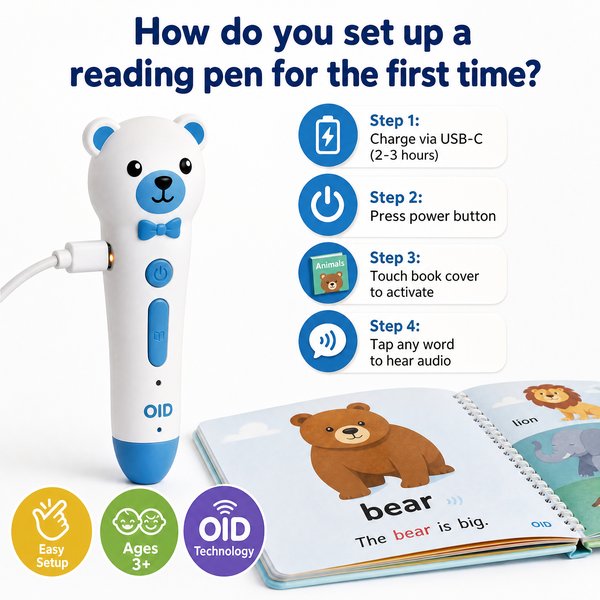
BLUF: To set up a children’s OID reading pen for the first time: unbox, fully charge (8–12 hours battery life gives 8–12h use), insert or confirm internal storage (16GB / 32GB / 64GB), power on, connect headphones to the 3.5mm jack if required, load or insert OID-coded books supplied by the vendor, then tap the pen tip on the OID markers — the pen should respond almost instantly (<0.1s). Important: this device uses OID-coded content for kids (Ages 3+), is NOT an OCR/translation or scanner pen, and has NO Bluetooth — follow the OID content workflow rather than expecting free-text scanning.
Quick setup checklist (one-line)
- Unbox → Charge fully → Power on → Select language → Load OID books → Insert headphones (3.5mm) if needed → Tap OID code → Confirm audio plays in <0.1s.
Step-by-step first-time setup (concise)
- Unpack and inspect: ensure pen, USB charging cable, quick start guide, and any OID-coded books or memory card (if provided) are included.
- Charge: plug into USB charger. Full charge typically supports 8–12 hours of playback.
- Confirm storage: unit ships with 16GB / 32GB / 64GB internal space. If supplied separately, install microSD per manual.
- Power on & language: press the power button, follow voice prompts to set language and volume.
- Load books/content: copy the vendor’s OID-coded content files to internal storage via USB or use the preloaded files. The pen will only read OID-coded books that match its content files.
- Test: plug a set of headphones into the 3.5mm jack (if you want private listening) and tap the pen tip on an OID code — audio should start in under 0.1s.
- No wireless steps: there is no Bluetooth pairing or OCR scanning step — content is tied to OID codes and preloaded audio files.
When it’s worth caring about / When you don’t need to overthink it
Battery & charging
When it’s worth caring about: If you plan all-day classroom use or field trips, prioritize units with a reliable charge cycle and 8–12h runtime and keep spare chargers or a charging station.
When you don’t need to overthink it: For small groups or home demo units, one full charge typically covers a day’s classroom activities.
Loading content & storage (16GB–64GB)
When it’s worth caring about: When buying bundles for different grade levels, decide storage: 16GB is fine for small collections; 32–64GB for multiple languages and extensive audio libraries. If you need custom content, plan file formats and naming conventions before copying files.
When you don’t need to overthink it: If you receive preloaded OID books from the manufacturer, simply verify files exist and test a few pages — no file management required.
Book compatibility: OID-coded books vs OCR/translation pens
When it’s worth caring about: If you expect the pen to read any printed text, stop — this pen supports only OID-coded books. OID pens (designed for Ages 3+) work with books printed with tiny Opaque ID codes that trigger pre-recorded audio. An OCR/translation pen (adult tool) scans arbitrary text and requires OCR engines and often Bluetooth/Wi‑Fi; that is a different product class.
When you don’t need to overthink it: If you already buy OID-encoded teaching books or plan to get content from the manufacturer (for example Toyvao preloaded reading books), the pen works out of the box — no OCR, no scanning, no translation setup required.
Audio output & headphones (3.5mm jack)
When it’s worth caring about: For classroom shared sets, use external speakers or headphone splitters; the pen has a standard 3.5mm jack for wired listening and DOES NOT have Bluetooth audio streaming.
When you don’t need to overthink it: For single-child use, plug standard headphones into the jack and set appropriate volume limits.
Child safety & certifications
When it’s worth caring about: For institutional purchases, verify CE / FCC / RoHS / EN71 / ASTM and UN38.3 (battery transport) certifications — required in many procurement specs and for import paperwork.
When you don’t need to overthink it: For local demo or sample units, ensure labels include basic safety marks and check for a reliable casing and choking-hazard guidance for Ages 3+.
OEM/ODM customization & MOQ
When it’s worth caring about: If you want custom branding, language packs, or boxed bundles, OEM/ODM is appropriate — typical factory MOQ is 100–500 pcs. Plan content and artwork before ordering.
When you don’t need to overthink it: For small pilot runs or classroom testing, order sample units from a factory-direct supplier (Toyvao can provide factory-direct demos and small-volume quotes) before committing to an MOQ.
HTML comparison table
| Feature | Toyvao Children’s OID Reading Pen | OCR/Translation Pen (adult) | Tablet App with Camera OCR |
|---|---|---|---|
| Target Age | Ages 3+ | Adult / Teens | All ages (app-dependent) |
| Content Source | OID-coded books / preloaded audio (16–64GB) | Scans arbitrary printed text | Camera + online OCR/translations |
| OCR / Scanning | No (OID only) | Yes | Yes |
| Bluetooth | No | Often Yes | Yes (via tablet) |
| Audio Output | 3.5mm headphone jack | Built-in speaker + Bluetooth | Tablet speaker / Bluetooth |
| Storage | 16GB / 32GB / 64GB | Varies; often 4–32GB | Depends on tablet |
| Response Time | <0.1s (tap-to-audio) | Varies (OCR processing delay) | Varies |
| Certifications | CE / FCC / RoHS / EN71 / ASTM / UN38.3 | Varies | Depends on manufacturer |
Customer feedback synthesis
Below are distilled quotes from retailer and school buyers to help set expectations.
- “Battery easily lasts a full school day — 8–12h as advertised — so rotations are simple.”
- “Kids picked it up in minutes; the <0.1s response makes reading sessions feel instant and engaging."
- “Factory-direct pricing from Toyvao made a district-wide rollout affordable and easy to customize.”
- “We were disappointed it doesn’t scan regular textbooks — you must buy OID-coded books.”
- “No Bluetooth was a surprise; we had to plan wired headphone stations for our media room.”
- “Some staff reported occasional sensitivity issues on the very edge of pages — works best when the OID markers are fully visible.”
Common troubleshooting (quick fixes)
- No audio on tap: confirm the book is OID-coded and that matching audio files exist on the pen.
- Slow/no response: ensure firmware is up to date and the tip is clean; most taps should respond in <0.1s.
- Headphones not working: check the 3.5mm jack and volume; remember there’s no Bluetooth alternative.
- Storage full: move or delete nonessential audio files or choose a larger 32GB/64GB model.
FAQ
Q: Can the pen read any printed book on the shelf?
A: No. This is an OID reading pen for children (Ages 3+). It reads only books that are printed with OID markers and have matching audio files loaded on the device. It is NOT an OCR or scanner pen.
Q: Does the pen connect to phones/tablets or Bluetooth speakers?
A: No. The unit does NOT have Bluetooth. Audio output is via the 3.5mm headphone jack only. Plan wired headphone or speaker solutions in classrooms.
Q: Can we preload custom language packs or brand the pen for our school/district?
A: Yes. OEM/ODM customization is available. Typical MOQ for custom orders is 100–500 pcs. Discuss content, language packs, and branding with the supplier before production.
Q: What certifications and safety standards does it meet?
A: The device typically carries CE, FCC, RoHS, EN71, ASTM and UN38.3 (battery transport) certifications — important for institutional procurement and import compliance.
Ordering & factory-direct note
If you want factory-direct pricing, sample units, or OEM content bundles, Toyvao can supply demo units and handle customization. MOQ for custom OEM/ODM is 100–500 pieces, and certifications include CE/FCC/RoHS/EN71/ASTM/UN38.3.
Call to action
Ready to pilot OID reading pens for your classrooms or retail lineup? Contact Toyvao for quotes, samples, and OEM options — WhatsApp: +86 186 8106 4480, Email: sales@toyvao.com, Website: https://toyvao.com. Get factory-direct support for content, branding, and certifications to simplify procurement.
