
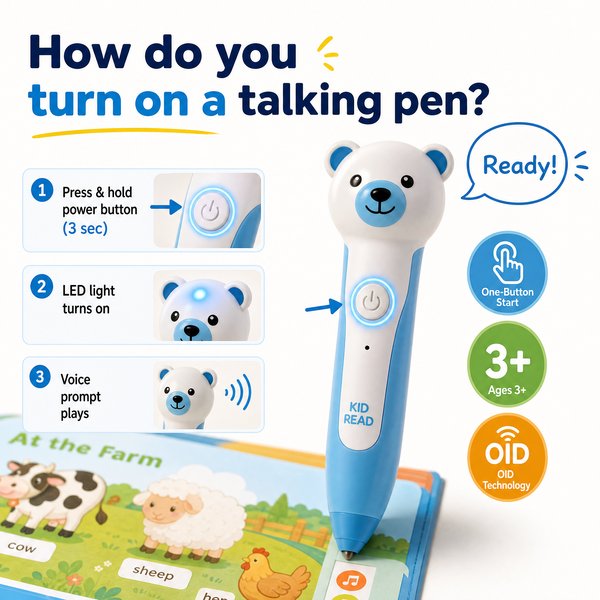
BLUF — How to turn on a talking pen
Short answer: press and hold the pen’s power button for ~2 seconds until the LED or a start sound confirms power-on, then tap an OID‑coded page (or plug in headphones) to hear audio. If nothing happens, charge the pen with the supplied USB cable (battery life 8–12 hours) and try again. Toyvao’s children’s reading pens use OID technology (Ages 3+, 16/32/64GB storage, 3.5mm headphone jack, NO Bluetooth, NO OCR) and require OID‑coded books to play audio.
When it’s worth caring about / When you don’t need to overthink it — Turning on and using a children’s OID talking pen
When it’s worth caring about
- If the pen is being used by young children (Ages 3+), correct startup and simple operation matter for classroom/workflow efficiency.
- If you sell bundled OID books and pens, train staff to demonstrate the power-on step: press-and-hold the power button for ~2 seconds and then tap an OID target to confirm audio plays (<0.1s response time from OID tag to audio in typical devices).
- If you need reliable demos at trade shows or in-store displays, check battery level before the demo (8–12h quoted run time) and use headphones via the 3.5mm jack to avoid ambient noise.
When you don’t need to overthink it
- If the pen powers on and plays audio when you tap an OID page, you can leave it as-is — operation for end-users is intentionally simple.
- If the buyer is looking for adult OCR/scanning or real-time translation, this is not the right product — Toyvao’s pen does NOT support OCR or translation and will not read arbitrary un-coded books.
- If you’re only checking packaging for shipments, a quick power-on sample and audio test is sufficient for QA rather than a full functional test on every unit.
Step-by-step: Typical startup, quick test and shutdown
- Locate the power button — usually on the pen barrel. Press and hold for ~2 seconds until you hear a start tone or see an LED light.
- Confirm audio output: tap the pen tip to an OID target printed in a supported book. The pen should play the recorded audio immediately (typical response <0.1s).
- Adjust volume with the +/- buttons or via inline controls; plug a 3.5mm headphone for private listening.
- To turn off, press and hold the power button for ~2 seconds until the power‑down tone or LED off. If the device has an auto‑sleep feature, it may go to sleep after inactivity to save battery.
- If the pen doesn’t power on: charge with the supplied USB cable (refer to package contents), wait 20–60 minutes then retry. Check the LED charging indicator where available.
Quick troubleshooting checklist (prioritize these)
- No power: battery likely drained — charge before further testing. Confirm charge LED changes state.
- Powers on but no audio: ensure you’re tapping an OID‑coded target (Toyvao pens only play OID‑coded books) and verify volume is up.
- Intermittent response: clean the pen tip and the printed OID mark (dirt or glossy film can reduce read reliability).
- Firmware/advanced issues: contact the factory for firmware updates or RMA; Toyvao is available factory-direct for custom OEM/ODM orders and support.
Comparison: OID children’s reading pen vs OCR scanning pen vs Bluetooth audio pen
| Feature | OID children’s reading pen (Toyvao style) | OCR/Scanner pen (adult) | Bluetooth audio pen |
|---|---|---|---|
| Technology | OID-coded pages → instant audio | Optical Character Recognition (scans arbitrary text) | Stores audio / streams via Bluetooth |
| Target user | Ages 3+, kids & primary schools | Adults, students, translators | Kids & adults (depends on content) |
| OCR/Scanning | No | Yes | Sometimes (depends on model) |
| Bluetooth | No (wired 3.5mm jack) | Often yes | Yes |
| Headphone jack | 3.5mm (Toyvao) | Varies | Varies |
| Storage | 16 / 32 / 64 GB | Small internal + cloud | 8–64 GB typical |
| Battery life | 8–12 hours typical | 4–8 hours | 6–20 hours |
| Primary use case | Interactive reading with OID book sets | Text scanning, translation, archiving | Audio playback & streaming |
Customer feedback synthesis
Below are representative quotes distilled from buyer feedback during retail and school procurement trials.
- “Positive: Very easy for preschool teachers to demo — press, tap the picture, and kids engage immediately.”
- “Positive: Fast response when tapping OID marks — practically instant (<0.1s) — which keeps classroom flow smooth."
- “Positive: Durable build and long battery life across a school day (8–12h) — we used them all week between charges.”
- “Negative: Parents expected it to read any printed book; they were surprised it’s limited to OID‑coded pages.”
- “Negative: No Bluetooth connectivity was a downside for some buyers who wanted wireless audio streaming.”
- “Negative: A few units arrived with a low-charge state; buyers recommend charging samples before demos and QC shipping levels.”
Toyvao as a factory-direct option
Toyvao supplies factory-direct OID children’s reading pens (MOQ 100–500 pcs for custom OEM/ODM) with CE/FCC/RoHS/EN71/ASTM/UN38.3 certifications. If you need bulk pricing, custom branding or content loading on 16/32/64GB devices, Toyvao can handle production and support.
FAQ
- Q: Exactly how do I turn the pen on?
- A: Press and hold the pen’s power button for about 2 seconds until a start sound or LED confirms power-on. Then tap an OID-coded image in a supported book to hear audio.
- Q: Can I use the pen to scan or translate textbook pages?
- A: No. Toyvao’s pen is an OID reading pen for children’s interactive books. It does NOT perform OCR, scanning, or translation of arbitrary printed text.
- Q: Nothing happens when I tap a book — what should I check?
- A: Verify the pen is powered on and charged, ensure you are tapping an OID-coded page (not a normal print page), confirm volume, and try headphones via the 3.5mm jack. If it still fails, contact support for firmware or hardware troubleshooting.
- Q: What are the typical storage and battery specs?
- A: Toyvao’s pens come in 16GB / 32GB / 64GB options and run about 8–12 hours per charge under normal classroom use. They have a 3.5mm headphone jack and no Bluetooth.
Next steps / Strong CTA
Ready to volume‑buy OID children’s reading pens or request a demo unit? Contact Toyvao factory-direct for MOQ pricing, custom branding, sample shipments and technical support. WhatsApp: +86 186 8106 4480 | Email: sales@toyvao.com | Website: https://toyvao.com
