
BLUF
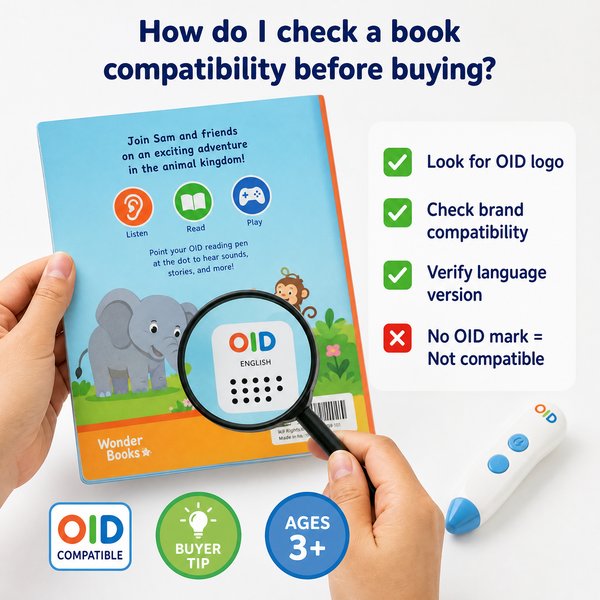
Bottom line: Before buying a children’s reading pen (like Toyvao’s OID reading pen), verify that the book is OID-coded and mapped to the pen’s content database — if it isn’t, the pen won’t work. Do not confuse OID reading pens (Ages 3+, 16–64GB, <0.1s response time on coded hits, 8–12h battery, 3.5mm jack, NO Bluetooth, NO OCR) with OCR/scanner or translation pens that can read arbitrary printed text. For bulk procurement, request sample books and a mapping check, confirm publisher support and licensing, and ask the factory (Toyvao can act factory-direct) for test units and a compatibility report.
How to check a book’s pen compatibility before buying
1) Code type: OID vs printed text
When it’s worth caring about: If you plan to use a children’s OID reading pen (Toyvao’s product uses OID-coded books only), always check whether the book contains visible OID codes or is explicitly listed as “OID-compatible” by the publisher. OID pens rely on embedded codes that map to audio files — they do not perform OCR or scan arbitrary type.
When you don’t need to overthink it: If the seller or publisher states “OID-compatible” on product pages, sample covers, or metadata, that’s usually sufficient for retail buying. Still request a sample mapping file for large orders.
2) Publisher / edition / ISBN mapping
When it’s worth caring about: If you are buying books from multiple publishers or reprints, confirm that the exact ISBN/edition is the one mapped for the pen. Many OID implementations are edition-specific (different print runs can change code placement). For MOQ orders (Toyvao OEM/ODM 100–500 pcs), require a compatibility list and a signed mapping agreement.
When you don’t need to overthink it: Single-publisher packs sold as “pen+book sets” commonly guarantee matching codes — you can accept that for smaller retail trials.
3) Language and audio scope
When it’s worth caring about: Confirm the language(s) and audio version on the book match the pen firmware/content — a pen may have 16GB/32GB/64GB storage and preloaded languages. If you need multiple language tracks or custom voice recordings, ask about custom firmware or content-loading options (Toyvao supports OEM content loading with MOQ).
When you don’t need to overthink it: For single-language children’s packs where label and box declare the language, a quick sample listen is usually sufficient.
4) Physical format and code location
When it’s worth caring about: Ensure code size, placement, and print quality meet the pen’s detection tolerance. Poor print contrast, glossy coatings, or unconventional layouts can reduce recognition accuracy. Request a printed proof or the exact code image to test on a demo pen (<0.1s response time on good prints).
When you don’t need to overthink it: Standard picture books produced with pen-friendly templates from the publisher normally require no extra checks.
5) Integration, licensing and content updates
When it’s worth caring about: For resale or classroom rollouts, confirm licensing (audio rights, distribution) and the method for pushing content updates or fixes. Ask the factory for a versioning and update plan — Toyvao provides CE/FCC/RoHS/EN71/ASTM/UN38.3 certifications and can deliver firmware/content updates under OEM terms.
When you don’t need to overthink it: If you’re reselling sealed pen+book bundles under the publisher’s brand, licensing and updates are usually handled by the set vendor.
6) Testing and acceptance criteria for bulk buys
When it’s worth caring about: For MOQ orders (100–500 pcs for custom OEM/ODM), require pre-shipment compatibility testing: verify a sample pen with random books from the batch, check response time (<0.1s on coded hits), battery life (8–12h typical), and audio mapping consistency. Request a test report and real-unit photos.
When you don’t need to overthink it: Small stock replenishments of identical SKUs rarely need fresh testing if previous batches passed acceptance tests.
Quick practical checklist before buying
- Look for “OID” or “pen-compatible” on the book — request ISBN-level mapping.
- Ask the publisher for a code image or sample page for a lab test.
- Confirm language, audio version and edition.
- Request a demo unit and do a live test (response <0.1s expected on coded areas).
- Confirm storage required (16GB / 32GB / 64GB) and whether additional content must be loaded.
- Verify licensing, CE/FCC/RoHS/EN71/ASTM/UN38.3 certifications and shipping compliance (UN38.3 for batteries).
- For custom OEM/ODM ask about MOQ (100–500 pcs) and factory-direct terms.
Comparison: OID children’s reading pen vs OCR/scanner pens
| Feature | Toyvao OID Reading Pen (Children) | OCR / Scanner / Translation Pen |
|---|---|---|
| Target user | Ages 3+ (preschool to early readers) | Older students, adults, professionals |
| Works with arbitrary printed text? | No — only OID-coded books | Yes — scans printed text using OCR |
| Typical response time | <0.1s on OID hits | Varies; OCR processing 0.5–3s+ |
| Storage | 16GB / 32GB / 64GB options | Usually 8–64GB depending on model |
| Bluetooth | No | Commonly yes |
| OCR capability | No — not a scanner or translation pen | Yes |
| Audio jack | 3.5mm headphone jack | Varies |
| Battery life | 8–12 hours typical | Varies widely |
| Certifications | CE / FCC / RoHS / EN71 / ASTM / UN38.3 | Model-dependent |
| OEM MOQ | 100–500 pcs for custom OEM/ODM | Varies by supplier |
Customer Feedback Synthesis
Positive quotes
“Perfect for our kindergarten program — kids pick it up immediately and the pen responds instantly to the coded pictures.”
“Great battery life across a whole week of activity stations, and the 3.5mm jack lets teachers use headphones during group time.”
“Factory-direct pricing from Toyvao made our first bulk buy affordable, and the preloaded story packs matched our curriculum.”
Negative quotes
“We expected it to read our old library books — but it only works with OID-coded books, so we had to repurchase titles.”
“Would love Bluetooth to push updates wirelessly; current workflow requires USB content loads for custom audio.”
“Some reprints changed the OID placement, and a few books needed reprints before the codes matched.”
FAQ
Q: How can I tell if a book is OID-compatible?
A: Look for an OID mark or an explicit “OID-compatible / pen-readable” label on the book. For procurement, request the publisher’s ISBN-to-OID mapping sheet or a sample page image to test with a demo pen.
Q: Can I convert my existing non-OID books to work with the pen?
A: Not directly. OID pens require printed OID codes mapped to audio files. Conversion would mean reprinting the book with OID codes and creating the audio mapping — this involves publisher approval, content production and reprint costs.
Q: Is this pen an OCR or translation device?
A: No. Toyvao’s children’s reading pen uses OID technology and does not perform OCR, scanning or translation. It only recognizes embedded OID codes in supported books.
Q: What testing should I require before a bulk order?
A: Require a pre-shipment compatibility test: test a sample pen against random books from the batch (response <0.1s on coded areas), confirm audio mapping, battery performance (8–12h), and request a signed acceptance report. For OEM orders, confirm MOQ (100–500 pcs) terms with the factory.
Next steps / Contact
If you need factory-direct samples, ISBN-to-OID mapping checks, or OEM/ODM quotes (MOQ 100–500 pcs), contact Toyvao for guided compatibility testing and sample units. Toyvao is a factory-direct solution for OID children’s reading pens with CE/FCC/RoHS/EN71/ASTM/UN38.3 certifications.
WhatsApp: +86 186 8106 4480
Email: sales@toyvao.com
Website: https://toyvao.com
