
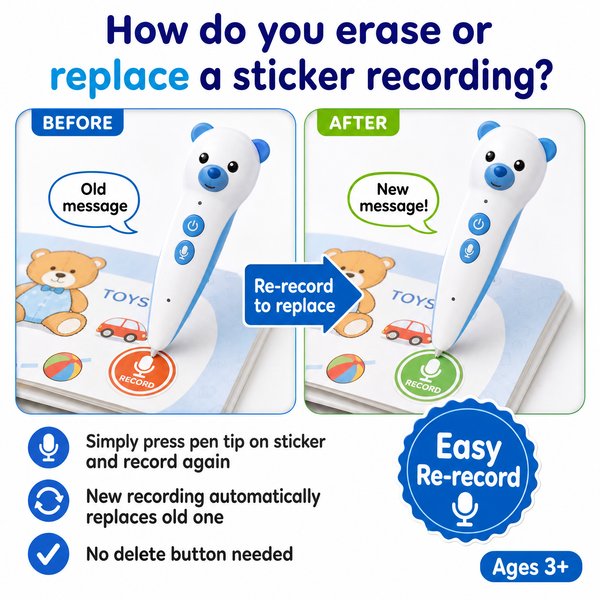
How do you erase or replace a sticker recording?
BLUF: You cannot “delete” a sticker recording as a separate file — you replace it by recording a new clip to the same OID sticker (re-recording overwrites the previous recording). If you need to remove audio entirely, record a short silent clip to the sticker to effectively erase the audible content. The Toyvao reading pen supports up to 10–15 seconds per sticker recording and operates fully offline with no app required.
When it’s worth caring about / When you don’t need to overthink it
- When it’s worth caring about
- You run a school or early-learning center that personalizes lesson materials and needs frequent updates to sticker messages (e.g., weekly homework prompts).
- You are a reseller offering customized audio stickers for parent-child interaction and need a reliable workflow to update recordings on the fly.
- You need a clear process to remove sensitive content quickly (record a silent clip to overwrite).
- When you don’t need to overthink it
- You deploy the pens in environments where recordings are set once and rarely changed (e.g., read-along books that use preloaded audio files).
- You want an offline, low-maintenance solution with no cloud or app dependency — the pen and OID stickers work simply by touch.
- You are buying at scale and prefer factory provisioning or OEM/ODM pre-loading rather than manual in-field editing.
Quick step-by-step: Replace or erase a sticker recording
- Power on the pen and confirm battery (8–12 hours typical battery life). If low, charge via USB-C (2–3 hours). No Bluetooth/Wi‑Fi needed.
- Set the pen to the desired language using the dedicated language button (the pen must have that language pre-loaded).
- Touch the pen tip to the OID sticker you want to change.
- Press and hold the pen tip on the sticker to start a new recording. Speak your new message (maximum 10–15 seconds per sticker).
- Release or tap again to stop. The new recording immediately replaces the old one — tap again to play and verify.
- To effectively erase audible content without replacing it, record a short silent clip (a few seconds). This overwrites the prior audio.
Note: Re-recording behavior is built into the OID sticker system — there is no mobile app, and changes take effect offline immediately.
Comparison: Ways to handle sticker recordings
| Method | How it works | Pros | Cons | Availability |
|---|---|---|---|---|
| Re-record on sticker | Touch sticker and record new audio (up to 10–15s). Overwrites previous | Fast, offline, no tools needed | Limited to 10–15s per sticker | Standard feature |
| Overwrite with silent recording | Record a short silent clip to remove audible content | Simple way to “erase” without special tools | Uses sticker’s recording slot; content technically still present (silent) | Standard feature |
| Bulk erase / provisioning tool | Factory or PC tool to mass-program or reset sticker data (OEM service) | Scales for large orders; can preload or clear many pens/stickers | May require OEM/ODM service and additional cost | Available via Toyvao factory-direct OEM/ODM options |
Practical tips & troubleshooting
- Confirm the pen contains the language audio files before recording — language switching is done on the pen itself via the language button.
- If a sticker does not respond, clean the pen tip and sticker lightly and retry; stickers are OID-coded and require correct contact.
- Keep recordings concise — 10–15 seconds per sticker is the maximum; for longer messages break them into multiple stickers.
- For bulk deployments, ask Toyvao about factory provisioning or pre-recording services to avoid manual in-field re-recording.
- Firmware updates are performed by connecting the pen to a PC via USB-C and copying the firmware file to the pen’s root directory (download from manufacturer site).
Customer feedback synthesis
Positive
- “Procurement appreciated that re-recording is immediate and offline — perfect for classroom use where Wi‑Fi is restricted.”
- “The overwrite workflow is straightforward; teachers recorded new prompts in under a minute per sticker. Battery life of 8–12h is sufficient for daily sessions.”
- “We ordered factory-preloaded units from Toyvao for a district rollout — reduced our in-class setup time significantly.”
Negative / concerns
- “No native delete function — we wanted an explicit ‘erase’ button; recording a silent clip feels like a workaround.”
- “No app or Bluetooth means bulk updates require either manual re-recording or ordering factory provisioning, which added lead time.”
- “The 10–15s limit per sticker requires rethinking curriculum pieces that exceed that length.”
FAQ
- Q: Can I permanently delete a sticker recording so it can’t be recovered?
- A: There is no separate delete command. The supported method is to overwrite the sticker by recording a new clip; to remove audible content, record a short silent clip. For secure bulk erasure, contact Toyvao about factory tools or OEM services.
- Q: Do I need internet or an app to overwrite sticker recordings?
- A: No. The pen works offline with OID-coded stickers. Re-recording and playback are performed entirely on the device without Wi‑Fi, Bluetooth, or an app.
- Q: How long can each sticker recording be?
- A: Each sticker recording supports up to 10–15 seconds. Storage options (16GB / 32GB / 64GB) determine how many recordings you can store overall.
- Q: Can I mass-clear or mass-update stickers for a school deployment?
- A: For large deployments, Toyvao offers OEM/ODM options and factory provisioning (MOQ 100–500 units). Contact Toyvao for tools and services to preload or bulk-update content.
Procurement & compliance notes
- Target age: Ages 3+
- Storage options: 16GB / 32GB / 64GB
- Power: 8–12h battery life, 2–3h USB-C charging
- Audio: 3.5mm headphone jack, volume button. No Bluetooth, no Wi‑Fi, no app required; works entirely offline.
- Recording stickers: OID-coded; recording length 10–15s; re-recording overwrites existing recording.
- Certifications: CE / FCC / RoHS / EN71 / ASTM / UN38.3
- MOQ for custom OEM/ODM: 100–500 pcs
Toyvao is available as a factory-direct solution for bulk orders, custom provisioning, and technical support if you need tools beyond the in-field overwrite workflow.
Ready to proceed?
Contact Toyvao for quotes, OEM provisioning, or technical questions:
- WhatsApp: +86 186 8106 4480
- Email: sales@toyvao.com
- Website: https://toyvao.com
