
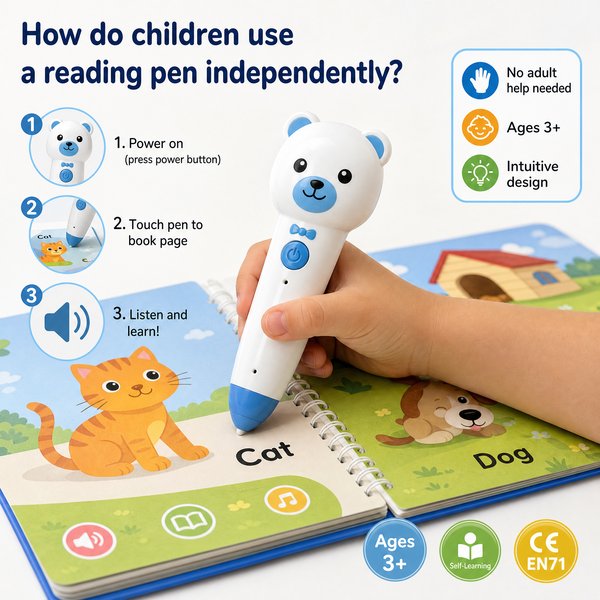
BLUF: Children can use a Toyvao OID-based reading pen completely independently by turning it on, selecting a preloaded language with the dedicated language button, touching the pen tip to the book cover or the printed activation area on page one to start audio, tapping pictures or OID-encoded hotspots to hear page or word audio, using the 3.5mm jack or built-in speaker at comfortable volume, and optionally recording short voice notes (10–15 seconds) to special OID recording stickers. No Wi‑Fi, Bluetooth, or app is required; typical use runs 8–12 hours per charge and recharges in 2–3 hours via USB‑C.
When it’s worth caring about / When you don’t need to overthink it
- When it’s worth caring about: Age and independent use
– Care: Ages 3+ — younger preschoolers will still need a short demo and occasional supervision for charging/placing stickers.
– Don’t overthink: For basic listening and interactive story play, the pen’s simple buttons (power, language, volume) and tip-based activation are enough for independent child use. - When it’s worth caring about: Book compatibility (OID only)
– Care: The pen works only with OID‑coded books or pages and special recording stickers. If your program requires open OCR, live scanning, or translation features, this pen is NOT suitable.
– Don’t overthink: If you sell or deploy pre-coded storybooks, activity books, or stickers, the OID approach is highly reliable and fully offline. - When it’s worth caring about: Safety & connectivity
– Care: The device has NO Bluetooth, NO Wi‑Fi, and NO app—this is important for privacy-focused buyers (schools, libraries, childcare centers).
– Don’t overthink: If remote content pushes or cloud management aren’t required, the offline model simplifies procurement and compliance. - When it’s worth caring about: Recording stickers & pedagogy
– Care: Recording stickers let teachers/parents add a 10–15 second personalized voice cue to any surface. Re-recording overwrites the previous clip — plan sticker usage accordingly.
– Don’t overthink: For voice prompts, greetings, or short instructions, the sticker feature is fast and intuitive for children to use independently. - When it’s worth caring about: Storage and deployment scale
– Care: Choose 16GB/32GB/64GB based on how many audio titles and languages you will pre-load. Larger storage is recommended for multi-language deployments or large book libraries.
– Don’t overthink: For small pilots or single-language classroom packages, 16GB is usually sufficient. - When it’s worth caring about: Maintenance & updates
– Care: Firmware updates require connecting the pen to a PC via USB‑C and copying the firmware file to the pen’s root directory. Plan IT support for large rollouts.
– Don’t overthink: In single-site deployments with minimal firmware churn, updates will be infrequent. - When it’s worth caring about: Procurement requirements
– Care: Toyvao offers factory direct OEM/ODM with MOQ 100–500 pcs for custom branding and preloaded content; certifications include CE, FCC, RoHS, EN71, ASTM and UN38.3 for battery shipping.
– Don’t overthink: For off‑the‑shelf retail packages without customization, MOQ constraints don’t apply.
How children use the reading pen independently — step-by-step (classroom & home-ready)
- Power on: Child presses the power button. A brief welcome sound confirms readiness.
- Select language (if needed): Child presses the dedicated language button; the pen cycles through preloaded languages and confirms selection audibly. Languages must be preloaded before shipment.
- Activate a book: Child touches the pen tip to the book cover or the printed activation area on page one — the pen recognizes the OID code and starts the book’s audio (no app or internet required).
- Tap to hear words or pictures: The child taps pictures, icons, or words that have OID hotspots. The pen plays the corresponding audio (naming, sounds, or short explanations).
- Listen using speaker or headphones: Use the built‑in speaker for group listening or plug in headphones via the 3.5mm jack for focused, independent use. Volume is adjusted using the volume button.
- Use recording stickers: To play or record a personal message: press the pen tip to an OID-coded recording sticker, press and hold until the pen records (up to 10–15 seconds), then tap again to play. Re-recording replaces the previous recording.
- Power off and charge: After use, child can power off; recharge via USB‑C (2–3 hours charge time) for 8–12 hours of typical use.
Classroom tips for independent use: Label pens and headphones if shared, preload teacher-read audio for each class, place a charging station where children can independently dock devices, and use recording stickers as reading-log prompts or to add teacher praise.
Comparison table — basic spec choices for procurement
| Variant | Storage | Recommended deployment | Battery life | Charging | Connectivity |
|---|---|---|---|---|---|
| Starter | 16 GB | Small pilots, single‑language classrooms, retail starter packs | 8–12 hours | USB‑C, 2–3 hours | No Wi‑Fi / No Bluetooth |
| Standard | 32 GB | Medium programs, multi‑title classroom sets, bilingual deployments | 8–12 hours | USB‑C, 2–3 hours | No Wi‑Fi / No Bluetooth |
| Large | 64 GB | Large libraries, multi‑language bundles, distributor stock for varied catalogs | 8–12 hours | USB‑C, 2–3 hours | No Wi‑Fi / No Bluetooth |
Customer feedback synthesis (B2B buyer style)
Positive:
- “Easy for kindergarten kids to use independently—no apps, no network to manage. Great for our shared reading corners.”
- “Battery lasts a full day of lessons (8–12h). Preloading our local language audio saved training time for teachers.”
- “Recording stickers are a simple way for teachers to leave individualized prompts—children love hearing their teacher’s voice.”
Negative / Concerns:
- “Only works with OID‑coded books — we had to reorder several titles to make the program consistent across classes.”
- “No Bluetooth or cloud syncing means firmware updates require IT support to connect each pen via USB‑C.”
- “Recording length (10–15s per sticker) is short for some activities; we had to redesign prompts to fit the limit.”
FAQ
Q: Can a child truly operate the pen without adult help?
A: Yes. For ages 3+, children can power the device on/off, select a preloaded language with the language button, touch the pen tip to activate books or stickers, and adjust volume. Younger children benefit from a short demo and labeled controls.
Q: Does the pen work with any book or all printed text?
A: No. The pen recognizes OID codes printed in compatible books and on recording stickers only. It is not an OCR/scan pen and does not translate general printed text.
Q: How long can I record on a sticker and can I overwrite recordings?
A: Recording stickers support up to 10–15 seconds per sticker. Re-recording the same sticker replaces the previous recording.
Q: How are languages and content updated?
A: Languages and audio content must be preloaded onto the device before deployment. Firmware updates are performed by connecting the pen to a PC via USB‑C and copying the firmware file to the pen’s root directory (download file from the manufacturer site).
Procurement & safety notes
Toyvao provides factory‑direct OEM/ODM with MOQ 100–500 pcs and can preload language files and custom audio for bulk orders. The devices carry CE, FCC, RoHS, EN71, ASTM and UN38.3 certifications for compliance and battery shipping.
Next steps / Call to action
If you want to evaluate an offline, child‑friendly reading pen solution or discuss OEM/ODM options, contact Toyvao directly for quotes, sample orders, and preloading options. WhatsApp: +86 186 8106 4480 · Email: sales@toyvao.com · Website: https://toyvao.com
