
Bottom-Line-Up-Front (BLUF)
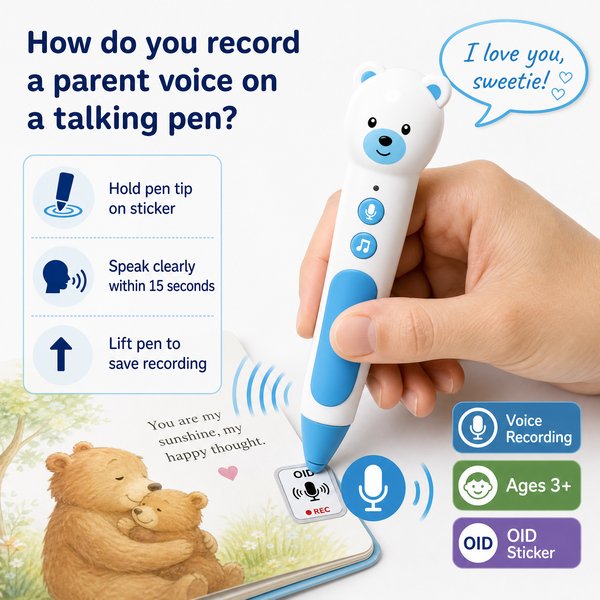
Short answer: To record a parent’s voice on a talking pen you use the pen’s recording stickers — press the pen tip onto a special OID-coded recording sticker, hold while speaking (records up to 10–15 seconds), then tap again to stop; playback is immediate by tapping the same sticker. This works entirely offline with Toyvao’s children’s reading pen (OID technology), requires no app, and re-recording overwrites the previous clip.
How to record a parent’s voice — step-by-step (practical guide for buyers and planners)
- Prepare the pen: confirm battery charge (8–12h typical runtime after 2–3 hours USB-C charging) and select the correct language using the dedicated language button — language audio files must be pre-loaded on the unit.
- Get recording stickers: these are special OID-coded stickers supplied by the manufacturer. You can place them on books, flashcards, lunchboxes, classroom walls or any flat surface.
- Enter record mode: press the pen tip on a recording sticker until the pen indicates (light/short beep depending on model).
- Speak clearly: record up to 10–15 seconds per sticker. Keep messages short and child-friendly (name, short greeting, reading prompt, or affirmation).
- Stop recording: tap the sticker again or follow the pen’s audio cue — the recording is saved and replaces any previous recording on that sticker.
- Playback: child taps the pen tip to the same sticker and the stored clip plays immediately through the pen’s speaker or connected headphones (3.5mm jack available).
- Management: to change the clip, simply re-record on the same sticker (re-recording overwrites). To update firmware or transfer files, connect the pen to a PC via USB-C and copy firmware to the pen root directory.
When it’s worth caring about / When you don’t need to overthink it — key B2B decision points
Recording length and use case
When it’s worth caring about: If you plan long narrations, class podcasts, or multi-paragraph bedtime stories from parents, 10–15 seconds per sticker can be limiting — consider structuring content as short prompts or sequential stickers.
When you don’t need to overthink it: For personalized greetings, short encouragements, name-tag messages, or single-sentence prompts on learning materials, the 10–15 second length is sufficient and very effective in classrooms and home kits.
Offline / connectivity constraints
When it’s worth caring about: If your procurement requires remote updates or cloud content management, note this pen has NO Bluetooth, NO Wi‑Fi and NO app — all audio and language files must be loaded in advance and firmware updated via USB-C to PC.
When you don’t need to overthink it: For bulk deployments in low-connectivity settings (early-years preschools, schools with strict IT policies, or retail toys), the offline design simplifies deployment and avoids network approval hurdles.
Compatibility with existing materials
When it’s worth caring about: If you expect the pen to read arbitrary printed text, translate, or OCR textbooks, this is NOT the right device — it only supports OID-coded books and OID recording stickers.
When you don’t need to overthink it: If you’re buying for a curated set of lesson books, branded reading series, or retail starter packs where you control printed materials (OID-coded), the pen offers a robust offline reading/recording experience.
Storage, battery and physical controls
When it’s worth caring about: If you need many preloaded audio files (multiple languages, long audio libraries), choose larger capacity (32GB or 64GB) and confirm pre-loading services with your supplier.
When you don’t need to overthink it: For standard lesson sets and sticker-based voice notes, 16GB is adequate. The pen supports 8–12 hours runtime and charges in 2–3 hours via USB-C — suitable for daily classroom use.
Feature comparison (relevant at-a-glance)
| Feature | Toyvao OID Talking Pen (offline) | Typical Translation / OCR Pen | Bluetooth Smart Pen (cloud-enabled) |
|---|---|---|---|
| Works offline | Yes — no app, no Wi‑Fi, no Bluetooth | No — needs cloud/processing for translations | No — requires pairing and app |
| Recording method | OID-coded recording stickers (10–15s per sticker) | Direct voice memos (varies) / OCR requires scanning | On-device recording + cloud sync |
| Supports arbitrary printed text | No — only OID-coded books | Yes — designed for text translation/OCR | Partial — requires compatible paper/pen systems |
| Storage | 16 / 32 / 64 GB options | Usually 8–32 GB | 16–64 GB with cloud backup |
| Battery & charging | 8–12h runtime; 2–3h USB-C charge | Varies widely | 6–12h runtime; USB charging |
| Languages | Pre-loaded only; switch via language button | Often supports on-the-fly translation via cloud | App-managed languages |
| Ideal buyer | Retailers, preschools, OEM reading kits, distributors | Travelers, professional translators | Edtech programs wanting analytics & cloud |
Product facts (concise spec sheet)
- Target age: Ages 3+
- Storage options: 16GB / 32GB / 64GB
- Battery life: 8–12 hours; Charging: 2–3 hours via USB-C
- Audio output: built-in speaker + 3.5mm headphone jack
- Connectivity: NO Bluetooth, NO Wi‑Fi, NO app required — works offline
- Recording: OID-coded recording stickers; up to 10–15 seconds per sticker; re-recording overwrites
- Book activation: touch pen tip to book cover or printed activation area (OID)
- Firmware updates: connect to PC via USB-C and copy firmware to root directory
- Certifications: CE, FCC, RoHS, EN71, ASTM, UN38.3
- MOQ for custom OEM/ODM: 100–500 pieces
Customer Feedback Synthesis (B2B buyer style)
Positive remarks:
- “Great for our preschool bundles — parents love leaving 10–15s voice notes inside books; very simple to deploy without IT.” — Regional distributor
- “Toyvao provided factory-direct OEM support and pre-loaded language packs for our bilingual set. MOQ and lead times were manageable.” — Educational product manager
- “Battery life and USB-C charging fit classroom schedules; the offline design avoids our school’s network security approvals.” — School procurement officer
Critical/concern remarks:
- “Only supports OID-coded books and stickers — we had to reprint materials to be compatible, which added upfront cost.” — Curriculum publisher
- “No Bluetooth or app integration means no remote content management; we had to plan content carefully before shipping.” — Chain retailer purchasing manager
- “10–15s sticker limit is short for some parent messages; we recommend using multiple stickers sequentially if longer narration is needed.” — Early years program coordinator
FAQ (what procurement officers and resellers ask)
- Q: How exactly do I record a parent’s voice on the pen?
- A: Place a Toyvao OID recording sticker where you want the message. Press the pen tip to the sticker until the pen signals record mode, speak (up to 10–15 seconds), then tap again to stop. Playback by tapping the sticker. Re-recording replaces the existing clip.
- Q: Can I upload longer audio files or many languages later over Wi‑Fi?
- A: No. This pen has NO Wi‑Fi and NO Bluetooth. Languages and audio files must be pre-loaded onto the device (16/32/64GB) before deployment, and firmware updates are done via USB-C connection to a PC.
- Q: What happens if we need the pen to read our existing textbooks?
- A: The pen only recognizes OID-coded books and activation areas. If you want your existing books to work, they must be printed or labeled with OID codes — discuss pre-printing or adding OID activation areas with the manufacturer.
- Q: What are OEM/ODM minimums and certifications?
- A: Custom OEM/ODM MOQ is 100–500 pieces. The pen carries CE, FCC, RoHS, EN71, ASTM and UN38.3 certifications suitable for retail and school procurement.
Recommended deployment tips for buyers
- Plan content limits (10–15s per sticker) into lesson design — use sequential stickers for multi-part messages.
- Decide storage size (16/32/64GB) based on number of preloaded books and language packs; 32GB is a common balance for bilingual sets.
- Order OID‑coded books and recording stickers together to avoid compatibility issues; pre-loading audio at the factory reduces on-site setup time.
- Train classroom staff or retail packers on the simple recording workflow (press, speak, tap to stop) — very little technical skill needed.
Final recommendation and CTA
If you need a factory-direct, offline talking pen optimized for curated reading programs and personalized parent voice notes, Toyvao’s children’s reading pen is a practical choice — simple recording stickers, up to 15s per message, 16–64GB options, 8–12h battery life, and full certifications for retail and school use. For MOQ, OEM pre-loading, sample requests, or technical files (firmware and OID printing guidance), contact Toyvao directly:
- WhatsApp: +86 186 8106 4480
- Email: sales@toyvao.com
- Website: https://toyvao.com
