
Bottom-Line-Up-Front (BLUF)
If you need a reading pen for young learners that prioritizes accessibility, choose an OID-based children’s reading pen with strong offline audio features: 3.5mm headphone jack, adjustable volume (5 levels), lightweight ergonomics (45–85 g), long battery life (8–12 hours) with 2–3 hours USB-C charging, and sufficient onboard storage (16/32/64 GB) so schools can preload lessons. For classroom use and early-reader support, an OID pen (works offline, no apps/Wi‑Fi) is the best accessible solution; if you require scanning/translation or open-text OCR, pick an OCR pen or tablet instead.
Key decision points — When it’s worth caring about / When you don’t need to overthink it
Offline operation, no Wi‑Fi/Bluetooth
When it’s worth caring about: You operate in tightly controlled school networks, have privacy/regulatory constraints, or need devices that don’t require IT setup — offline OID pens work straight out of the box and are easy to manage at scale.
When you don’t need to overthink it: Your deployment is small, tech-savvy, and you expect constant content updates via apps — then a Wi‑Fi/tablet approach may be acceptable.
Headphone jack + volume control
When it’s worth caring about: Classrooms and sensory-sensitive students — a 3.5mm jack and 5 levels of volume control let teachers control noise exposure and allow headset use for HAT (hearing assistive technology).
When you don’t need to overthink it: If devices are used one-on-one in quiet environments and you’re using speakers only, the jack is less critical.
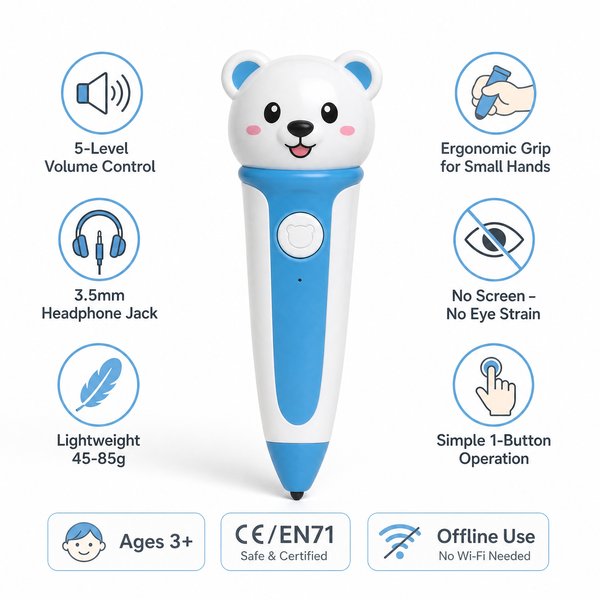
When it’s worth caring about: Devices for ages 3+ — choose 45–85 g weight, rounded ergonomic grips, and one-button operation so pre-readers can self-operate independently and safely.
When you don’t need to overthink it: For older children or adult users who can manage touchscreens and multi-button devices, ergonomics are less decisive.
Battery life and charging
When it’s worth caring about: Full-day classroom use — prioritize 8–12 hour battery life and 2–3 hour USB-C charging to avoid mid-day downtime.
When you don’t need to overthink it: If use is brief or supervised with chargers readily available, a shorter battery life is acceptable.
Storage capacity (16/32/64 GB)
When it’s worth caring about: You preload large audio libraries and multi-language content for many students — choose 32–64 GB to avoid frequent content swaps.
When you don’t need to overthink it: If you only deploy a few short stories per device, 16 GB will suffice.
OID compatibility vs OCR/translation needs
When it’s worth caring about: You want consistent, teacher-controlled content tied to specific physical books that encourage print engagement — OID pens are ideal (they read invisible dot codes printed in special books and play pre-recorded audio).
When you don’t need to overthink it: If you must scan arbitrary printed text, perform translations, or provide TTS for any book, choose an OCR pen or tablet (these are usually more expensive and often require an app/internet).
Certifications & durability
When it’s worth caring about: School procurement — insist on CE/FCC/RoHS/EN71/ASTM/UN38.3 to meet safety, toy and battery transport requirements and reduce procurement risk.
When you don’t need to overthink it: For informal home use, certification priorities may be lower but still recommended.
Concrete accessibility feature checklist (must-haves for children’s reading pens)
- 3.5mm headphone jack + support for hearing assistive devices
- Volume adjustment (5 levels) with clear tactile feedback
- Lightweight (45–85 g) and ergonomic grip for small hands
- One-button or extremely simple control scheme for independent use
- No screen — reduces eye strain and screen-time concerns
- Offline OID operation for privacy and classroom reliability
- Battery: 8–12 hours runtime, 2–3 hours USB-C charging
- Storage options: 16 / 32 / 64 GB to preload content libraries
- Ruggedness and toy safety certifications: CE, FCC, RoHS, EN71, ASTM, UN38.3
Comparison: OID reading pen vs OCR pen vs Tablet vs Audiobook player
| Feature / Device | OID Reading Pen (e.g., Toyvao OID pen) | OCR Pen | Tablet | Audiobook Player |
|---|---|---|---|---|
| Primary use | Interactive point-and-read for OID-coded children’s books | Scan arbitrary text; OCR/TTS; translations (often app-dependent) | Multimedia apps, web, videos — broad functionality | Passive audio playback of preloaded books |
| Offline capability | Yes — fully offline | Often requires app/internet for best features | Usually requires Wi‑Fi for apps/updates | Yes — offline playback |
| Ease-of-use for ages 3+ | Winner — one-button, ergonomic, lightweight | Not ideal for 3+ — better for older children/adults | Distracting for young children; screen time concerns | Simple but non-interactive |
| Interaction / Engagement | High — point-to-word/illustration triggers audio | Medium — reads scanned lines; needs steadier hands | High but screen-focused; can be distracting | Low — passive listening only |
| Content control for schools | High — brand-controlled OID books and audio | Variable — depends on app/provider | Variable — app stores and web content | High for preloaded titles but non-interactive |
| Battery & charging | 8–12 h; 2–3 h USB‑C (practical for class) | Varies; often shorter | Varies; often needs daily charging | Often long life but simple playback |
| Privacy & school IT overhead | Low — no Wi‑Fi/Bluetooth; easy to deploy | Higher — app/online features | High — Wi‑Fi, MDM/IT setup | Low — like OID pen for privacy but non-interactive |
| Cost | Mid — optimized for children’s deployments | High — advanced hardware & software | High — multipurpose device | Low — cheapest option |
| Best for | Early readers, classroom accessibility, print engagement — Winner overall for accessibility in young learners | Adults/older students needing OCR/translation | Multimedia learning & older students | Passive listening programs and storytime |
Customer Feedback Synthesis (B2B buyer style)
Positive
- “Reliable day-long battery and USB‑C charging — kept our reading center running without extra chargers.” — District procurement officer
- “Teachers liked the offline model and simple one-button controls; students stayed engaged with physical books.” — Elementary school curriculum coordinator
- “Factory-direct pricing and ability to OEM/ODM with MOQ 100 helped us pilot brand-labelled kits across several classrooms.” — Distributor
Negative / Concerns
- “Only works with OID-coded books — we had to reprint material or buy matching titles for some curricula.” — School librarian
- “No Bluetooth/Wi‑Fi means content updates are manual; we’d prefer a hybrid for centralized management.” — Large-contractor buyer
- “Audio can be less clear in noisy classrooms; recommend using headsets or small-group settings.” — Special education coordinator
Procurement & technical notes
- MOQ for OEM/ODM: typically 100–500 pcs — suitable for pilots and rollouts.
- Available storage: 16 GB / 32 GB / 64 GB — choose based on how many audio titles you preload.
- Certifications: CE, FCC, RoHS, EN71, ASTM, UN38.3 — meets toy safety and battery transport rules.
- Connectivity: USB‑C charging; no Bluetooth, no Wi‑Fi, no app required; works offline with OID-coded books only.
FAQ
- Can the pen read any printed book or only specific books?
Answer: OID reading pens require OID-coded books that have invisible dot patterns produced for the same brand/content. They are not OCR pens and cannot read arbitrary printed text. - Is this suitable for visually impaired students?
Answer: For early-reader accessibility and learners with reading difficulties, OID pens that play pre-recorded audio and have headphone support are very useful. For full visual impairment requiring TTS on arbitrary text, an OCR device or dedicated assistive technology is better. - How are content updates handled?
Answer: Content is preloaded onto the device’s internal storage (16/32/64 GB). Updates are done by connecting the pen to a computer via USB-C. Because the device is offline, there is no remote push update over Wi‑Fi. - What warranty and certifications come with the device?
Answer: Devices include standard manufacturer warranty coverage and comply with CE/FCC/RoHS/EN71/ASTM/UN38.3. Confirm warranty length and terms with the supplier at the time of order.
Recommendation
For school procurement officers and retailers buying for ages 3+, prioritize OID reading pens with the accessibility checklist above (3.5mm jack, 5-volume levels, 45–85 g weight, 8–12 h battery, 16–64 GB storage, USB‑C charging). They offer the best balance of accessibility, privacy, classroom usability and cost-effectiveness. If you need OCR/translation or arbitrary text reading, select an OCR pen or tablet instead — but expect higher cost and greater IT overhead.
Contact & next steps
If you want factory-direct pricing, OEM/ODM options, sample units or a technical spec sheet, contact Toyvao — a manufacturer experienced in OID children’s reading pens and B2B deployments. WhatsApp: +86 186 8106 4480 · Email: sales@toyvao.com · Website: https://toyvao.com
