
How to Improve Video Playback on an Electronic Badge: A Comprehensive B2B Sourcing Guide
Published by Toyvao | Leading OEM Factory for Electronic Anime Badges
Electronic anime badges have evolved from static display devices to dynamic multimedia platforms capable of delivering engaging video content. As a B2B sourcing professional, understanding the technical requirements for optimized video playback is critical for product development, quality assurance, and competitive positioning in the rapidly expanding wearable technology market.
This guide addresses the core technical considerations, component selection strategies, and manufacturing best practices for enhancing video playback performance on electronic badges.
Market Context: The Growing Demand for Video-Capable Wearables
The global wearable technology market reached $38.2 billion in 2022 and is projected to grow at a CAGR of 12.8% through 2030, according to Grand View Research. Within this segment, animated wearables and collectible electronics represent a high-growth niche, particularly in Asian markets where anime merchandise demand continues to accelerate. The anime merchandise market alone is valued at approximately $24.3 billion globally (Statista, 2023), with electronic badges capturing an increasing share as consumers demand interactive, video-enabled products.
This market expansion creates significant opportunities for OEM manufacturers to differentiate through superior video playback capabilities. However, achieving smooth, high-quality video performance requires strategic decisions across display technology, processor selection, storage solutions, and power management.
Core Technical Factors Affecting Video Playback Performance
1. Display Panel Selection and Specifications
The display is the primary user-facing component determining video quality perception. For electronic badges, several display technologies compete on cost, power consumption, and performance metrics:
- LCD (Liquid Crystal Display): Industry standard for badge applications. Offers good color reproduction and brightness levels (300-500 nits typical). Most cost-effective for mass production.
- OLED (Organic Light-Emitting Diode): Superior contrast ratios and color accuracy. Higher cost (15-25% premium over LCD) but delivers premium user experience and lower power consumption at typical brightness levels.
- E-ink/E-paper: Extremely low power consumption but unsuitable for video playback due to refresh rate limitations (typically 1-2 Hz).
- Micro-LED: Emerging technology offering exceptional brightness and efficiency; currently cost-prohibitive for badge-scale production.
For video playback optimization, prioritize display panels with:
- Refresh rate: Minimum 60Hz (ideally 120Hz for smooth motion)
- Resolution: 480×480 pixels minimum for 2.4-inch badges; 540×540 or higher for premium tiers
- Color depth: 16-bit (65,536 colors) minimum; 24-bit recommended for anime content
- Response time: <5ms to minimize motion blur
2. Processor and Chipset Architecture
Video decoding demands significantly exceed static image display requirements. The processor must handle real-time codec decompression while managing system resources efficiently.
Recommended processor specifications:
- ARM Cortex-A53 or higher: Minimum processing power for HD video (720p) at 30fps
- Dedicated video decoder: Hardware-accelerated H.264/H.265 decoding reduces CPU load and extends battery life by 30-40%
- Minimum 1GB RAM for smooth buffer management and codec operation
- Operating frequency: 1.2-1.5 GHz optimal for badge form factors
Chipsets from MediaTek (MT8163, MT8167) and Qualcomm (Snapdragon 400 series) are industry standards for this application segment, offering proven reliability and manufacturer support.
3. Storage Solutions and Codec Optimization
Video file management directly impacts playback smoothness and device responsiveness:
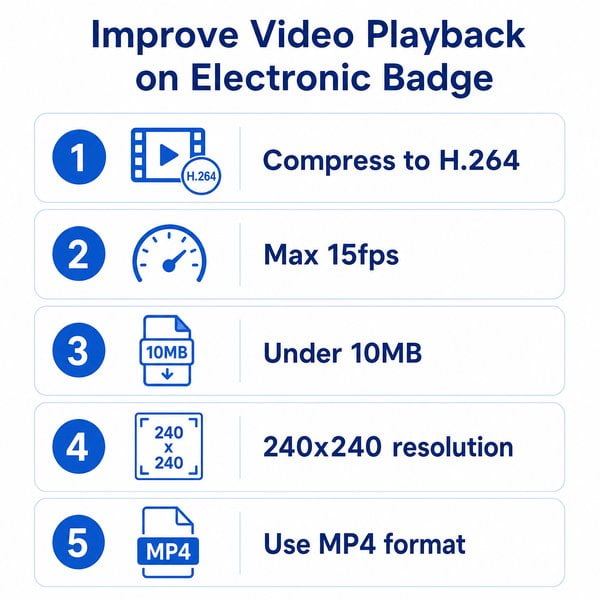
- Storage capacity: 16GB-64GB eMMC or UFS storage accommodates 20-100 minutes of H.265-encoded video at 720p resolution
- Video codec selection: H.265 (HEVC) provides 40-50% better compression than H.264, critical for badge storage constraints
- Bitrate optimization: 2-4 Mbps for 720p video maintains quality while ensuring consistent playback on mid-range processors
- Container format: MP4 (.mp4) offers best compatibility; MKV (.mkv) provides superior compression but requires robust decoder support
Pre-encoding video assets to device specifications during manufacturing prevents runtime transcoding, which degrades performance on resource-constrained hardware.
4. Memory Architecture and Buffer Management
Insufficient RAM or poor buffer allocation causes frame drops, stuttering, and playback interruptions. Optimal configuration includes:
- Dedicated video buffer: 64-128MB allocated to codec operations
- Frame buffer: Minimum 2-4MB for display pipeline
- System RAM overhead: Reserve 256-512MB for OS and background processes
- Circular buffer implementation: Reduces memory fragmentation and maintains consistent throughput
5. Power Management and Thermal Considerations
Video playback is power-intensive. Sustained performance requires optimized power delivery:
- Battery capacity: Minimum 1500mAh for 4-6 hours continuous video playback
- Power management IC (PMIC): Multi-rail PMIC maintains stable voltage to processor and display during peak demand
- Thermal management: Graphite pads or thin thermal spreaders prevent processor throttling during extended video sessions
- Adaptive brightness: Dynamic display brightness reduces power consumption by 20-30% while maintaining perceived quality
Component Specifications Comparison Table
| Component Category | Budget Tier | Mid-Range Tier | Premium Tier | Performance Impact on Video |
|---|---|---|---|---|
| Display Panel | IPS LCD, 480×480, 60Hz, 16-bit | IPS LCD, 540×540, 90Hz, 24-bit | OLED, 540×540, 120Hz, 24-bit | Higher refresh rate = smoother motion; OLED = superior contrast |
| Processor | ARM Cortex-A53, 1.0 GHz | ARM Cortex-A53, 1.3 GHz | ARM Cortex-A72, 1.8 GHz | Higher frequency = faster decoding, fewer frame drops |
| RAM | 512MB | 1GB | 2GB | More RAM = better buffer management, fewer stutters |
| Storage | 16GB eMMC | 32GB UFS 2.1 | 64GB UFS 3.0 | Faster storage = quicker file access, reduced latency |
| Codec Support | H.264 only | H.264 + H.265 | H.264 + H.265 + VP9 | H.265 = 40-50% smaller files, lower CPU load |
| Battery | 1500mAh | 2500mAh | 3500mAh | Larger capacity = longer playback sessions |
| Estimated Unit Cost (10K+ qty) | $18-22 |
