
Executive Summary
This guide focuses on selecting audio chips (codecs/SoCs), flash storage, RAM, and codecs for Talking Book Pens (also called Picture Book Reading Pens, Story Pens, or OID Reading Pens). It separates practical engineering requirements from commercial choices so sourcing and product teams can make cost/quality trade-offs with predictable outcomes.
Key conclusions:
– For speech-only narration use mono, narrow-to-wideband codecs (Opus, MP3, ADPCM) rather than PCM. Typical target quality: intelligible, natural voice at 16–32 kbps mono.
– For low-cost fixed-content pens (single book or limited library) use SPI NOR/QSPI flash 16–128 MB plus a low-cost Cortex-M MCU and hardware MP3/ADPCM decoder. This minimizes BOM and power.
– For large libraries, frequent content updates, or DRM, prefer removable microSD or eMMC + file system + MCU with higher RAM or a Linux-class SoC.
– Choose codecs for the balance of quality, CPU need, power, and licensing: Opus (best quality at low bitrates, royalty-free) and MP3 (widely supported, low CPU, now patent-expired) are pragmatic choices. AAC yields good quality but has licensing and higher CPU demands.
– Latency target for “tap-and-play” behavior: <150 ms from touch to audio start. Achieve this with prefetch buffers, QSPI flash or SD with aggressive caching, and a responsive interrupt-driven firmware stack.
– Battery, headphone amp, DAC SNR, and EMC/toy-safety compliance drive final component selection; include hardware headroom for a 20–40% margin on RAM/CPU to support future features (voice prompts, TTS, Bluetooth).
This document provides technical benchmarks, sizing formulas, hardware and codec trade-offs, cost considerations, compliance checklist, and a step-by-step procurement decision path.
What Is Picture Book Reading Pen and Who Uses It
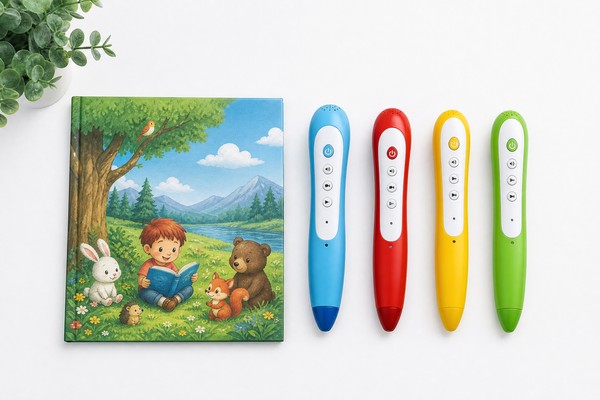
A Picture Book Reading Pen is a handheld electronic reader used by children to tap printed pictures or encoded touch points on specially produced books. Each touch triggers playback of one or more audio files: narration, sound effects, or language learning prompts. The core system components relevant to this guide are:
– Touch detection front-end (optical OID tag reader, IR, or capacitive pen tip)
– Audio playback subsystem (MCU/SoC, audio codec/DAC, headphone/speaker amplifier)
– Non-volatile storage for audio assets (SPI NOR, NAND, eMMC, or microSD)
– RAM for code, buffers, and decoding working memory
– Power subsystem (battery, charging)
– Optional: Bluetooth/Wi‑Fi for content updates, DRM module, microcontroller security
Primary buyers and users:
– OEMs and ODMs building low-cost toy reading pens
– Publishers and educational product companies commissioning hardware for interactive books
– Sourcing/procurement teams selecting BOM components for mass production
– Firmware and test engineers who will integrate codecs and storage handling
Buyer objectives typically prioritize:
– Low unit cost for consumer price points
– Fast and reliable tap-to-play responsiveness
– Sufficient audio quality for clear narration
– Battery life measured in hours of typical use
– Content management and update methods (microSD, USB, wireless)
– Safety and regulatory compliance for children’s products
Why Demand Is Growing
Demand drivers:
– Publishers shifting to hybrid print+audio products to increase engagement and add value.
– Parents and educators prioritizing early literacy tools with audio scaffolding.
– Regional content localization (language editions) requiring flexible storage and update capability.
– Declining component costs for flash memory and SoCs make richer audio feasible in low-cost devices.
– Expectation that devices will support multilingual libraries and occasional content updates.
Procurement implications:
– Buyers want modular hardware that supports 1–2 years of content expansion without redesign.
– Flexibility in storage (fixed flash vs microSD) is often a strategic decision based on catalog size and supply chain control.
– More buyers are asking for DRM or encryption for licensed audio; hardware must support crypto primitives efficiently.
Key Technology Differences
This section compares the core technology choices affecting audio quality, BOM cost, power, and integration complexity.
Codec classes and trade-offs:
– PCM (uncompressed): Highest quality but largest storage and bandwidth. Useful only for very short sound effects or when storage is abundant. Not recommended for narration at scale.
– IMA ADPCM / ADPCM (lossy): Low CPU and simple stream decode. Compression ratio ~4:1 vs 16-bit PCM. Good for intelligible voice at low complexity and low RAM requirements.
– MP3 (MPEG-1/2 Layer III): Mature, low CPU decode, widely supported. Typical acceptable speech bitrates 32–96 kbps mono. Patent pool expired; royalty concerns largely resolved. Low memory footprint on embedded decoders.
– AAC (LC-AAC): Better coding efficiency than MP3 at music-focused bitrates. Higher CPU and code complexity; licensing applies.
– Opus (CELT + SILK): Best quality at low bitrates for speech; optimized for real-time streaming. Good at 6–32 kbps mono for voice. Higher CPU than MP3 but offers best storage efficiency and flexibility. Royalty‑free.
– Vorbis: Open, royalty-free, reasonable voice performance at moderate bitrates but less efficient than Opus.
Storage types:
– SPI NOR / QSPI NOR flash: XIP possible, low pin count, simple BOM, typical sizes 2–256 MB. Best for firmware + modest audio libraries. Fast random access, low read power. Limited capacity and higher $/GB.
– SPI NAND / eMMC / UFS / microSD: microSD cards (removable) and eMMC provide MB to GB storage, suitable for large catalogs or audio heavy titles. Wear leveling and file system overhead required. Higher latencies and power during read.
– eMMC/UFS: Onboard, high capacity, reliable for larger libraries; more expensive BOM. Prefer when removable media is undesirable.
– SD / microSD: Lowest cost per GB and easy for content updates. Mechanical failure risk and counterfeit card issues in supply chain must be managed.
Processing platforms:
– Cortex-M0/M3/M4: Low-cost microcontrollers. Capable of simple decoding (ADPCM, MP3 with hardware assist or optimized software), low power. RAM typically 64–512 KB.
– Cortex-M7 / R7: Higher performance M4-class option with DSP capabilities. Suitable for Opus software decoding with careful optimization.
– Cortex-A (Linux SoC): Appropriate when supporting file systems, large libraries, streaming, Bluetooth, GUI, or complex DRM. Higher power and cost.
Audio output hardware:
– PWM DAC: Lowest cost, acceptable for basic voice but noisy and lower SNR.
– Integrated codec with DAC: 12–24 bit DAC recommended. Look for SNR >= 85–90 dB for clear voice.
– External DAC + headphone amplifier: Needed when headphone use is primary and higher volume/headroom required. Choose amplifier capable of 20–80 mW into 16–32 Ω, with short-circuit and thermal protection.
Security/DRM:
– Software encryption (AES) is common for content protection. Choose SoC/MCU with hardware AES engine if DRM is required, to reduce CPU load and increase battery life.
Key Features and Specifications to Evaluate
This section lists measurable technical specifications to request and validate during sourcing and evaluation.
Audio quality metrics:
– Sample rate: 8 kHz (narrowband/telephone quality) up to 48 kHz (music). For narration, 16 kHz (wideband) is generally sufficient; 22.05 kHz or 44.1 kHz used when music or higher fidelity required.
– Bit depth: 8-bit or 16-bit nominal. With compression, effective bit depth is less relevant than codec bitrate.
– Bitrate: For mono speech:
– Opus: 12–24 kbps for good speech; 8–12 kbps for intelligible low-bandwidth
– MP3: 32–64 kbps acceptable for voice
– ADPCM: Equivalent PCM bitrate ~32 kbps (depends on implementation)
– SNR (signal-to-noise ratio) of DAC: target >= 80–90 dB for clear narration without audible hiss.
Latency and responsiveness:
– Touch-to-audio start target: <150 ms
– Buffer size and prefetch should allow immediate start for short files; use tiny preload buffers and indexing to achieve this.
Memory sizing and formulas:
– Audio storage calculation examples (mono):
– PCM 16-bit 16 kHz: 16,000 samples/s * 2 bytes = 32,000 B/s ≈ 1.92 MB/min
– MP3 64 kbps mono: 64,000 bits/s / 8 = 8,000 B/s ≈ 0.48 MB/min
– Opus 16 kbps mono: 2,000 B/s ≈ 0.12 MB/min
– Practical sizing example: A 30-minute narrated book at MP3 64 kbps ≈ 30 * 0.48 = 14.4 MB. Allow overhead for metadata and file system (+10–20%).
– RAM for decoder and buffers:
– MP3: 40–200 KB working RAM typical (depends on decoder)
– ADPCM: <32 KB
– Opus: 64–256 KB depending on implementation and frame size
– Additional RAM needed for firmware stacks, file system (FAT), touch mapping, and Bluetooth if present — plan for 128–512 KB beyond codec needs on Cortex-M; >1–4 MB for Linux-class systems.
CPU performance:
– Cortex-M4 @ 80–150 MHz can handle MP3 decodes, ADPCM, and simple DSP
– Opus often requires a Cortex-M7 or DSP acceleration; for robust Opus decoding test with your chosen firmware
– Linux SoC recommended when decoding many simultaneous streams, running complex DRM, or supporting Bluetooth streaming
Power:
– Audio playback current draw ballpark:
– Cortex-M system + DAC + amplifier idle/standby: a few microamps to a few mA
– Active playback with headphone: 20–120 mA depending on amplifier and volume
– Battery sizing: example 400 mAh battery at 50 mA average playback current ≈ 8 hours continuous playback
I/O and interfaces:
– QSPI / Quad SPI read speeds for NOR flash: 40–133 MHz clock, usable bandwidth 40–400+ Mbps; supports XIP for low-latency access
– SD/SDIO: typical sustained read speed 5–20 MB/s (varies by card), higher power spikes on access
– I2S for external codecs, or analog output from integrated codec
Reliability and life:
– Flash endurance: NOR flash typically 10,000–100,000 erase cycles; NAND depends on block-level wear leveling
– MicroSD counterfeit risk: qualify suppliers and require performance testing
Software and content management:
– Filesystem: FAT16/FAT32 for microSD; proprietary storage layout for SPI NOR; consider ext4 on eMMC under Linux
– Content update mechanisms: USB mass storage, microSD swap, Bluetooth OTA (DFU), Wi‑Fi OTA; factor in security for OTA
Pros and Cons
This section provides pros and cons of common architectures and codec choices in practical sourcing terms.
SPI NOR flash + Cortex-M + MP3/ADPCM
– Pros: Low BOM cost, low power, simple software, fast random access, supports XIP for fast startup, compact PCB.
– Cons: Limited capacity (tens to low hundreds of MB), higher $/GB, less flexible for large or frequently updated catalogs.
microSD / eMMC + Cortex-M/Linux SoC + Opus/MP3
– Pros: High capacity, low $/GB, easy content update (microSD), Opus yields best storage-efficiency for voice.
– Cons: Higher BOM complexity, power spikes during SD access, mechanical reliability concerns for removable cards, filesystem management.
Linux SoC + eMMC + Opus
– Pros: Full-featured (Bluetooth streaming, TTS, multi-language UI), easier DRM integration, scalable for large libraries.
– Cons: Higher cost, higher power, more complex software stack and BOM.
Codec trade-offs
– Opus
– Pros: Best quality for speech at low bitrates; royalty-free.
– Cons: Higher CPU, more RAM; embedded implementation complexity.
– MP3
– Pros: Low CPU, mature decoders, simpler for embedded.
– Cons: Larger storage needed vs Opus for same perceptual quality (particularly at low bitrates).
– ADPCM
– Pros: Very low CPU and RAM; simple implementation.
– Cons: Lower quality at low bitrates compared to modern codecs.
DAC/Amplifier choices
– PWM DAC
– Pros: Lowest cost.
– Cons: Lower SNR, audible noise; only acceptable for low-cost toys.
– Integrated DAC with headphone amp
– Pros: Clean audio, headphone-ready.
– Cons: Higher BOM cost and board area.
Security/DRM
– AES-CTR encrypted files using hardware AES in MCU
– Pros: Good protection, minimal performance hit if hardware crypto available.
– Cons: Additional firmware complexity and key management requirements.
Step-by-Step Decision Guide
This guide gives a structured evaluation path. Use it in an RFP or procurement checklist.
Define product use case and constraints:
– Primary content: speech-only narration, music & voice, or mix?
– Catalog size: single book (few minutes), multi-book (tens of minutes), library (hours)
– Update frequency and method: none, microSD updates, OTA, USB
– Target unit price and BOM constraints
– Required battery life and physical size constraints
– Regulatory and regional requirements (e.g., CE/EN71, ASTM F963)
Select target audio quality and codec:
– If speech-only and storage is limited: choose Opus 12–24 kbps mono for best storage-efficiency. Ensure CPU can support Opus.
– If lowest CPU/RAM and simplest integration: choose MP3 at 32–96 kbps mono or IMA ADPCM for minimal resource use.
– If music fidelity required: use 44.1 kHz, 16-bit, and MP3/AAC 128+ kbps or PCM for short clips.
Calculate storage needs:
– Use the formulas in “Key Features and Specifications to Evaluate” to compute per-book and fleet-level storage.
– Add 10–20% overhead for file system, metadata, and indexing.
Choose storage medium:
– If required capacity < 128 MB and no frequent updates: QSPI NOR flash is simplest and reliable.
– If capacity > 128 MB, frequent updates, or publisher-controlled updates: microSD or eMMC.
– If removable media is acceptable and low cost per GB is priority: microSD with secure boot and validation on update.
Set performance and responsiveness targets:
– Touch-to-play latency < 150 ms; specify in RFP.
– Cold-start playback time from idle < 500 ms for short samples.
– Simultaneous playback channels (if stereo or multiple effects required) — typically 1–2 channels.
Specify MCU/SoC capabilities:
– Minimum RAM & CPU per chosen codec (see sizing):
– MP3: MCU with 64–256 KB RAM and Cortex-M3/M4 at 48–120 MHz is usually adequate.
– Opus: Cortex-M7 or Cortex-A class recommended; allow 128–512 KB working RAM for worst-case.
– Include hardware AES for DRM if needed.
– Ensure adequate I/O: QSPI, SDIO, I2S, I2C, USB, UART for production/debug.
Audio output specification:
– DAC resolution: 12–16 bit minimum; 24-bit optional for high-end but unnecessary for narration.
– Headphone amp: 20–50 mW/channel into 16 Ω, with thermal protection.
– Output limiter and maximum SPL control for hearing safety; specify a maximum SPL (e.g., 85–90 dB(A) at 0.5 m or per regional standard).
Prototype and validation:
– Build a functional prototype with representative flash size, codec, and battery.
– Measure actual playback current, flash access latency, CPU utilization, and start-up latency.
– Verify tap-to-play latency under worst-case conditions (cold cache, small file, SD card cold).
Supply chain and validation tests:
– Memory supplier qualification: test for counterfeit microSD and ensure NOR flash bins match speed and endurance.
– Performance burn-in: exercise audio playback and repeated touch mapping cycles; check for file system corruption and flash wear.
– EMC and safety pretest on prototypes.
Contract terms and firmware:
– Include firmware update and content update process in contract.
– Define responsibility for DRM key management and secure storage.
– Specify test vectors for latency, audio quality subjective tests, and power draw.
Pricing and Cost Analysis
Unit cost drivers:
– SoC/MCU choice: low-end MCUs (Cortex-M0/M3) cost $0.5–$3 in volume; Cortex-M4/M7 from $1.5–$6; Linux SoCs $3–$15+ depending on features.
– Flash storage:
– SPI NOR (64–128 MB): $0.8–$2 depending on volume and brand
– eMMC (4–16 GB): $2–$6
– microSD (8–32 GB): $1–$8 depending on capacity and quality
– Audio codec/DAC and amplifier: integrated codec chips $0.4–$1.5; external DAC + headphone amp $0.5–$2 combined.
– Battery and power management: $0.8–$3 depending on capacity and charger ICs.
– Additional costs: touch front-end, mechanical parts, packaging, testing, safety certification.
Example BOM scenarios (rounded, component-only, unit volumes 10k–100k):
– Low-cost single-book pen (SPI NOR 32 MB, Cortex-M0/M3, ADPCM or MP3, PWM DAC)
– SoC/MCU: $1.0
– SPI NOR 32 MB: $0.9
– DAC (PWM/integrated): $0.2
– Amp and passive components: $0.3
– Battery + charger: $1.0
– Total component estimate: $3.0–$4.0
– Mid-range multi-book pen (QSPI 64–128 MB or microSD slot, Cortex-M4, MP3/Opus, integrated DAC)
– SoC/MCU: $1.8
– QSPI 128 MB: $1.6 or microSD socket + 8 GB: $2.0
– Codec/DAC + amp: $1.2
– Battery & PMIC: $1.5
– Total component estimate: $6–$8
– High-end pen (Linux SoC, eMMC 8GB, Opus/AAC support, Bluetooth, high-SNR DAC)
– SoC: $6–$12
– eMMC 8 GB: $3–$6
– High-quality codec/DAC + amp: $2–$4
– Bluetooth module: $1.5–$3
– Battery + charger: $1.5–$3
– Total component estimate: $15–$25+
Cost trade-offs:
– Choose Opus to save storage and lower long-term content distribution costs if CPU and BOM permit.
– Using microSD pushes update & support responsibility to content production but lowers unit storage cost.
– Hardware decoders reduce CPU cost and power consumption but may not support the most efficient codecs.
Competitive Landscape
Supplier segmentation:
– MCU vendors offering low-cost Arm Cortex-M MCUs (NXP, STMicroelectronics, Microchip/Atmel, Silicon Labs) — target small pen designs.
– Audio SoC vendors that integrate touch front-end, DAC, and MP3 playback in a single chip — attractive for simplified design and lower unit cost.
– Memory suppliers: large flash vendors (Micron, Winbond, Macronix) for SPI NOR/NAND and eMMC; mainstream SD card vendors for removable media.
– Codec IP and software providers: open-source libraries (libopus, libmp3lame variants) vs commercial embedded codec vendors supplying optimized decoders.
Market position of major approaches:
– Low-cost integrated SoC solutions dominate inexpensive mass-market pens where BOM minimization is crucial.
– ODMs offering “platforms” with SPI flash and MP3 decoders are common in educational toy markets; they provide fast time-to-market but limit custom features.
– Premium pens used in educational and multilingual markets are shifting toward higher-capacity storage and Opus to reduce per-title storage cost while supporting multiple languages.
Sourcing risks:
– Counterfeit or sub-spec microSD cards causing field failures — require supplier qualification & incoming inspection.
– Supply chain shortages for certain flash sizes and MCUs — design with alternate part numbers and flexible footprints.
– Dependence on a single ODM for integration raises IP and quality control risks.
What Buyers Say
Common buyer requirements and complaints collected from RFPs and post-market defect reports:
– “Latency on touch is the single biggest UX complaint.” Buyers emphasize measuring latency <150 ms in contractual acceptance tests.
– “We frequently run out of storage when adding language tracks.” Make sure the initial spec includes a library expansion plan and adequate flash headroom.
– “MicroSD makes updates easy but customers swap cards incorrectly.” Buyers prefer controlled update mechanisms (USB or authenticated OTA) for branded products.
– “Battery life falls short of spec when Bluetooth is used.” Provide separate power budgets for all supported modes (playback-only, Bluetooth streaming, update/OTA).
– “Audio quality complaints were mainly about hiss and low volume.” Use at least 12-bit DAC with SNR ≥ 80 dB and verify headphone amp capability.
– “DRM requests add complexity.” Buyers expect vendors to propose turnkey DRM options with clear key management requirements and cost implications.
Recommendations derived from buyer feedback:
– Include representative audio assets and test vectors in vendor evaluations.
– Require supplier to provide a belt-and-braces approach to storage: fail-safe firmware handling, file system checks, and update validation.
– Insist on vendor-provided measurement reports for latency, battery life, SPL, and EMC pre-certification.
Safety, Maintenance and Compliance
Required certifications and standards to consider for childrens’ audio devices:
Toy safety and general product compliance:
– EU: EN 71 series (mechanical & physical properties, flammability, migration of certain elements) — affects enclosure materials and paint/printing.
– US: ASTM F963 and CPSIA requirements — chemical safety and small parts tests.
– International: ISO 8124 series — toy safety.
– Electrical and EMI: CE (EMC), FCC Part 15 in US for electronic emissions; RCM in Australia.
– Battery safety: IEC 62133 for rechargeable lithium batteries and UN38.3 for transport of lithium battery cells.
– LVD / Electrical safety: As applicable per region (e.g., IEC 62368-1 for audio/video products).
Hearing safety:
– Set maximum sound-pressure output limits. Industry guidance commonly uses ≤85 dB(A) at the ear as a safe exposure level for extended use; check local regulation and aim to include hardware/software limiters in the audio path.
– Provide volume limit switch or parental lock and document safe use durations at different volume settings.
EMC and radio compliance:
– If Bluetooth/Wi‑Fi is included, test for FCC/CE/R&TTE regulatory compliance. Include antenna design verification and pre-compliance testing before volume production.
Maintenance and durability:
– Lifetime tests for flash endurance and file system robustness — specify test cycles equivalent to expected lifetime (e.g., tens of thousands of taps).
– MicroSD slot lifecycle (insertion/removal cycles) tested to mechanical spec.
– Water resistance rarely required but consider ingress protection if devices are used by young children.
Content and privacy:
– If device collects usage data or connects to an app, ensure COPPA compliance (US) and GDPR privacy requirements (EU). Limit data collection and include parental consent flows.
Firmware and secure updates:
– Require secure boot and signed firmware updates to protect device integrity.
– If DRM/encrypted content used, specify secure key storage (e.g., hardware-backed secure element or MCU secure storage).
Frequently Asked Questions
Q: What codec gives the best voice quality for the least storage?
A: Opus provides the best perceptual speech quality at low bitrates (12–24 kbps mono) and is royalty-free. Use Opus if the MCU/SoC can handle the CPU and RAM load or choose a SoC with Opus support.
Q: Can I use MP3 to save development time?
A: Yes. MP3 decoders are light on CPU and RAM and are widely supported in embedded decoders. For simple designs where storage is not the primary constraint and you want minimal integration risk, MP3 is pragmatic.
Q: Is PCM ever justified?
A: Only for very short sounds or if the design requires exact audio fidelity (e.g., music-heavy products). PCM for full narration consumes large amounts of flash and is rarely cost-effective.
Q: How much RAM does an Opus decoder need?
A: Implementation-dependent; expect 64–256 KB of working RAM for a typical wideband Opus decoder on an embedded platform. Allow additional RAM for file system, buffers, and application code.
Q: Should I pick microSD or onboard flash?
A: For small catalogs and tighter hardware control, choose onboard SPI/QSPI flash. For large or evolving catalogs and ease of updates, microSD provides flexibility at lower $/GB. Consider product support implications for removable media.
Q: What start-up latency is achievable?
A: With QSPI/XIP and prefetch cache, tap-to-play latencies of <100 ms are achievable. With microSD and no caching, worst-case latencies can exceed 300–500 ms unless prefetching is implemented.
Q: Do I need a hardware audio amplifier?
A: If earbuds/headphones are used, include a dedicated headphone amplifier capable of delivering 20–50 mW into 16–32 Ω. For small speakers, integrated amp channels may suffice; evaluate for distortion and thermal performance.
Q: What about DRM?
A: DRM adds complexity: hardware AES engines, secure key storage, and a delivery ecosystem. Use AES with hardware crypto acceleration for minimal CPU impact. Define DRM requirements early.
Contact Toyvao
For procurement assistance, technical evaluation services, or to request vendor recommendations and BOM trade-off analyses tailored to your target unit price and feature set, contact Toyvao’s product sourcing team at sourcing@toyvao.com. Include the following in your inquiry: target unit price, expected storage per title (minutes), required update method (microSD/USB/Bluetooth), and any regional compliance targets.
