
Introduction
As an essential learning aid for children, the reading pen leverages multi-sensory interaction—such as audio and images—to stimulate learning interest and enhance language and cognitive development. However, during routine use, reading pens are inevitably subject to various types of damage. When a reading pen malfunctions, parents and educators often face a difficult choice: repair or replace? This article examines common types of reading pen damage, the factors to weigh when deciding between repair and replacement, and practical maintenance recommendations to help stakeholders make informed decisions and ensure uninterrupted learning experiences for children.
Common Types of Damage to Reading Pens
Damage to reading pens typically falls into the following categories:
Physical Damage
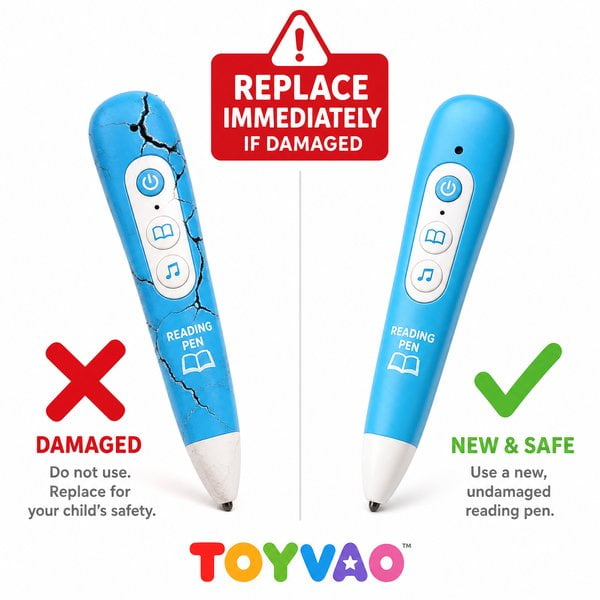
Physical damage is the most common form of failure and is usually caused by drops, impacts, compression, or liquid ingress. Such incidents can lead to cracked housings, damaged screens, non-responsive buttons, or damage to internal circuit boards and precision sensors (such as the pen tip). The pen tip is especially vulnerable because it makes direct contact with reading materials and is considered a wear-prone component.
Functional Failures
Functional failures refer to operational or performance anomalies while the exterior may still appear intact. Common manifestations include:
- Unable to power on or frequent crashes: This may result from battery issues, system faults, or loose internal hardware connections.
- Unresponsive touch or poor reading sensitivity: Causes can include a damaged pen-tip sensor, software recognition problems, or incorrect reading posture.
- Abnormal sound or no audio: Speaker failure, volume settings, or audio decoding errors are common causes.
- Camera malfunction: For models equipped with a camera, issues can include the camera failing to operate properly or producing blurred images.
- Charging issues: Problems such as inability to charge, slow charging, or abnormal charging indicator behavior are usually related to the charging port, battery, or charging circuitry.
Battery Issues
Over time, battery performance degrades, often manifesting as reduced standby or usage time, slower charging, or complete inability to hold a charge. In extreme cases, batteries may swell, which not only affects usability but also presents safety risks.
Software / Firmware Issues
Software or firmware problems can cause system instability—such as crashes, inability to recognize content packages, or failure to connect to a computer or Wi‑Fi. These issues are often resolvable via firmware updates or factory resets.
Factors to Consider When Repairing vs Replacing
When deciding whether to repair or replace a reading pen, parents and procurement managers should consider the following key factors:
Repair Cost
Repair cost is the primary consideration. If repair expenses approach or exceed 50% of the cost of a new reading pen, replacing the device is generally more economical. For higher-end models, even when repair costs are relatively high, repair may still offer better value than purchasing a brand-new unit.
Service Life and Model of the Reading Pen
The pen’s age and model are important. Older units and legacy models may have aged internal components that are likely to fail again after repair. Additionally, spare parts for outdated models can be difficult to source, leading to extended repair times or making repair impossible if parts are discontinued.
Severity of Damage
The extent of damage directly affects repairability and cost. Minor physical damage (e.g., superficial scratches or slightly loose buttons) or simple functional faults (such as crashes resolved by a reset) are generally easy and inexpensive to repair. However, severe issues—like a damaged mainboard, extensive water-corrosion of circuitry, or a completely destroyed pen-tip sensor—are costly and may be irreparable.
Availability of Parts and Repair Services
Before opting for repair, verify the availability of genuine replacement parts and qualified repair services. Brands with official service centers or authorized repair networks provide more reliable support. If parts are scarce or professional repair channels are lacking, repair difficulty and risk increase.
Warranty Status
Check whether the reading pen is still under warranty. Failures covered by warranty can usually be repaired or replaced at no cost, significantly reducing financial burden.
Technological Updates
Reading-pen technology advances rapidly; newer models often deliver significant improvements in functionality, performance, and user experience. If the damaged pen is older and repair costs are substantial, upgrading to a newer model may provide better long-term value and enhanced learning outcomes.
When Repair Is Recommended
- Minor physical damage: Superficial housing scratches or slightly loose buttons that do not affect core functionality.
- Simple functional faults: Issues that can be resolved by a reset, or problems caused by a faulty cable or adapter preventing charging.
- Battery replacement: If the only issue is battery aging and replacing the battery is significantly cheaper than buying a new unit, battery replacement is recommended.
- Software issues: Problems that can be resolved through firmware updates, factory resets, or reinstallation of content packages.
When Replacement Is Recommended
- Severe physical damage: Damage such as a compromised mainboard, extensive water corrosion, or a totally destroyed pen-tip sensor—these cases are often difficult to repair, costly, and the post-repair reliability is uncertain.
- Excessive repair costs: When repair expenses approach or exceed 50% of the price of a new pen, replacement is generally more cost-effective.
- Frequent recurring faults: If the pen continues to experience multiple problems after repair, it indicates underlying instability; replacing the device will provide a more reliable user experience.
- Obsolete product model: Older models may lack available parts or have been discontinued, making repair impractical. Newer generations also typically offer notable functional and technical advantages.
- New technologies offer superior capabilities: If newer models with enhanced features better meet current learning needs and the old pen is seriously damaged, upgrading will significantly improve the learning experience.
Maintenance Recommendations to Extend Reading Pen Lifespan
To extend the service life of reading pens and reduce the likelihood of damage, consider the following maintenance best practices:
- Proper use and storage: Teach children to handle the pen gently to avoid drops and impacts. Store the pen in a dry, clean environment away from excessive heat, humidity, and strong magnetic fields when not in use.
- Regular charging and maintenance: Use the original charger and cable where possible, and avoid overcharging or deep discharge. Periodically clean the pen body and pen tip with a soft cloth to maintain cleanliness.
- Timely firmware updates: Monitor official firmware releases from the brand and apply updates promptly to fix known bugs and optimize performance.
- Use protective cases or screen protectors: A suitable protective case can significantly reduce physical damage. For models with displays, a screen protector can help prevent scratches.
Conclusion
The decision to repair or replace a reading pen should be made on a case-by-case basis, taking into account the type of damage, repair costs, the pen’s age and warranty status, and the benefits offered by newer technology. Carefully evaluating these factors will ensure children continue to have efficient, safe learning tools and that the reading pen delivers maximum value throughout their development.
