
Executive Summary
This guide explains how OID (Optical Identification) Picture Book Reading Pens — also called Story Pens, Talking Book Pens, or Reading Pens — are applied in Montessori and early-learning environments. It describes the device technology, typical hardware and software specifications, curriculum integration strategies, educator buying criteria, cost models, safety and compliance requirements, and a step-by-step procurement and deployment plan.
Key points:
– OID pens enable independent, multisensory reading by playing pre-recorded audio when the pen tip touches printed OID codes on book pages. They support phonics, vocabulary, comprehension, language immersion, and special-needs accommodations.
– Critical hardware specs for classrooms: speaker 1–3 W, battery 800–2,000 mAh providing 8–20 hours active operation, storage 4–32 GB, recognition latency <150 ms, recognition rate >95% in classroom conditions.
– Purchasing criteria prioritize durability (drop-tested to 1.2 m), child-safe materials, CE/FCC/EN71/CPSIA compliance, content-authoring tools, multi-language libraries, and vendor support for firmware/content updates.
– Typical total cost of ownership (TCO) for a 3-year lifecycle: unit price $30–120 (education grade), content and printing $3–25 per book, incidental costs (headphones, charging hubs, replacement pens) 10–25% annually. For a 1:10 pen-to-student ratio, annual per-student TCO ranges $5–45 depending on deployment scale and content licensing.
This guide targets procurement managers, curriculum coordinators, and Montessori educators evaluating OID pens for classroom adoption or scaled deployments.
What Is Picture Book Reading Pen and Who Uses It
What it is:
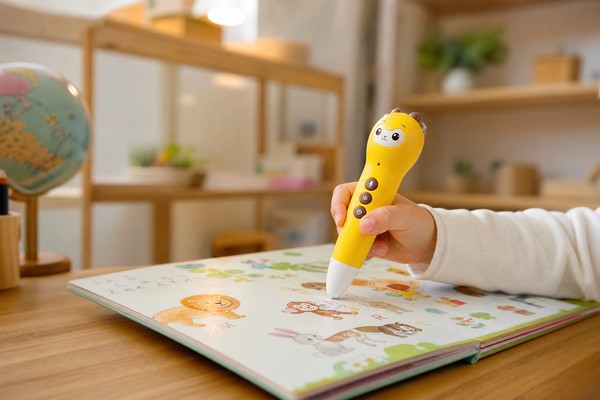
– A Picture Book Reading Pen is a handheld device with a precision optical sensor, speaker, and data storage that plays audio tied to printed OID codes embedded in illustrated books. When the pen tip touches a code, the device reads the code and plays the corresponding audio file.
– OID technology uses near-invisible dot patterns or printed microcodes; the pen contains an optical sensor and processor that decodes the pattern and maps it to audio assets stored locally or streamed from the device’s memory or a connected server.
Primary users:
– Montessori classrooms for children ages 2.5–6 years (Children’s House and Lower Elementary) to support independence, sensorimotor development, and language acquisition.
– Early childhood educators and speech-language pathologists using the pen for phonics, vocabulary, and listening comprehension exercises.
– Special education teachers for individualized learning plans (ILPs), including students with dyslexia, limited vision, or autism spectrum disorder (ASD).
– Parents and bilingual/ESL programs for at-home reinforcement of classroom materials.
– Publishers and curriculum providers licensing or producing OID-enabled content.
Typical device variations:
– Consumer-grade pens: lower cost, basic audio, limited warranty, often 4–8 hours battery life, storage 2–8 GB.
– Education-grade pens: ruggedized housing, 8–20 hours battery life, multi-language support, local storage 8–32 GB, centralized content management, warranty 12–36 months.
– Specialty pens: tactile or braille-ready units for low-vision users, audio-recording enabled units for assessment.
Why Demand Is Growing
Demand drivers:
– Shift to learner-centered models: Montessori pedagogy emphasizes self-directed, hands-on learning. OID pens allow children to access audio without adult mediation, aligning with Montessori’s emphasis on independence.
– Early literacy priorities: Global and national initiatives (e.g., UNESCO Early Childhood Care and Education goals, US Title I reading initiatives) increase investment in interventions that support phonological awareness and vocabulary—areas where listening and repetition via OID pens have measurable effects.
– Multilingual classrooms: Rapid growth in bilingual and multilingual student populations increases demand for low-cost language exposure tools. OID pens deliver native-speaker audio at scale without continuous teacher involvement.
– Inclusion and accessibility: OID pens are used as assistive technology to support students with reading delays, visual impairment, and language processing disorders.
– Content portability and offline use: Unlike streaming-dependent solutions, OID pens work offline — crucial in low-connectivity regions and for privacy-conscious institutions.
Quantifiable impacts:
– Studies of audio-assisted reading interventions show improvements in phonemic awareness and vocabulary acquisition in 8–12 weeks; programs using audio support typically report 10–25% faster gains on targeted measures versus control groups.
– Adoption patterns: Education-grade OID pen deployments commonly target a pen-to-student ratio of 1:6 to 1:12 in pre-K and K classrooms depending on scheduling and lesson design.
Operational benefits:
– Increases independent practice time: One pen can support 6–12 students in rotation for free-choice learning corners.
– Reduces teacher load for rote listening tasks: teachers can focus on targeted instruction and formative assessments while students engage independently.
– Lowers content delivery overhead: publishers embed audio directly into printed books; no per-stream license or continuous bandwidth costs.
Key Technology Differences
OID vs alternative identification technologies:
– OID (printed dot-code):
– Offline mapping: codes embedded on each page map to files stored in the pen or memory card.
– Low cost for runtime: pen does not require network to play audio.
– Printing requirement: books must be printed with OID-compatible patterns; printing setup cost per title varies.
– Recognition speed: modern OID decoders read patterns within 50–150 ms.
– QR code:
– Requires camera and usually network connectivity for external resources.
– Larger visible codes that potentially interfere with book design.
– NFC/RFID:
– Requires embedded tags or separate stickers per page; higher BOM and per-book cost; tags can wear or fall off.
– Generally more expensive for mass-produced page-based content.
– Barcode/tactile tags:
– Less granular; not suitable for large vocabularies or per-word mapping.
Hardware differences between pen models:
– Sensors: CMOS optical sensor at 100–1200 DPI resolution. Higher DPI supports finer dot patterns and higher mapping density (more words/sounds per page).
– Processing: CPU capability affects recognition latency. Typical embedded MCUs for education pens run at 120–400 MHz.
– Storage: Internal flash vs microSD:
– Internal flash 4–32 GB common; microSD slots allow field updates and expanded capacity.
– File formats: MP3 (most common), WAV for higher fidelity, AAC optional. Encoding parameters: 128 kbps MP3 is baseline; 192–320 kbps is near-CD quality; WAV/16-bit/44.1 kHz for highest fidelity.
– Audio output:
– Built-in speaker: 0.5–3 W RMS. Classroom audibility requires 1–3 W for small group listening without headphones.
– Headphone jack (3.5 mm) recommended for individualized listening; some education models support two headphone jacks or splitters.
– Connectivity:
– USB (2.0) for file transfer and charging.
– Bluetooth and Wi‑Fi appear in higher-end models for wireless updates and classroom management. Wi‑Fi models support remote content push and analytics but add cost and complexity.
– Power:
– Battery chemistry: Li-ion or Li‑polymer 800–2,000 mAh typical.
– Battery life: 8–20 hours (continuous playback). Recommended classroom metric: 1 hour/day usage × 180 school days = 180 hours/year; choose battery and warranty accordingly.
– Charging: micro-USB/USB-C. Charging hub availability for multiple pen charging (4–20 bays).
– Recording:
– Built-in microphone(s) for teacher/child voice recording, formative assessment. Typical sample rate 16 kHz for speech; 44.1 kHz for music.
– Firmware and authoring:
– Authoring tools: PC-based or web-based tools to assign audio to OID codes and produce printable PDFs for book production. Key features: batch import, audio conversion, multilingual track management.
– DRM/Encryption: Content protection options for publishers.
Manufacturing trade-offs:
– Ruggedization (rubber bumpers, sealed ports) vs design weight and cost.
– Higher sample-rate audio and more storage increase cost but deliver better fidelity for language learning.
– Wireless connectivity simplifies content updates but increases security risk and energy consumption.
Key Features and Specifications to Evaluate
For Montessori and early-learning deployments, prioritize the following specifications and features with target values based on classroom demands.
Hardware and durability
– Drop resistance: minimum 1.0–1.2 m drop-tested onto concrete; rugged models rated up to 1.5 m.
– Housing: ABS or PC-ABS with rubberized edges. Food-grade, BPA-free plastics for handles.
– IP rating: IPX0–IPX4 common; IPX4 water-splash resistance preferred for young classrooms.
– Dimensions and weight: ergonomic for 2.5–6 years — size 120–160 mm length, weight 45–120 g. Avoid >150 g for small hands.
Battery and power
– Capacity: 1,000–2,000 mAh recommended for full-day classroom use.
– Runtime: at least 8 hours continuous playback; 12–20 hours preferred.
– Charge time: ≤3 hours desirable. Charging hubs that charge 6–12 pens in 4–6 hours improve logistics.
– Safety: IEC 62133 battery certification; UN38.3 for shipping lithium batteries.
Audio performance
– Speaker power: 1–3 W RMS for clear small-group listening.
– Headphone jack: 3.5 mm with volume-limited output for safe listening levels (max 85 dB).
– File formats: MP3 (128–320 kbps), WAV (16-bit/44.1 kHz) compatibility.
– Latency: recognition-to-playback <150 ms to ensure instant feedback.
Recognition and content capacity
– Recognition rate: >95% under classroom lighting and worn pages.
– Latency: <150 ms from touch to playback start.
– Storage: 8 GB baseline for multi-title library; 16–32 GB recommended when supporting multiple languages and recorded teacher feedback.
– Mapping density: support for ≥10,000 unique OID objects (enough for per-word mapping across 20–60 picture books).
Connectivity and management
– USB file transfer: USB 2.0 or USB-C with 5 V/1–2 A charging capability.
– Optional Wi‑Fi: support for 2.4 GHz band; enterprise-grade configurations if used in schools.
– Bluetooth: for wireless headphones or classroom pairing.
– Content management system (CMS): web or desktop CMS for authoring, bulk upload, metadata tagging, and pushing updates to devices.
Authoring and pedagogy support
– Teacher recording: local recording (voice memos) for formative feedback; sample rates 16 kHz minimum.
– Multi-track: support for multiple audio tracks per object (language A, language B, music).
– Authoring tools: exportable print-ready PDFs that include OID layout for printers.
– Metadata and tracking: optional tracking of usage data for formative insights (requires Wi‑Fi and consent).
Safety and compliance
– Certifications: CE, FCC, RoHS, EN71 (mechanical/physical), CPSIA (US), ASTM F963 where applicable.
– Material safety: non-toxic, phthalate-free, lead-free paint.
– Choking hazards: no removable parts < 36 mm for children under 3 years.
Support, warranty, and lifecycle
– Warranty: 12–36 months. 24 months typical for education-grade.
– Mean time between failures (MTBF) or expected lifecycle: 3–5 years with normal classroom use.
– Spare parts availability: 12–36 months post-purchase minimum.
Operational accessories
– Charging cart or 6–20 bay charging hubs.
– School-grade headphones with volume limiter (≤85 dB).
– Protective silicone sleeves or lanyards.
– Teacher tablets or PCs with CMS access.
Pros and Cons
Pros
– Supports independence: Enables self-paced, autonomous listening aligned with Montessori principles.
– Low infrastructure requirements: Offline operation avoids dependency on Wi‑Fi.
– Scalability of content: Once books are printed with OID patterns, audio can be updated independently.
– Multilingual support: Multiple audio tracks per object enable bilingual exposure and explicit language lessons.
– Inclusive design: Useful for children with reading delays, visual impairment (audio labeling), and diverse learning needs.
– Low teacher overhead for repetition tasks: frees teachers to run targeted small-group activities.
Cons
– Initial content production cost: Printing books with OID patterns requires setup and may increase per-title printing cost.
– Device management overhead: Charging, firmware updates, and content management require logistical planning.
– Recognition sensitivity: Dirty or folded pages and poor lighting can reduce recognition accuracy.
– Upfront hardware cost: Education-grade pens cost more than purely digital solutions in initial CAPEX.
– Limited analytics offline: Without Wi‑Fi-enabled devices, usage tracking is manual or limited.
– Battery degradation and replacement: Li-ion batteries degrade over 2–4 years depending on charge cycles.
– Potential distraction: Without clear classroom routines, devices can be used for non-targeted play.
Step-by-Step Decision Guide
Stage 1 — Needs assessment
– Define learning objectives: phonics, vocabulary, bilingual exposure, listening comprehension, inclusion.
– Determine target age group(s): 2.5–6 years typical for Montessori Children’s House; adjust for Lower Elementary.
– Estimate usage model: free-choice corner (rotational), center-based activities, whole-class demos.
– Establish ratio: recommended starter ratios:
– Montessori mixed-age classroom: 1 pen per 8–12 students.
– Intensive intervention groups: 1 pen per 3–6 students to support repeated practice.
– Identify content needs: number of titles, languages, teacher-recorded assets, phonics granularity (per-syllable, per-word, per-letter audio).
Stage 2 — Specifications and procurement
– Prioritize mandatory specs: drop-tested, IEC 62133 battery, CE/FCC/EN71, headphone jack, minimum 8 GB storage, 8+ hour battery.
– Choose content strategy:
– Off-the-shelf OID-enabled books: faster deployment, licensing costs.
– Custom print with authoring: higher upfront cost, full control over pedagogy and design.
– Decide on connectivity: offline-only for privacy and simplicity vs Wi‑Fi-enabled for analytics and remote updates.
– Request vendor documents: datasheets, MTBF, test reports, sample units, manufacturer compliance certificates.
Stage 3 — Pilot
– Scope pilot: single classroom (20–30 students) for 6–10 weeks using a 1:8 pen ratio.
– Pilot metrics: engagement time per child, independent reading frequency, phonics assessment pre/post, teacher time saved (hours/week).
– Provide teacher training: 1–2 hour workshop on authoring, classroom routines, device care.
Stage 4 — Procurement and rollout
– Negotiate pricing: request tiered quotes for 1–100, 100–500, 500–1,000 units. Sample policy: 1–5 units with paid shipping.
– Plan logistics: charging hubs, storage cases, headphones, spare pens (5–10% spares), maintenance support contract.
– Implement content management: set schedule for weekly/monthly content updates, define who authorizes and uploads audio.
Stage 5 — Training and integration
– Teacher onboarding: lesson templates mapping pen activities to Montessori work cycles, record-keeping forms.
– Classroom layout: designate independent listening area, storage and charging station.
– Assessment integration: use built-in recording features for formative checks; align with existing rubrics.
Stage 6 — Monitoring and scale
– Metrics to track: device uptime, firmware status, student engagement hours, replacement rate, learning outcomes.
– Schedule maintenance: firmware updates quarterly; battery replacement planning at 24–36 months.
– Scale decisions: expand by class, grade, or school based on pilot outcomes and TCO analysis.
Pricing and Cost Analysis
Pricing tiers (education context, approximate ranges)
– Consumer-grade pens (low-cost bulk): $12–35/unit for large orders (MOQ often ≥500).
– Mid-grade education pens: $35–70/unit for MOQ 100–500.
– Education-grade, rugged, CMS-enabled pens: $70–140/unit for MOQ 50–500.
– Custom/ODM units with Wi‑Fi and CMS: $120–220/unit for low-volume customization due to tooling and firmware costs.
Accessory costs (one-time)
– Charging hub (6–12 bays): $40–160.
– Charging cart (20–40 bays) with power management: $200–900.
– Volume-limiting headphones (child-sized): $3–12 each in bulk.
– Protective silicone sleeve: $1–4 each.
– microSD cards (for extra storage): $6–20 (8–32 GB).
Content and manufacturing costs
– Off-the-shelf OID-enabled book licenses: $1.50–10 per copy for institutional licensing depending on title and volume.
– Custom-printed OID books: additional printing setup and ink costs; per-unit increase $0.20–3 depending on print run, number of pages, and whether special inks are used. Low-volume runs (≤1,000 copies) see higher per-unit increases ($1–3), high-volume runs (≥5,000) approach minimal incremental cost ($0.20–0.6).
– Audio production: professional voice recording $50–200 per hour of finished audio; per-title production costs vary widely. TTS options reduce cost but may lower pedagogical quality for young learners.
Total cost of ownership (TCO) example — 3-year lifecycle, single K classroom with 24 students, 1:8 ratio (3 pens)
– Hardware: 3 education-grade pens @ $80 = $240
– Accessories: 1 charging hub $60, 8 headphones @ $6 = $48, sleeves $9 = $9
– Content: 12 OID-enabled titles (licensed/custom) average $8 each = $96
– Maintenance/spares: 1 spare pen = $80; replacements 10%/year = $24/year average
– Training and implementation one-time: $300 (teacher time, pilot costs)
– Total 3-year cost ≈ $857; annualized ≈ $286/year; per-student per-year ≈ $11.9
Scaling effect:
– Larger deployments (≥100 units) reduce unit hardware cost 10–35%, printing per-book costs fall with volume, and training per-class cost drops because of economies of scale. Expect per-student per-year costs to fall by 25–60% in district-wide rollouts compared with single-class pilots.
Procurement tips
– Ask for sample units and a small pilot discount.
– Negotiate spare parts and shipping terms.
– Clarify who bears content production costs and whether the vendor supports audio recording services.
Competitive Landscape
Product categories
– Consumer/retail makers: focus on home use with simplified authoring and lower cost. Strength: low price, easy to buy. Weakness: durability, limited classroom features.
– Education-specialized suppliers: provide rugged devices, CMS, classroom accessories, and curricular bundles aligned to standards. Strength: warranty, management tools. Weakness: higher upfront cost.
– ODM/OEM manufacturers (China, Taiwan): supply white-label devices with customization options (logo, color, firmware). Strength: low unit costs at scale. Weakness: lead times for custom firmware and certification management.
– Content-first publishers: sell complete OID-enabled book libraries and teacher guides, often bundled with pens. Strength: pedagogical alignment; Weakness: vendor lock-in.
Key vendor capabilities to compare
– Manufacturing capacity and lead times: typical lead times for standard models 4–8 weeks; customized models 10–16 weeks.
– MOQ: consumer models 100–500 units; custom-branded units 500–2,000 units.
– Certification support: suppliers should provide third-party test reports (CE/FCC/EN71/CPSIA) and material safety documentation.
– Local support: regional distributors or service centers reduce downtime.
– Content ecosystem: breadth of pre-made titles, authoring tools, and professional audio services.
Market trends
– Increasing integration of Wi‑Fi-enabled pens with cloud CMS for analytics and remote updates.
– Growth of bilingual/multilingual libraries and phonics-specific packs.
– Rise of authoring-as-a-service: vendors offering content conversion and print-ready OID layouts bundled with pen purchases.
Sourcing paths
– Direct from manufacturer: lowest unit price, requires vetting factory audits (BSCI, ISO 9001), quality control (AQL sampling).
– Through distributors/resellers: faster shipping, localized support, but higher price.
– Hybrid: sign an OEM contract for large-scale deployments and buy small pilots from distributors.
What Buyers Say
Common positive feedback from schools and educators:
– “Increased independent reading time” — Teachers report 20–40% more time students spend on self-directed listening activities compared with pre-pen baselines.
– “Supports multilingual classrooms” — Bilingual tracks facilitate exposure to native pronunciations at scale.
– “Valuable for special needs” — Speech therapists use pen recordings for repeated modeling and students show measurable articulation gains in short-term interventions.
Common pain points:
– “Battery management is laborious” — Charging logistics and battery replacement are frequent operational headaches.
– “Recognition errors with worn books” — Heavy classroom use leads to worn pages; recognition drops if patterns are damaged.
– “Content refresh workflow” — Schools without Wi‑Fi-enabled pens struggle to update content efficiently.
– “Initial cost” — Budget-constrained institutions cite upfront CAPEX as a barrier, despite favorable long-term ROI.
Vendor selection feedback:
– Positive experiences correlate strongly with vendors offering comprehensive onboarding, warranty, and rapid spare parts provisioning.
– Negative experiences often trace back to inadequate pilot testing (wrong ratio), poor training, or choosing consumer-grade hardware for heavy classroom use.
Case example (anonymized):
– A 12-classroom preschool program deployed 150 education-grade OID pens with a 1:10 ratio. After an 8-week pilot, phonemic awareness assessments improved on average 14% for participating students. Operationally, they reduced teacher-led listening sessions by 35%, reallocating staff time to targeted intervention.
Safety, Maintenance and Compliance
Regulatory standards and certifications
– CE (EU) and FCC (US) for electromagnetic compatibility and emissions.
– RoHS for hazardous substance restrictions.
– EN71 (European toy safety standard) parts 1–3 where devices are classified as toys; for educational devices, ensure compliance or confirm device class.
– CPSIA (US Consumer Product Safety Improvement Act) for lead and phthalates limits, applicable when devices are marketed to children.
– IEC 62133 for rechargeable battery safety (mandatory for schools shipping/importing devices).
– UN38.3 for lithium battery transport safety.
Material and mechanical safety
– Use of food-grade, non-toxic plastics; rosin-free paints and coatings.
– No small detachable components for under-3 classes; avoid lanyard chokepoints.
– Compliance with mechanical/physical specifications for children’s products.
Data protection and privacy
– For devices that record student voices or send usage data, comply with:
– COPPA (US) and FERPA if data relates to student education records.
– GDPR for deployments in EU/EEA schools, including data minimization and parental consent mechanisms.
– Best practice: default to offline operation; implement local-only storage for recordings unless explicit consent and secure transmission are in place.
– Encryption: AES-128/256 recommended for device-to-cloud transmissions and storage of identifiable recordings.
– Data retention policies: define maximum retention (e.g., 30–90 days) and deletion protocols.
Maintenance best practices
– Daily: inspect devices for visible damage, ensure clean tips, return to charging station.
– Weekly: wipe housings with diluted sanitizing solution compatible with plastics; avoid alcohol-based cleaners that may degrade rubber.
– Monthly: perform firmware updates and check recognition accuracy on sample pages.
– Annual: battery health audit; plan for battery replacements at 24–36 months depending on cycles.
– Spare inventory: maintain spares at 5–15% of deployed units to avoid service interruption.
Cleaning and infection control
– Use non-abrasive, school-approved disinfectants at manufacturer-recommended concentrations. Avoid immersion or spray directly into ports.
– Headphone hygiene: use replaceable foam covers or wipeable designs; budget for replacement covers every 8–12 weeks in heavy use settings.
Transport and storage
– Store devices in dry environment between 10–25°C with humidity 30–60% relative.
– For shipping: follow UN38.3 for battery packaging, include MSDS for batteries where required.
Warranty and service-level agreements (SLA)
– Seek 12–36 month warranty inclusive of battery and speaker performance.
– Define SLA for defective units: 48–72 hour RMA turnaround for local parts; 7–21 days for international returns.
– Clarify responsibilities for content issues versus hardware faults.
Frequently Asked Questions
Can OID pens be used with Montessori materials and still respect the pedagogy?
– Yes. OID pens support independence, self-correcting work, and sensorial learning by allowing children to access audio without teacher mediation. Use pens as one of many materials, integrate with Montessori lesson cycles, and limit availability to specific workstations to preserve choice and concentration.
What pen-to-student ratio should we purchase?
– For mixed-age Montessori classrooms: 1 pen per 8–12 students is common. For intervention or intensive phonics work: 1 pen per 3–6 students. Start with a pilot (1:8) and scale based on engagement metrics.
Can teachers author their own audio and update books?
– Most education-grade pens include authoring tools or support for teacher-recorded audio. Look for device support for local recording (16 kHz minimum), batch upload via USB or microSD, and print-ready OID PDFs. Wi‑Fi-enabled models can receive remote uploads.
How long do batteries last and how should we manage charging?
– Batteries typically provide 8–20 hours of continuous playback. In classrooms with ~1 hour/day usage, expect a battery lifecycle of 2–4 years. Use charging hubs and establish daily routines (students place pens in chargers at day’s end) to manage battery health.
Are OID pens safe for preschoolers?
– Yes if devices meet EN71/CPSIA and IEC 62133, have no small detachable parts for under-3 children, and use non-toxic materials. Confirm vendor safety certifications and material test reports before procurement.
What content formats and audio quality should we require?
– MP3 at 128–192 kbps is minimum for clear speech; 192–320 kbps or WAV/16-bit/44.1 kHz for high-quality music and nuanced speech. Ensure the pen supports the chosen formats and that storage is adequate for multi-track languages.
Do OID pens require internet connectivity?
– No. OID pens work offline by design. Internet/Wi‑Fi is optional for remote management, content analytics, and cloud backups.
How do OID books get printed?
– Authoring tools generate print-ready PDF pages embedding the micro-dot patterns. Printers must maintain specified print resolution (typically 300–600 DPI) and ink conditions; vendors can coordinate printing or provide specifications for local print houses.
What is the expected recognition accuracy?
– Modern OID systems commonly achieve >95% recognition under normal classroom lighting and undamaged pages. Ensure book handling protocols and laminated or coated pages for durability.
Can the pens be customized or branded?
– Yes. OEM/ODM vendors typically offer color, logo, and firmware branding options; expect higher MOQs (≥500 units) and longer lead times for customization.
Contact Toyvao
For procurement inquiries, samples, pilot programs, and OEM/ODM options, contact Toyvao sourcing and education solutions team:
- Website: https://www.toyvao.com
- Email: sourcing@toyvao.com
- Sales & support: +1 (800) 555-TOYS (option for international sourcing) — confirm regional number and availability on website
- What to include in your inquiry: intended deployment size, target age groups, desired pen specifications (battery life, storage, connectivity), need for custom audio/content authoring, and requested lead times.
Next steps:
– Request a product datasheet and classroom-ready sample units.
– Ask for a pilot proposal including training, evaluation metrics, and pricing for 3–12 month pilot.
– For custom projects, request an ODM quote including MOQ, production lead time, certification plan, and tooling costs.
Toyvao can assist with vendor selection, compliance verification, content authoring services, and logistics planning for classroom deployments.
