
Executive Summary
This guide explains how to integrate a picture-book series with a single Picture Book Reading Pen SKU and how to batch-program multiple books to that pen. It covers hardware and software architecture choices, production and printing constraints, content preparation and compression settings, manifest and mapping formats, batch programming workflows (USB mass-storage copy, vendor SDK, automated programming fixtures), verification and QA procedures, cost drivers, compliance requirements, and operational best practices for scale.
Key recommendations:
– Use pens with at least 256 MB flash for a catalog of 20–50 short books; 512 MB+ for larger series or higher audio quality.
– Standardize on MP3 mono, 22.05 kHz, 64–96 kbps for most children’s narration to balance quality and size.
– Implement a manifest + OID (optical identification) mapping file: use JSON manifest and CSV mapping of OID → audio filename.
– Reserve unique code ranges per book (bookID prefix) to prevent OID collisions across titles.
– Use batch programming via USB mass-storage for small volumes; implement USB-jig/serial + automated fixture with scripting or use vendor flashing SDK for volumes >5,000 units to reduce per-unit programming time <5 seconds.
– Include SHA-256 checksums and optional AES-128 file encryption; sign manifests with RSA-2048 for tamper protection.
– Build QA tests that check OID readability, audio checksum, latency (<150 ms per tap), speaker SPL (85–95 dB at 10 cm), battery charge/discharge, and firmware version.
This guide presumes the pen uses an optical sensing identification system (OID-style) and supports a file-based content package model. Adjust for NFC/RFID or cloud-centric designs where noted.
What Is Picture Book Reading Pen and Who Uses It
Product definition
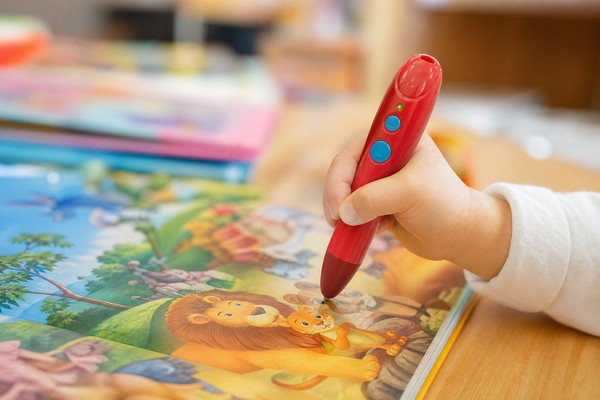
– Picture Book Reading Pen (also called Story Pen, Talking Book Pen, OID Reading Pen): a handheld electronic device with an optical sensor that reads encoded marks on printed pages. When a child taps an image, word, or icon on the page with the pen tip, the pen’s firmware decodes the printed code and plays the associated recorded audio file (narration, sound effect, song).
– Typical hardware elements: optical sensor module, MCU, audio DAC, amplifier and speaker (0.5–2 W), onboard flash (16 MB–4 GB), rechargeable Li-ion battery (200–1500 mAh), user controls (volume, play/pause), file-access interface (USB Mass Storage, Bluetooth LE, Wi‑Fi), and basic UI (LEDs, display in premium models).
Primary users
– Publishers integrating audio into picture-book series for language learning, read-aloud enhancement, or special-needs access.
– Educational product managers and sourcing teams procuring hardware/firmware and coordinating printing and content production.
– Manufacturers/ODM/OEMs and fulfillment partners responsible for preloading devices and packaging.
– Local distribution and after-sales teams responsible for field updates and product support.
Use cases
– Preloaded multi-book pen: pen ships pre-loaded with multiple titles (library model).
– Modular book delivery: pen ships with base content and customers add books via USB/OTA.
– School deployments: single pen model used across multiple curricula where admins load or push content in batches.
Why Demand Is Growing
Market drivers
– Early-literacy and language-learning curriculum expansion: schools and parents seek interactive multimedia to improve engagement and comprehension.
– Reusability across titles: buyers prefer a single hardware SKU that can serve multiple books to minimize SKU proliferation and simplify logistics.
– Cost control: producing one pen SKU in higher volumes reduces unit cost and simplifies spare parts and returns management.
– Localization and updates: ability to batch-program or OTA update pens reduces reprint cycles and supports multilingual versions without re-manufacturing hardware.
Operational advantages
– Inventory simplification: one pen SKU reduces procurement complexity and obsolescence risk.
– Faster time to market: standard content packaging and programming workflows enable quicker deployments across geographies.
– Scalability for publishers: content-only updates (no hardware change) allow continuous rollouts.
Industrial constraints
– Printing technology and sensor compatibility limit what can be adopted across publishers.
– DRM, regional regulation, and battery/material compliance add non-trivial cost and operational overhead.
Key Technology Differences
Sensor and identification methods
– Optical ID (OID-style micropatterns): Pen reads micro-dot or printed coordinate patterns on paper. Advantages: dense mapping, inexpensive sensors, can be invisible under normal lighting. Limitations: requires specific print registration and tolerances.
– NFC/RFID tags: Use embedded tags per page or per region. Advantages: robust in laminated books, no print constraints. Limitations: higher per-book cost, tag placement needed.
– QR/barcode: Simple and low-cost, but visually intrusive and slower to decode.
– Bluetooth beaconing: Pen pairs with a local device or server to map page IDs to audio remotely. Advantages: scalable; Limitations: requires connectivity.
Memory and file system
– Flash type and size: NAND (16 MB–4 GB) or eMMC. Minimum recommended sizes vary by catalog volume:
– Small series (≤10 short books): 64–128 MB acceptable.
– Medium (10–50 books): 256–512 MB recommended.
– Large (>50 books or high-quality audio): 1 GB+.
– File system: FAT32 commonly used for USB mass-storage compatibility; embedded devices may use proprietary partitions or FAT on an internal filesystem.
Audio formats and bitrates
– WAV (PCM): uncompressed, large (1 minute @ 16-bit 44.1 kHz mono ≈ 5.29 MB).
– MP3: lossy, common. Recommended: mono, 22.05 kHz, 64–96 kbps for narration. Use 128 kbps only for music or high-fidelity needs.
– AAC/OGG: alternative codecs; ensure pen’s decoder supports chosen codec.
Connectivity
– USB Mass Storage: simplest for preloading content—pen mounts as a removable drive.
– Serial/DFU via micro-USB/USB-C: used by ODMs for flashing firmware and content with vendor tools.
– Bluetooth LE: used for small transfers or remote triggers; not recommended for initial large-scale content pushes.
– Wi‑Fi: supports OTA updates and streaming but increases BOM cost and power consumption.
Mapping and manifest approaches
– OID-to-file mapping table: maps a detected code to a filename or content ID.
– Directory-per-book: content grouped by book folder with a local manifest file.
– Global manifest with bookID prefixing: enables support for multiple books with unique code ranges.
Security and DRM
– Encryption: AES-128 or AES-256 for stored audio assets.
– Signatures: RSA-2048 or ECDSA to validate manifest integrity.
– Access controls: role-based access within content management platforms.
Key Features and Specifications to Evaluate
Hardware specifications
– Flash capacity: evaluate against library size; recommend 256 MB minimum for multi-book pen.
– MCU performance: needs enough processing headroom to decode OID, decompress audio, and manage UI. Cortex-M4 class or better for reliable performance.
– Battery: target runtime 8–12 hours of intermittent use (typical children usage). Estimate: 500–1000 mAh Li-ion.
– Speaker: 0.5–2.0 W, SPL target 85–95 dB @ 10 cm for clear playback in classroom/home settings.
– Charging: USB-C preferred; presence of charging circuit and protection ICs (overcharge, short circuit).
– Sensor spec: optical sensor resolution and allowable dot contrast; supplier should provide readable dot size and DPI (confirm printer tolerances).
Firmware and software
– Content package format: manifest.json + assets; check sample schema and ensure support for multiple languages.
– Mapping table capacity: max number of OID entries supported; demands often range from a few thousand to >65k entries.
– Update mechanisms: support for incremental updates (delta update), OTA, and rollback.
– Latency: target ≤150 ms from tap to audio start for acceptable UX.
– Power management: low-power sleep between taps to preserve battery.
Printing and paper specs
– Supported paper types (uncoated, coated, laminated) and acceptable coatings or varnishes.
– Dot pattern ink/color and registration tolerance; specify recommended line screen and DPI with printer.
– Lamination compatibility: cold lamination preferred; hot lamination may alter dot contrast.
Content production
– Audio format support and bitrate policy.
– Subtitle/caption assets for accessibility.
– Multilingual audio tracks and storage strategy (per-book per-language folders).
Security and compliance
– Compliance certificates: CE, FCC (or country equivalents), RoHS, REACH, and toy-specific standards (ASTM F963, EN71 parts where applicable).
– Battery certifications and UN38.3 shipping compliance.
– Data privacy: GDPR, COPPA if online components or accounts exist.
Operational features
– SKU management: single pen SKU strategy must support loading and identifying multiple book IDs.
– Provisioning tooling: vendor-provided SDK, command-line tools, or GUI-based batch tools.
– Logging: pen should be able to log played items for classroom analytics if required (consider privacy regulation).
Pros and Cons
Pros of single-pen multi-book model
– Inventory simplification reduces SKU count, procurement complexity, and obsolescence.
– Economies of scale lower unit cost when ordering one SKU at volume.
– Faster localization and content updates without changing hardware.
– Simplifies after-sales service and spare part logistics.
Cons and risks
– Upfront engineering investment: firmware and tooling to support many book mappings.
– Printing and dot-code registration constraints can increase printing QA and cost.
– Storage limits: inadequate flash will force content compromises or complex OTA strategies.
– Security: managing DRM and content protection increases operational complexity.
– Field updates: if no Wi‑Fi, updating many devices in the field requires physical access or complex logistics.
Step-by-Step Decision Guide
Assess project scope
– Catalog size: count of books (N), pages per book (Pavg), average audio length per page (Tavg).
– Storage calculation: approximate required flash:
– Audio size per book (MB) = (Tavg minutes per page × Pavg × bitrate_kbps × 60) / 8 / 1024.
– Example: Pavg=24 pages, Tavg=0.5 min/page, bitrate=96 kbps => per book ≈ (0.5×24×96×60)/8/1024 ≈ 8.5 MB.
– For 30 books, storage ≈ 255 MB; add 20% overhead → ~306 MB → choose ≥512 MB to be safe.
– Decide audio quality vs storage tradeoff: 64 kbps reduces size ~33% vs 96 kbps.
Select architecture and hardware
– If prints will be laminated, choose NFC/RFID or ensure optical sensor supports reading through lamination.
– For library model without field updates, USB Mass Storage pens are simplest.
– For frequent updates or remote push, choose Wi‑Fi-enabled pens and plan for cloud backend.
Design OID scheme
– Use a two-part code: BookID (16-bit) + PageID (16-bit) + Optional zoneID (8-bit).
– Reserve ranges per title to avoid collisions. Example: BookID 0x0001–0x00FF reserved for Series A.
– Confirm sensor/mapping table size supports total entries (number_of_books × pages × taps_per_page).
Prepare print specifications
– Provide printer with dot-pattern template and specify:
– Minimum printable dot diameter (e.g., 0.2–0.4 mm — confirm with sensor vendor).
– Line-screen and DPI (600 DPI typical for micro-dot patterns).
– Tolerances for registration: ±0.5 mm.
– Ink types compatible with lamination if needed.
Create content pipeline
– Record: use 22.05–44.1 kHz sampling during recording; master at 44.1 kHz if music, 22.05 kHz suitable for speech.
– Mastering: normalize to -3 dBFS, remove DC offset, apply de-essing if needed.
– Convert: produce MP3 mono files at 64–96 kbps; name files with predictable schema (bookID_page_zone.mp3).
– Manifest: create manifest.json with fields: bookID, title, language, version, totalPages, audioFiles[], checksums[].
Build mapping files
– Produce CSV mapping: oid_code, bookID, page_number, zone, audio_filename.
– Example row: 0x123456, 0x0002, 12, 1, 0002_012_01.mp3
Choose batch programming workflow
– Low-volume (<5,000 devices): use USB Mass Storage and scripted copy via multi-port USB hub. Process:
– Mount device, copy folder /books/bookID/* into device root or designated directory.
– Verify via SHA-256.
– High-volume (≥5,000): use automated fixture with vendor SDK:
– Use short-lived USB or UART sessions to push prebuilt binary image.
– Use a multi-station programming jig (8–32 devices concurrently).
– Ensure tool supports concurrency, checksum verification, and automated label printing.
Automation and fixture design
– Pogo-pin jigs for USB or proprietary programming pads.
– Integrate power measurement and battery conditioning stations if shipping with batteries.
– Use barcode or RFID to track serial numbers and installed content versions.
Verification and QA
– Automated scripts to validate manifest and file presence, check sha256 checksums.
– Sample-based OID read test across pages using a robotic tap fixture or manual test procedure:
– Test latency, correct file playback, seek robustness.
– Random sampling for battery and speaker tests: 1%–5% of lot.
– Retain logs for traceability.
Field update and rollback strategy
– Use versioned manifest with “currentVersion” and “rollbackVersion”.
– Support delta updates where possible to reduce bandwidth.
– Provide admin tools for schools to update via local USB stick or via cloud push if pens have Wi‑Fi.
Labeling and packaging
– Each pen must be labeled with firmware version, content version, capacity, and serial number.
– Include instructions for parents/teachers about updating and charging.
Pricing and Cost Analysis
Unit hardware BOM (indicative OEM prices at typical Chinese OEM volumes)
– Basic pen (no Wi‑Fi, 128 MB flash): $5–$9 per unit.
– Mid-range pen (USB-C, 256–512 MB flash, better speaker): $9–$18 per unit.
– High-end pen (Wi‑Fi, 1 GB+, durable casing): $18–$45 per unit.
Programming and integration costs
– Manual USB copy per unit: labor 15–60 seconds; cost ≈ $0.05–$0.30 per unit depending on labor rates and batch tooling.
– Automated programming station (hardware amortized): initial equipment $2,000–$12,000 depending on concurrency; per-unit programming cost declines to <$0.05 at scale (>10k).
– Content production: narration rates vary by talent and market. Typical range:
– Professional voice actor: $50–$250 per finished hour per language.
– Studio and mastering: $20–$60 per finished hour.
– Localization/translation editing: $30–$150 per finished hour.
– Printing OID patterns: incremental cost per book can be $0.02–$0.10 depending on page count and printer setup; lamination costs extra.
Storage and distribution cost drivers
– Larger flash increases BOM by $1–$6 depending on capacity.
– Wi‑Fi module + certification adds $3–$10 to BOM and adds to product certification cost.
– Battery size increases shipping classification complexity and transport cost.
Example total cost scenarios (approximate per-unit landed cost, FOB China)
– Small series pen preloaded with 10 short books (256 MB pen): hardware $12 + programming $0.20 + content amortized $1.50 + printing/packaging $1.00 = ~$14.70/unit.
– Large series pen preloaded with 40 books (512 MB pen): hardware $18 + programming $0.25 + content amortized $4.50 + printing/packaging $1.50 = ~$24.25/unit.
Pricing considerations for clients
– License costs for DRM platforms or cloud services are recurring; factor into TCO.
– After-sales warranty and replacements typically 3–12% of unit cost annually.
Competitive Landscape
Market segments
– Hardware ODMs: Provide pens with varying memory, sensors, and connectivity. Choose based on scale and firmware support.
– Content platforms: SaaS providers offering content management systems (CMS) for packaging, signing, and OTA distribution.
– Printing houses: Specialized printers that can print OID patterns and control registration tolerances.
– System integrators: Combine pen, firmware, content, printing, and logistics into turnkey solutions.
Selection criteria
– Manufacturer reliability: certifications, production capacity, experience with OID sensors and children’s product compliance.
– Software ecosystem: SDK availability, sample code, manifest schema, API for batch operations.
– Support for QA: availability of test jigs, reference designs, and sample fixtures.
– After-sales support: warranty terms, local repair options, spare parts lead times.
Differentiators buyers should look for
– Clear manifest format and tooling to automate packaging.
– Proven OID print specs and sample verification at the printer.
– OTA capability if long-lived content updates are expected.
– Strong compliance track record for toy and battery safety regulations.
What Buyers Say
Common buyer feedback themes from B2B customers
– “Printing is the most fragile link.” Buyers report failed reads when printers do not follow exact dot-size and registration tolerances or when lamination is applied incorrectly. Recommendation: require sample verification from the printer against the pen vendor’s test kit.
– “We needed an SDK.” Buyers prefer vendors that provide a command-line SDK and automation examples for bulk programming and verification, not only a GUI tool.
– “Memory overruns cause delays.” Underestimated storage needs (especially when adding multiple languages) lead to mid-project redesigns; plan a minimum buffer of 20–50%.
– “OTA was a life-saver.” For repeat content updates across schools, Wi‑Fi-enabled pens eliminate the need to physically access devices.
– “DRM and signature issues.” Buyers expect manifest signing and encryption as standard in contract to prevent unauthorized content copying.
– “Latency and UX matter.” Delays above 150–200 ms per tap decrease user engagement—buyers test extensively for latency.
Operational complaints
– Long vendor lead times for custom firmware changes.
– Poor documentation for mapping file formats.
– Insufficient QA fixtures supplied by OEMs.
Positive reports
– Single-SKU strategy simplified procurement and reduced returns.
– Automated programming reduced per-unit labor below $0.05 at volumes >10k.
Safety, Maintenance and Compliance
Regulatory requirements
– Electrical safety: IEC 62368-1 or national equivalents for consumer electronics.
– Toy safety: EN71 (parts 1–3) for Europe; ASTM F963 for the U.S. where product marketed as toy.
– EMC: CE and FCC testing for emissions and immunity.
– Batteries: UN38.3 for transport, CB/UL for battery cells where required.
– Chemical: RoHS and REACH compliance for hazardous substances.
– Privacy: GDPR, COPPA compliance if collecting usage data or connecting to cloud services.
Maintenance and end-of-life
– Battery care: recommend charging cycle specs and safe shipping practices. Include battery capacity and expected lifecycle (e.g., 300–500 full cycles).
– Firmware updates: plan for firmware signing and roll-back mechanisms to avoid bricking devices during OTA.
– Cleaning and durability: specify cleaning instructions; avoid solvents that degrade printed OID marks.
– Replaceable parts: consider modular design for battery replacement if long service life expected.
Quality assurance processes
– Incoming inspection of pen hardware: functional test, battery charge, speaker check, flash capacity verification.
– Printer QA: verify dot pattern readability with the exact model of pen sensor prior to full press runs.
– Pre-shipment batch testing: sample-based OID read and audio playback testing, battery discharge testing, packaging integrity.
Legal considerations
– Content licensing: secure explicit rights for distribution via devices and for updates in each target territory.
– Age-appropriate labeling and choking hazard warnings per region.
Frequently Asked Questions
What is the maximum number of books one pen can support?
– Depends on flash and mapping table. Practically, a 512 MB pen using MP3 @96 kbps can store ~60–80 short books (24 pages, ~30 s/page). Mapping tables in firmware often support tens of thousands of OID entries; check vendor specification.
Should I preload all books or provide downloads?
– Preload if offline reliability and immediate out-of-box experience matter, especially for low-connectivity regions. Use download model (USB/OTA) if catalogs are large or you need frequent updates.
What audio settings balance quality and storage?
– Recommended default: MP3, mono, 22.05 kHz, 64–96 kbps. Use 64 kbps for pure narration and 96–128 kbps for music or bilingual content.
How do I prevent OID collisions across books?
– Assign bookID prefixes and reserve distinct code ranges per title. Use manifest that maps BookID+OID to audio filename.
How long does batch programming take?
– Manual USB copy: 15–60 seconds/unit. Automated flashing with a multi-port jig: <5 seconds/unit at scale (>10k) depending on firmware and flash type.
Do printing and lamination affect readability?
– Yes. Use printer samples and require adherence to recommended dot size and registration tolerances. Prefer cold lamination; test hot-lamination if unavoidable.
Is encryption necessary?
– Strongly recommended for licensed content. AES-128 on stored assets plus signed manifest (RSA-2048) is common practice.
What happens to content updates in the field?
– If pens have Wi‑Fi, push via OTA with versioned manifest and rollback. If not, supply distributors with update packages that can be copied via USB or a flash-drive distribution model.
How should I validate that a printer is compatible?
– Require the printer to supply a printed test sheet with coded OID samples. Use the pen vendor’s test kit to verify readability across the press and after any post-press treatments (varnish, lamination).
Contact Toyvao
For integration support, testing kits, vendor recommendations, and turnkey execution services contact Toyvao. Include details: project scope (number of books, target regions, expected volumes), preferred architecture (OID/NFC/Wi‑Fi), and timelines. Toyvao will provide an integration checklist, sample manifest schemas, reference hardware/spec sheets, and a quote for programming and fulfillment services.
