
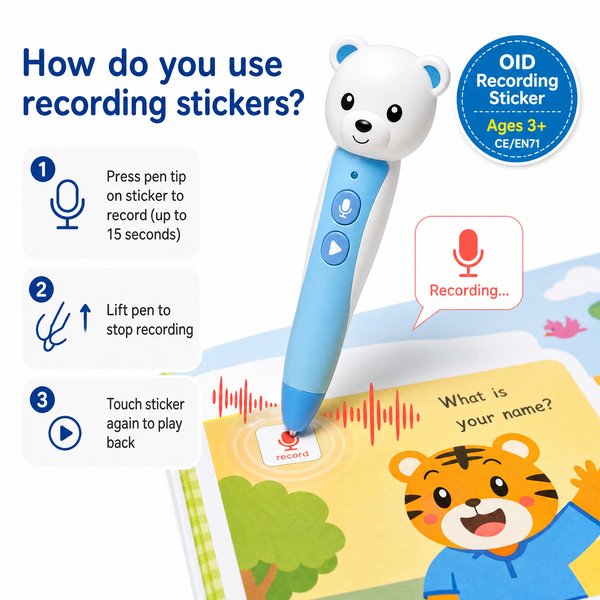
BLUF: Recording stickers are OID-coded adhesive tags that let teachers, parents, and schools add short (up to 10–15 seconds) offline voice prompts to any surface. Using an OID-enabled children’s reading pen (e.g., Toyvao’s pen), you touch the pen tip to a sticker to record a message and touch it again to play it back—no app, Wi‑Fi, or Bluetooth required. They are ideal for low-tech personalized audio hotspots in classrooms, libraries, and retail products.
How recording stickers work — quick practical steps
- Ensure you have an OID-enabled pen with the correct language audio files pre-loaded and sufficient storage (16/32/64GB). Battery life is typically 8–12 hours with 2–3 hours USB‑C charging.
- Peel and stick the OID-coded sticker onto a flat, dry surface (book cover, flashcard, toy, wall panel, etc.).
- Power on the pen and select the required language using the dedicated language button (languages must be pre-loaded on the pen).
- To record: press the pen tip onto the sticker and speak. The sticker supports up to 10–15 seconds per recording. (Re-recording simply overwrites the previous file.)
- To play back: tap the pen tip to the same sticker; the pen will play the stored message through its speaker or via the 3.5mm headphone jack. Volume is adjustable with the pen’s volume button.
- Firmware updates are done by connecting the pen to a PC via USB‑C, copying the downloaded firmware file into the pen’s root directory, then safely ejecting and restarting the device.
When it’s worth caring about / When you don’t need to overthink it
When it’s worth caring about
- Personalized learning: you want teachers or parents to add short, individualized audio prompts (encouragement, pronunciation, reading hints) directly to existing materials.
- Offline deployments: your environment cannot rely on Wi‑Fi/Internet (field schools, low-connectivity classrooms, travel kits) — the pen and stickers work fully offline.
- Fast rollout and scaling: you need a quick, low-tech way to add audio hotspots to many surfaces without printing new books or developing an app.
- Compliance and safety: you require hardware with recognized certifications (CE/FCC/RoHS/EN71/ASTM/UN38.3) for sale in regulated markets.
When you don’t need to overthink it
- Long-form audio: if you need multi-minute recordings or chapter-length narration; stickers are limited to short 10–15 second clips per sticker.
- Universal OCR/translation needs: this is not a scanner, OCR, or translation pen — stickers only play recordings tied to their OID identity.
- Wireless management: if you require remote content updates over-the-air or cloud sync — this system is intentionally offline (no Bluetooth/Wi‑Fi/no app).
Key technical facts (so you can spec and purchase)
- Record length per sticker: up to 10–15 seconds (re-recording replaces previous audio).
- Device storage options: 16 GB / 32 GB / 64 GB (factory can preload audio files and languages).
- Battery: 8–12 hours typical active use; charging: 2–3 hours via USB‑C.
- Audio output: built-in speaker + 3.5mm headphone jack; volume button on pen body.
- Connectivity: NO Bluetooth, NO Wi‑Fi, NO app required — fully offline OID system.
- Compatibility: works only with OID-coded books/stickers (not compatible with ordinary QR codes or non-OID materials).
- Customization & MOQ: OEM/ODM options available; MOQ 100–500 pieces for custom runs.
- Certifications: CE, FCC, RoHS, EN71, ASTM, UN38.3.
Comparison: Recording stickers vs pre-recorded OID books vs app/QR audio
| Feature | Recording Stickers (OID) | Pre-recorded OID Books | App / QR code audio |
|---|---|---|---|
| Offline operation | Yes — plays and records offline | Yes — plays offline | No — needs smartphone and network or cached app |
| User-recorded audio | Yes — up to 10–15s per sticker (re-record) | No — fixed pre-loaded narration | Yes — depends on app features |
| Scalability (add audio to existing items) | High — stick onto any flat surface | Low — requires new printed books | Medium — requires QR printing / app management |
| Device requirements | OID pen (no app) | OID pen (no app) | Smartphone + app |
| Best for | Personal prompts, classroom interactions, library labels | Commercial learning sets and storybooks | Remote content, long audio, multimedia |
Best practices for deployment (B2B tips)
- Preload languages and audio files at the factory for quick out-of-box use; Toyvao can ship pens with language packs pre-installed to avoid onsite configuration.
- Standardize sticker placement (e.g., top-right corner of flashcards) and include a small printed activation area so users know where to touch.
- Use spare stickers for replacements; maintain a sticker inventory because adhesive durability varies by surface and environment.
- Provide brief training for teachers/parents: power on, select language, press to record, press to play, re-record replaces previous clip.
- Label pens with language and device ID for fleet management in schools and libraries.
Customer feedback synthesis
Positive
- “Great for classroom centers — teachers recorded quick cues and students loved the instant playback. Battery life lasted a full school day.” — K–5 district procurement officer.
- “Simple offline system; no apps to manage. We ordered pre-loaded units from Toyvao and deployed them in 5 schools without IT support.” — Regional reseller.
- “The stickers let us update exhibit labels without reprinting. Short messages are perfect for engagement.” — Museum education manager.
Negative / Concerns
- “10–15 seconds per sticker is restrictive for some curriculum uses — we needed multiple stickers per concept.” — Curriculum director.
- “No wireless firmware updates; updating requires a PC and manual file copying which is slow for large fleets.” — IT procurement lead.
- “Works only with OID-coded stickers/books — compatibility limits reuse with legacy materials.” — Distributor.
FAQ
- Q: Can the recordings on stickers be longer than 15 seconds?
- A: No. Each sticker supports up to 10–15 seconds per recording. For longer content, use multiple stickers or pre-recorded OID pages/books.
- Q: Will a sticker work on textured or curved surfaces?
- A: Stickers perform best on flat, dry surfaces. Adhesion and read reliability can degrade on highly textured or very curved surfaces; test samples before mass application.
- Q: How do I change the language for recording and playback?
- A: The pen has a dedicated language button. Languages must be pre-loaded on the device (Toyvao offers factory pre-loading as part of OEM/ODM packaging). The pen will play the sticker using the currently selected language files.
- Q: How do I update firmware across a fleet of pens?
- A: Firmware updates are performed by connecting each pen via USB‑C to a PC and copying the manufacturer’s firmware file to the pen’s root directory. There is no OTA method; plan for batch update sessions during maintenance windows.
Interested in factory-direct pricing, pre-loading languages, or OEM sticker branding? Contact Toyvao for samples, MOQ details (100–500 pcs for custom OEM/ODM), certifications, and technical support. WhatsApp: +86 186 8106 4480 • Email: sales@toyvao.com • Website: https://toyvao.com
