
Executive Summary
This guide outlines procurement, classroom deployment, IT integration, and licensing choices for Picture Book Reading Pens (also called Story Pens, Talking Book Pens, OID Reading Pens) intended for K–6 classroom use. It distills technical specifications (storage, connectivity, audio formats, OID code density), procurement parameters (per-unit pricing, MOQ, lead time), classroom set strategies (1:1, shared, station), licensing models (per-seat, site license, concurrent users, offline rights), and IT operational requirements (Wi‑Fi, MDM, firewall, bandwidth, firmware OTA).
Key recommendations:
– Choose device classes aligned to pedagogy: basic offline OID pens for low-cost shared sets; Wi‑Fi-enabled smart pens for data collection, personalized content, and teacher dashboards.
– Use class set sizes that match enrollment (24–32 devices) and charging/asset-management equipment sized to the set.
– Negotiate licensing for offline use or local hosting to reduce daily bandwidth and to ensure classroom resilience; expect per-seat content subscriptions of $2–$15 per student/year depending on content depth.
– Plan IT integrations: VLAN for IoT, TLS for content delivery, MDM or vendor device portal, scheduled OTA windows, and bandwidth provisioning (estimate 50–200 MB per firmware update per device).
– Budget total cost of ownership (TCO) over 3 years including hardware, licensing, accessories, maintenance, and replacement (typical TCO range $35–$220 per student/year depending on device tier and content model).
This guide provides decisive criteria, technical checklists, procurement language, and deployment steps to reduce risk and speed implementation.
What Is Picture Book Reading Pen and Who Uses It
What it is
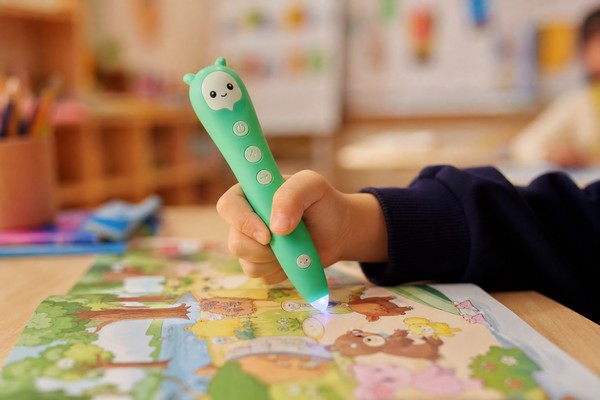
– Picture Book Reading Pens are handheld devices that detect printed hotspots on illustrated storybooks and play pre-recorded audio. Detection is typically optical: the pen’s sensor reads micro-dots or printed optical identifiers (OID) embedded in the book margins or images. When the pen scans a hotspot, it triggers an audio file from internal storage or a networked server.
– Common names: Story Pen, Talking Book Pen, OID Reading Pen. Functional variants include offline OID pens (local audio only), Wi‑Fi-enabled smart pens (streaming, sync, recording), and hybrid pens (local playback + periodic sync).
Who uses it
– Primary users: early readers (Kindergarten–Grade 3), ESL learners, special education (literacy support, AAC accompaniment), and language programs across K–6.
– Operational users: classroom teachers for guided lessons, literacy specialists for intervention, librarians for reading programs, and IT teams for integration and support.
– Procurement stakeholders: district curriculum directors, special education directors, school technology officers, purchasing departments.
Common classroom roles
– Individual independent reading (headphones or low-volume speaker).
– Small group/center activities (shared device or station set).
– Teacher-led read-aloud with whole-class listening (single pen with amplified speaker).
– Assessment and data collection (smart pens record usage, produce logs).
Why Demand Is Growing
Pedagogical drivers
– Evidence: Early independent oral reading practice improves fluency and vocabulary acquisition; tactile/interactive media increases engagement in reluctant readers. Story pens enable self-paced listening and repetition without constant teacher presence.
– Inclusion: Supports multilingual classrooms and special needs students (visual and auditory pairing of text).
Operational drivers
– Device durability and low learning curve make pens an operationally simple tool compared with tablets for low-bandwidth environments.
– Lower procurement barrier than 1:1 tablets — device price can be 20–80% lower depending on features.
Market drivers
– Content ecosystems: publishers producing OID-enabled books and bundled audio drives device utility.
– Hybrid learning models: remote or at-home extensions where pens with local content or SD-card distribution reduce reliance on home internet.
IT and cost drivers
– Institutions favor devices that can operate offline to avoid classroom network load and to maintain privacy-compliant deployments.
– Licensing flexibility (site vs per-seat) is increasingly requested to control recurring costs.
Key Technology Differences
Optical identification (OID) vs Touch/QR
– OID pens read micro-dot patterns printed in the margin or under images at densities typically 150–600 DPI equivalent in code-space. The pen sensor must support the vendor’s code density—confirm exact OID standard and printer requirements if you plan to create custom print assets.
– QR-based pens use camera capture of visible codes; more tolerant to printing quality but less seamless for line-level hotspots.
Audio delivery models
– Fully offline: audio stored on internal flash (8–32 GB typical) or on removable microSD cards. Advantages: no network dependency, lower latency. Disadvantages: manual content updates; higher storage per device.
– Hybrid/sync: audio stored locally with metadata synced to vendor cloud over Wi‑Fi. Advantages: easier content management, usage analytics. Disadvantages: requires Wi‑Fi access; potential privacy considerations.
– Streaming-only: audio delivered in real-time from server. Appropriate only in high-bandwidth, low-latency environments.
Connectivity
– No-network devices: no Wi‑Fi, only USB (micro-USB/USB-C) for file loading.
– Wi‑Fi-enabled: 2.4 GHz support required; 5 GHz optional. Standards: 802.11 b/g/n minimum; 802.11ac (Wi‑Fi 5) if heavy streaming expected.
– Bluetooth LE: used for pairing with teacher/tablet apps or for limited proximity data transfer.
– Cellular: rare — typically not used in school deployments due to cost and management.
Speaker and headphone
– Speaker power ranges: 0.5W–2W. Classroom group listening requires 1W+ for audibility in small groups; individual use benefits from headphone jack (3.5mm) or Bluetooth audio.
– Volume safety: devices should have hardware/software limits (recommendation: maximum output ≤85 dB at 2 cm to align with safe listening guidance).
Processors and OS
– Proprietary firmware on MCU for OID pens; some devices run embedded Linux or Android for advanced apps and MDM compatibility.
– Firmware OTA capability: look for TLS-protected OTA with rollback support.
Storage and audio formats
– Storage: 8GB/16GB/32GB typical. A 16GB device can store ~2000–4000 minutes of high-quality MP3 (128 kbps).
– Audio formats: MP3 and WAV common; AAC supported on higher-end devices. Confirm bitrate support (64 kbps–192 kbps) and codec licensing handled by vendor.
Battery and charging
– Battery capacity: 600 mAh–2000 mAh (Li-ion). Typical playback time: 6–20 hours depending on speaker and usage. Charge time: 2–4 hours.
– Charging ports: USB-C increasingly standard; micro-USB still common on older models.
– Charging accessories: charging cradles, multi-bay chargers, or charging carts available; check per-device charging protocol (5V/1–2A recommended).
Durability and materials
– Housing: ABS plastic, flame-retardant grades common. Impact resistance drops specified (e.g., survive 1.2 m drop).
– IP rating: some models offer splash resistance (IPX4) but few are fully waterproof.
Security and privacy
– Data at rest: AES-128/256 encryption available on higher-tier devices.
– Data in transit: TLS 1.2+ for sync and OTA.
– Student data: measure compliance with COPPA (US), GDPR (EU), and local student data privacy laws.
Key Features and Specifications to Evaluate
Minimum tech spec checklist for procurement
– OID compatibility: specify OID variant (vendor-specific ID), detection distance 0–3 mm, activation accuracy ±1–2 mm, scan response <100 ms.
– Audio: speaker power 0.8–1.5W (recommended), headphone jack 3.5mm, Bluetooth audio support for shared wireless headsets.
– Storage: minimum 8GB flash; 16GB recommended for multi-language libraries.
– Battery: minimum 800 mAh; 1500 mAh recommended for full school day use (8–10 hours playback).
– Charging: USB-C with 5V/2A support; optional charging carousel/carts with 24–40 bay capacity.
– Connectivity: Wi‑Fi 2.4 GHz b/g/n; 5 GHz and Bluetooth LE5.0 preferred for smart features.
– OS/firmware management: cloud portal for device provisioning, usage reports, and OTA updates.
– Teacher interface: web or app dashboard for content assignment, usage analytics, and device status (battery, last sync).
– Licensing options: per-seat, site, concurrent, perpetual content packs; offline rights for remote use.
– Physical: weight 50–120 g; length 140–180 mm; tip design ergonomic for children.
– Safety: CE/FCC/ROHS; EN71 and CPSIA where required; battery overcharge protection and flame retardant casing.
– Warranty and RMA: minimum 12 months warranty, response SLA stated (e.g., 72-hour replacement for defective units in stock).
Procurement contract items
– MOQ and lead-time: verify MOQ (often 100–500 units); lead times typically 4–12 weeks depending on customization.
– Spare parts: purchase spares (5–10% of deployment) — tips, silicone sleeves, charging cables.
– Service-level agreement (SLA): define support hours, response times, remote troubleshooting, and replacement logistics.
– Acceptance testing: define functional acceptance tests (audio playback, OID detection, charging, Wi‑Fi join) and sample pass/fail criteria.
Performance metrics to require
– Mean time between failures (MTBF) or expected failure rates (e.g., <2% DOA; <5% annual failure).
– Battery cycle life (minimum 300 full cycles).
– Firmware reliability: rollback capability within 48 hours if OTA causes failures.
Pros and Cons
Pros
– Low training overhead: minimal digital literacy required for students.
– Resilience: offline-capable devices work without school network dependency.
– Cost-effective: lower unit price than tablets for basic audio playbacks.
– Targeted literacy support: immediate audio-text mapping supports emergent readers and ESL students.
– Durability: purpose-built school devices usually more robust than consumer devices.
Cons
– Content lock-in risk: many vendors use proprietary OID or file packaging—changing vendors can require repurchasing content or complex conversion.
– Limited interactivity: basic pens offer only playback; assessment/analytics require smart models.
– Maintenance overhead: batteries degrade over 2–4 years; physical wear (tips, ports) requires spares and replacements.
– Licensing costs: recurring content subscriptions raise TCO; concurrent licensing and offline rights can be complex and expensive.
– IT friction: Wi‑Fi-enabled pens require network adjustments and ongoing management if using cloud services.
Step-by-Step Decision Guide
Define objectives
– Learning goals: fluency practice, vocabulary, bilingual support, literacy intervention.
– Deployment scope: single classroom pilot vs district-wide rollout.
– Measurement: define KPIs (minutes of use per student per week, improvement in oral fluency scores, device uptime).
Assess classroom models and set sizes
– 1:1 model (recommended for K–2): one pen per student. Recommend device counts matching class sizes (24/25/30).
– Shared classroom sets (recommended for Grade 3+ or budget-limited programs): 6–12 pens per class rotated between students in centers.
– Station-based: 4–6 pens per literacy center, combined with book sets on shelves.
– Library model: 30–50 pens in central loan program with checkout system.
Pilot selection
– Select two representative classrooms (different grade levels) with a 4–8 week pilot.
– Pilot metrics: daily usage minutes, device reliability logs, teacher feedback, student engagement scores.
– Purchase: keep pilot set to ratio chosen (e.g., 24 pens + 24 books) with charging cart and 10% spares.
Specify IT requirements
– Wi‑Fi: ensure stable 2.4 GHz coverage in reading areas; allocate separate SSID/VLAN for devices and limit internet access to vendor domains.
– Firewall: white-list vendor endpoints and TLS ports; avoid deep packet inspection that breaks TLS.
– Bandwidth planning: estimate 50–200 MB per device for periodic sync/OTA. For 30 pens, plan 1.5–6 GB per update. Schedule updates after hours or stagger provisioning.
– MDM/device management: confirm whether vendor provides cloud portal; if devices run Android/AOSP, plan for enterprise MDM (SOTI, MobileIron). If not, use vendor portal.
– Certificate management: vendors may require accepted root certificates for TLS; provide IT with vendor certificate information.
Procurement and contracting
– RFP framework: include functional requirements (OID compatibility, audio formats, battery, charging), SLA, acceptance tests, training, warranty, licensing model (per-seat vs site).
– Pricing schedule: request unit price tiers for 1–99, 100–499, 500+; provide accessories and spares pricing.
– Trial and acceptance: include a 30–60 day pilot acceptance clause with return terms and no-penalty replacement for failures.
– IP/content rights: specify offline distribution rights if deployment includes home use; define what happens if a license lapses (does content lock, do pens refuse playback).
Deployment and training
– Asset tagging: barcode or QR label pens and accessories. Tagging recommended: unique asset ID and classroom assignment.
– Charging and storage: choose charging carts sized to set (24–40 bays). Secure carts to storage rooms.
– Teacher training: 1–2 hour initial workshop covering device use, content assignment, charging, basic troubleshooting.
– Student onboarding: 15–30 minute guided session for handling, volume safety, and book care.
– Support plan: front-line teacher troubleshooting guide (FAQ), escalation to vendor helpdesk, and documented RMA flow.
Monitoring and continuous improvement
– Use dashboards (vendor or internal) to track usage, devices offline, battery status, and content access.
– Quarterly reviews with vendor: review SLA compliance, content updates, and pedagogical fit.
– Replace 10–20% of devices annually to account for attrition and battery degradation in 3-year lifecycle plans.
Pricing and Cost Analysis
Hardware pricing (indicative ranges)
– Low-end offline OID pen: $15–$35 each. Minimal storage (4–8GB), no Wi‑Fi, speaker/headphone jack, basic OID decoding.
– Mid-range smart pen: $40–$80 each. 8–16GB storage, Wi‑Fi (2.4 GHz), Bluetooth LE, teacher provisioning portal, recording capability.
– High-end smart pen/tablet hybrid: $90–$150 each. 16–32GB, 2.4/5 GHz Wi‑Fi, advanced analytics, higher-powered speaker, robust MDM integration.
– Charging carts: $200–$600 for 24–40-bay passive charging trolleys; $600–$1,200 for active charging with management features.
– Accessories: protective sleeves $2–$6 each, spare tips $0.50–$2, spare charging cables $3–$8.
Licensing and content costs
– Per-seat subscription: $2–$15 per seat/year for curated libraries and teacher dashboards. Lower end for basic audio libraries; higher end for adaptive/assessment features.
– Site license: $3,000–$30,000/year depending on district size and content breadth; negotiable for larger deployments.
– Per-title or perpetual content pack: $5–$50 per book title depending on publisher and rights. Perpetual rights increase upfront cost but reduce recurring fees.
– Custom content creation: $300–$2,000 per hour for localized voice recording, depending on professional studio vs vendor in-house capabilities.
TCO (3-year example scenarios)
– Basic shared-classroom model (24 pens offline)
– Hardware: 24 x $25 = $600
– Charging cart: $300
– Spares (10%): 3 x $25 = $75
– Content perpetual packs (150 titles @$15): $2,250
– Training and deployment: $750
– 3-year TCO ≈ $3,975 → per-student (24 students) ≈ $55 over 3 years (~$18/year)
- 1:1 smart-pen model (30 pens, Wi‑Fi-enabled, subscription)
- Hardware: 30 x $80 = $2,400
- Charging cart: $600
- Spares (10%): 3 x $80 = $240
- Licensing: 30 seats x $10/year x 3 years = $900
- Training/support: $1,200
- 3-year TCO ≈ $5,340 → per-student ≈ $178 over 3 years (~$59/year)
Cost levers to manage
– Choose perpetual content for stable curricula to reduce recurrent fees; choose subscription for dynamic libraries.
– Select offline models to reduce bandwidth and ongoing sync costs.
– Negotiate volume discounts: expect 10–30% discounts at 100–500+ unit levels.
– Include spares in initial purchase (5–10%) to avoid procurement delays.
Procurement tips
– Ask vendors for total project quotes including shipping, customs, training, and initial content upload.
– Specify acceleration clauses for vendor delays and explicit RMA turnaround times.
– Request clear depreciation and replacement cycles for budgeting (3-year typical).
Competitive Landscape
Device categories
– Basic OID-only pens: low cost, robust, minimal IT footprint. Main competition in price and book bundling.
– Wi‑Fi smart pens: integrated analytics, teacher dashboards, remote content provisioning. Compete on features and TCO.
– Tablet/app ecosystems: full-featured but higher cost, multitasking distractions, higher fragility.
– Hybrid solutions: tablet apps that emulate pen behavior via NFC tags or QR codes.
Supplier comparison criteria
– Ecosystem depth: number of titles available, language options, and publisher partnerships.
– Technical openness: support for open OID standards vs proprietary formats; API access; ability to host content locally.
– Support and SLAs: local support presence, spare stock levels, RMA lead times.
– Integration capability: compatibility with LMS (LTI/xAPI), MDM support, and analytics export (CSV, xAPI).
– Compliance and certifications: CE/FCC/EN71/CPSIA/REACH where applicable.
Market tendencies
– Consolidation: a small number of vendors dominate advanced smart-pen market; new entrants offer low-cost offline devices.
– Local content providers: regional publishers and localization services are increasingly partnering with pen vendors to provide native-language content.
– Open standards push: districts are increasingly requiring xAPI and LTI connectors for enterprise interoperability; vendors responding with API-based integrations.
Vendor selection checklist
– Evidence of deployments in similar-sized districts.
– References for classroom durability and battery performance.
– Transparent licensing terms including offline rights and content portability.
– Clear device management and firmware update processes.
What Buyers Say
Common positive feedback
– Increased independent reading: teachers report higher student engagement and time-on-task.
– Ease of use: students can operate pens with minimal instruction; pens survive typical classroom rough handling.
– Language support: ESL students benefit from repeatable audio in multiple languages.
Common criticisms and pain points
– Content mismatch: publishers’ titles don’t always align with district scope and lexile expectations; custom mapping costs add up.
– Battery and port failures: frequent complaints about short battery life on low-end models and micro-USB port wear.
– Vendor lock-in: switching vendors often requires repurchasing content or complex conversions due to proprietary OID systems.
– IT surprises: schools underestimated bandwidth and firewall configuration needs for Wi‑Fi models.
Buyer advice distilled
– Run a realistic pilot that includes teacher workflows and IT integration to expose connectivity and update challenges.
– Include teachers and librarians in vendor selection to ensure content fit.
– Budget for spares and replacement chargers upfront; expect 5–10% immediate spare need and 10–20% annual attrition.
Safety, Maintenance and Compliance
Safety standards and certifications
– Toy and electrical safety: CE (EU), FCC (US radio), RoHS (hazardous substances), EN71 (toy safety), and CPSIA (US) common requirements—verify vendor provides test certificates for intended market.
– Battery safety: compliance with UN 38.3 for lithium-ion shipping; built-in overcharge/over-discharge protection required.
– Acoustic safety: vendor should document maximum output levels and headphone limits; implement school policy to cap safe daily volume (recommend limit ≤85 dB).
Data protection and privacy
– Student data: confirm vendor compliance with local student-data laws (COPPA in US for under-13, GDPR in EU). Require data processing agreement (DPA) if vendor collects usage data.
– Local storage: prefer offline content or local hosting to avoid transfer of identifiable student data where privacy laws are strict.
– Consent: ensure parental consent processes if personal data will be recorded or stored (e.g., audio recordings from student practice).
Maintenance best practices
– Daily charging protocol: schedule overnight charging; rotate swap carts if multiple classes share sets.
– Cleaning: use non-abrasive disinfectant wipes approved for electronics; avoid submerging devices. Provide silicone sleeves for protective cleaning.
– Firmware updates: test OTA updates on pilot subset before district-wide rollout; schedule updates outside learning hours.
– Replacement policy: keep 5–10% spares to avoid downtime. Track battery health and retire devices when battery capacity drops <70% of original.
Disposal and end-of-life
– E-waste: follow local electronics disposal laws. Collect devices for centralized recycling; vendor trade-in or recycling programs may be available.
– Data sanitization: require vendor to provide secure wipe procedures for storage and SD cards.
Emergency and safety protocols
– Lost/stolen: asset-tagging and serial-number registration; maintain quick RMA and replacement path.
– Choking and small parts: enforce guidelines on removing small components and protect tips and sleeves.
Frequently Asked Questions
Q: How many pens should we buy per classroom?
A: For K–2, target 1:1 (one pen per student). For Grades 3–6, shared sets of 6–12 per class or station-based deployment are typical. For libraries consider 30–50 pens centralized.
Q: Should we buy offline or Wi‑Fi-enabled pens?
A: Choose offline for low-IT-overhead, predictable classroom use, and stronger privacy. Choose Wi‑Fi-enabled if you require teacher dashboards, usage analytics, frequent content updates, or remote troubleshooting.
Q: What is the typical lifecycle and warranty?
A: Typical lifecycle is 3 years with batteries requiring replacement after 2–3 years. Standard warranty is 12 months; extended warranty and on-site replacement options available from many vendors.
Q: How do we handle content updates?
A: Offline devices use USB or microSD provisioning; hybrid devices sync content via Wi‑Fi. Plan for scheduled update windows, and use vendor tools to bulk-provision content to carts or microSDs to minimize classroom disruption.
Q: Can pens work with our LMS?
A: Some vendors expose APIs, xAPI, or LTI connectors. Confirm before procurement. If vendor lacks integration, usage data can often be exported as CSV for manual import into district systems.
Q: What are hidden costs?
A: Spares, charging infrastructure, warranty extensions, content licensing renewals, and local assembly/customization (printing OID-enabled books) are frequent unplanned costs.
Q: Are there accessibility features?
A: Yes—multi-language audio, variable playback speed, and repeat functions. Confirm screenless accessibility options for visually impaired students; some vendors support tactile cues and large-button interfaces.
Q: What network configuration is required?
A: At minimum: stable 2.4 GHz SSID, DHCP, and white-listing of vendor domains for cloud functions. For concurrency and streaming, upgrade AP density and bandwidth. Provide vendor with firewall and proxy requirements during procurement.
Contact Toyvao
For procurement consultations, pilot planning, and bespoke quotes for classroom deployments, contact Toyvao Sourcing:
- Email: sourcing@toyvao.com
- Sales inquiry form: https://www.toyvao.com/contact
- Business hours: Monday–Friday, 09:00–17:00 (local time)
Provide the following when you contact us for a faster response:
– Planned deployment size (number of classrooms and estimated devices).
– Desired device tier (offline/basic, mid-range smart, or high-end).
– Licensing preference (per-seat, site license, perpetual).
– IT environment summary (Wi‑Fi SSID counts, proxy/firewall, existing MDM).
– Pilot timeline and go-live target date.
Toyvao can assist with vendor shortlists, RFP templates tailored to the technical checklist in this guide, pilot design, and total cost modeling.
