
BLUF — Bottom-Line-Up-Front
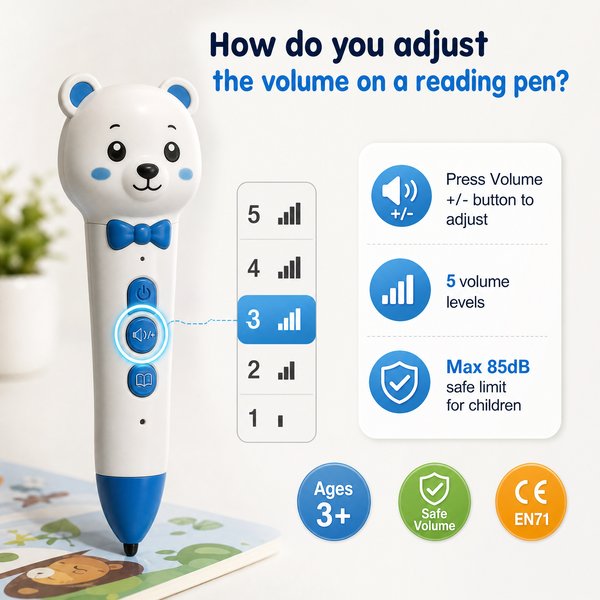
To adjust the volume on Toyvao’s Children’s Reading Pen, use the dedicated volume adjustment button(s) on the device: press the + or − buttons repeatedly (or press-and-hold briefly to change faster) while the pen is playing. You can also plug in wired headphones via the 3.5mm jack for private listening. The pen has no Bluetooth or app control, and it only plays OID‑coded books — it is not a translation or OCR/scanner pen.
Quick practical steps
- Power on the pen and select an OID-coded book or audio track.
- Press the volume + button to raise sound, − to lower sound; press repeatedly for small steps or press-and-hold to sweep faster.
- Plug in headphones to the 3.5mm jack to route audio away from the speaker and use headphone volume controls if available.
- If volume seems stuck, check battery level (pen supports 8–12h battery life; charge 2–3 hours via USB‑C) and ensure the device is playing supported OID content.
When it’s worth caring about / When you don’t need to overthink it — Volume management for procurement
When it’s worth caring about
- Your buyers are young children (Ages 3+): volume limits and easy local controls matter for hearing safety and classroom use.
- You need classroom-wide consistency: hardware buttons avoid lost tablets/apps and reduce support calls compared with app-controlled devices.
- You plan to bundle headphones or headphone splitters for group settings — the 3.5mm jack makes this simple and low-cost.
- You require long daily use: with 8–12h battery life, volume settings impact perceived runtime and classroom satisfaction.
When you don’t need to overthink it
- You’re not planning to control volume remotely or via a learning management system — there’s no Bluetooth or app pairing functionality.
- Your content ecosystem is built around OID‑coded books rather than open OCR/translation files; the pen only supports OID-coded books.
- You don’t require advanced audio processing (equalizer, noise cancellation) — the pen is designed for simple playback with hardware volume controls.
Key technical context B2B buyers need
- OID technology: pen responds only to Toyvao-compatible OID-coded books (not an OCR or scanner pen; not a translation pen).
- Storage options: 16GB / 32GB / 64GB — supports large audio libraries for multiple books.
- Battery and charging: 8–12 hours typical playback; 2–3 hours full charge via USB‑C.
- Audio ports and controls: built‑in speaker, 3.5mm headphone jack, dedicated volume adjustment button(s).
- Connectivity: NO Bluetooth — no wireless volume control or streaming from external devices.
- Certifications: CE / FCC / RoHS / EN71 / ASTM / UN38.3 — factory-ready for international distribution.
- MOQ for OEM/ODM customization: 100–500 pcs.
HTML comparison table
| Feature | Toyvao Children’s Reading Pen (OID) | Typical Bluetooth/Smart Pen | OCR/Translation Pen |
|---|---|---|---|
| Volume control | Dedicated hardware + / − buttons; 3.5mm headphone jack | Often on-device + app control via Bluetooth | On-device buttons; sometimes limited headphone support |
| Connectivity | No Bluetooth; USB‑C charging | Bluetooth + Wi‑Fi options | Usually no Bluetooth; focuses on text scanning |
| Supported content | Only OID‑coded books (best for packaged learning sets) | App-based content and streaming | Scans and translates printed text |
| Battery / Charging | 8–12h; 2–3 hours via USB‑C | Varies; often shorter for streaming | Varies; often similar |
| Storage | 16 / 32 / 64 GB | Typically limited internal + cloud | Limited, optimized for text snippets |
Customer feedback synthesis
Here are representative buyer and end-user comments collected from classroom pilots and retailer feedback:
- Positive: “Simple hardware buttons make classroom management so much easier — kids can’t mess up network settings.”
- Positive: “Battery lasts a full school day (8–12h) and charging is quick — two to three hours to full charge via USB‑C.”
- Positive: “The 3.5mm jack is a practical win — we supply inexpensive headphones and learning centers run smoothly.”
- Negative: “No Bluetooth meant we couldn’t push audio updates remotely; we had to rely on manual content updates.”
- Negative: “The pen only works with OID-coded books — our existing book library wasn’t compatible without republishing.”
- Negative: “Volume steps feel large for very young listeners; some customers wanted a software limiter or finer control.”
When it’s worth caring about / When you don’t need to overthink it — Troubleshooting volume problems
When it’s worth caring about
- Pen is playing but volume stays low: check whether headphones are partially inserted or a connector is dirty; inspect speaker grille for blockage.
- Volume buttons unresponsive: confirm battery level (8–12h typical) and fully charge for 2–3 hours via USB‑C; reboot the pen by powering off/on.
- School-wide uniform levels required: consider headphone splitters and preset policies if you need consistent max volume across devices.
When you don’t need to overthink it
- Single-device, home use: most teachers and parents will be satisfied using the hardware +/− buttons and standard wired headphones.
- Non-OID content needs: if you’re switching to open-content ecosystems, the Toyvao pen is not suitable — choose different device types.
FAQ
Q: How exactly do teachers adjust the volume for multiple pens in a classroom?
A: Each Toyvao pen has physical +/− volume controls. For multiple devices, bundle headphones with fixed volume-limiting splitters or distribute pens pre-set to desired levels. There is no centralized Bluetooth/app control.
Q: Can the pen’s maximum volume be limited or locked for young children?
A: The pen does not include a software volume lock. You can use school-grade volume-limiting headphones or external inline limiters to enforce a maximum listening level.
Q: Will plugging in headphones bypass the built-in speaker and allow volume control through the headphones?
A: Yes. Inserting a plug into the 3.5mm jack routes audio to wired headphones; the pen’s volume buttons still adjust output level to the headphones, and many headphones also have their own volume controls.
Q: The pen’s volume suddenly drops — could this be a battery issue?
A: Possibly. Low battery can reduce playback loudness. The Toyvao pen is specified for 8–12h playback and requires about 2–3 hours charging via USB‑C. Recharge fully and test again; if the problem persists, check for firmware or hardware issues with the supplier.
Procurement and compliance notes
- MOQ for custom OEM/ODM: 100–500 pieces (factory direct options are available).
- Certifications: CE, FCC, RoHS, EN71, ASTM, UN38.3 — cleared for many international school markets and retail channels.
- Product use case: designed for OID-coded book ecosystems; not a scanner/OCR or translation device; no Bluetooth.
Final recommendation & CTA
If your program relies on durable, easy-to-manage audio hardware for Ages 3+ with built-in volume buttons, headphone support (3.5mm), and long battery life (8–12h), Toyvao’s Children’s Reading Pen is a factory-direct option worth evaluating. For pricing, customization (MOQ 100–500 pcs), sample requests, or certificate copies, contact Toyvao directly:
- WhatsApp: +86 186 8106 4480
- Email: sales@toyvao.com
- Website: https://toyvao.com
Reach out now to request a quote, OEM/ODM options, or demo units and confirm how the pen’s hardware volume controls will fit your classroom deployment.
